What This Workflow Does
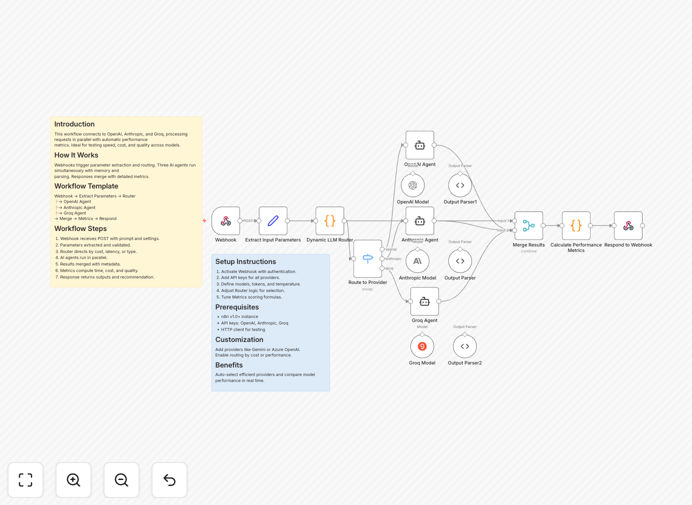
This workflow solves the challenge of comparing different AI model responses efficiently. By connecting to OpenAI, Anthropic, and Groq simultaneously, it processes requests in parallel with automatic performance metrics collection.
The system is ideal for businesses that need to test speed, cost, and quality across multiple AI providers. It eliminates manual comparison processes and provides structured data for decision-making about which AI provider works best for specific use cases.
How It Works
1. Webhook Trigger
The workflow begins with a webhook that receives prompts and settings. This allows integration with other systems or direct API calls.
2. Parameter Extraction
Essential parameters are extracted and validated, including the prompt text, temperature settings, and maximum token limits.
3. Parallel Processing
Three AI agents (OpenAI, Anthropic, and Groq) run simultaneously, each with their own memory and response parsing logic.
4. Results Merging
Responses are merged with detailed metadata including processing time, token usage, and estimated costs.
5. Performance Metrics
The workflow calculates comparative metrics and provides recommendations based on configured priorities (speed, cost, or quality).
Who This Is For
This workflow is ideal for:
- AI developers comparing model performance
- Product teams evaluating cost-effective AI solutions
- Businesses needing reliable AI response routing
- Technical teams implementing multi-provider AI architectures
What You'll Need
- n8n instance (v1.0 or higher)
- API keys for OpenAI, Anthropic, and Groq
- Basic understanding of webhook concepts
- HTTP client for testing (Postman, curl, etc.)
Quick Setup Guide
- Import the JSON template into your n8n instance
- Add your API credentials for each provider
- Configure the webhook with your preferred authentication
- Adjust router logic based on your priority (speed, cost, or quality)
- Test with sample prompts to verify all connections
Key Benefits
Reduce comparison time by 80%: Parallel processing eliminates sequential waiting between AI provider requests.
Cost optimization: Built-in cost tracking helps identify the most economical provider for your use case.
Quality benchmarking: Compare response quality across providers with consistent evaluation criteria.
Flexible routing: Easily modify the workflow to prioritize different factors based on your business needs.
Extensible architecture: Add additional AI providers by duplicating and modifying existing nodes.
Pro tip: Use the metrics data to create dashboards tracking AI provider performance over time, helping you spot trends and make data-driven decisions about which providers to use for different types of requests.