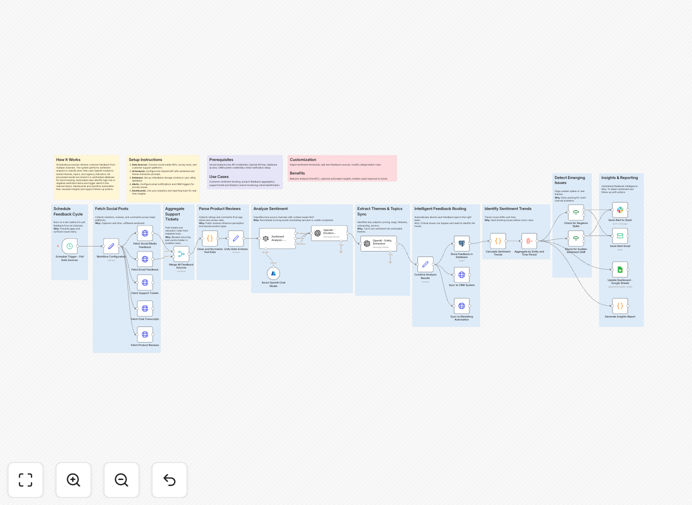
What This Workflow Does
Customer sentiment tracking is crucial for businesses to maintain positive relationships and quickly address concerns. This workflow automates the collection and analysis of customer feedback across multiple channels including email, social media, surveys, and support tickets.
The system performs sentiment analysis to classify tone as positive, neutral, or negative, then triggers real-time alerts for your team when negative sentiment is detected. This allows for immediate intervention before small issues escalate into major problems.
How It Works
Step 1: Data Collection
The workflow connects to multiple data sources including email inboxes, social media APIs, and CRM systems to gather customer feedback in one centralized location.
Step 2: Sentiment Analysis
Using OpenAI's natural language processing capabilities, each piece of feedback is analyzed for emotional tone and assigned a sentiment score. The system can detect subtle nuances in language that indicate customer satisfaction levels.
Step 3: Classification & Routing
Feedback is categorized by sentiment and routed appropriately - positive feedback to marketing teams, neutral to customer success, and negative to support teams for immediate follow-up.
Step 4: Alerting & Reporting
The system triggers instant notifications via Slack, email, or SMS when negative sentiment is detected. Daily and weekly reports provide aggregate sentiment trends across all channels.
Pro tip: Combine this workflow with your CRM to automatically create support tickets for negative feedback, ensuring no customer concern falls through the cracks.
Who This Is For
This workflow is ideal for customer-facing businesses across industries that receive feedback through multiple channels. Particularly valuable for:
- E-commerce stores monitoring product reviews
- SaaS companies tracking user satisfaction
- Customer support teams managing high volumes of inquiries
- Marketing teams measuring campaign sentiment
What You'll Need
- An n8n instance (self-hosted or cloud)
- Access to customer feedback channels (email, social media APIs, etc.)
- OpenAI API key for sentiment analysis
- Notification channels configured (Slack, email, etc.)
Quick Setup Guide
- Download and import the JSON template into your n8n instance
- Configure your data source connections (email, social media APIs, etc.)
- Add your OpenAI API key in the sentiment analysis node
- Set up your alert destinations (Slack channels, email addresses, etc.)
- Test the workflow with sample data to verify proper functioning
- Activate the workflow and monitor your sentiment dashboard
Key Benefits
Reduce response time to negative feedback by 80% by receiving instant alerts when customer satisfaction drops.
Identify emerging issues before they escalate through continuous sentiment monitoring across all channels.
Improve customer satisfaction scores by proactively addressing concerns highlighted by sentiment analysis.
Save 15+ hours per week by automating manual sentiment tracking and reporting processes.
Gain unified visibility into customer sentiment across all touchpoints in one dashboard.