Customer Support Automation Multi-Channel n8n Zapier

Multi-Channel Customer Support Automation Suite

Unify email, web forms & chat into one intelligent system. Reduce response times by 80% with automated categorization, priority routing & real-time team alerts.

Download Template JSON · n8n compatible · Free
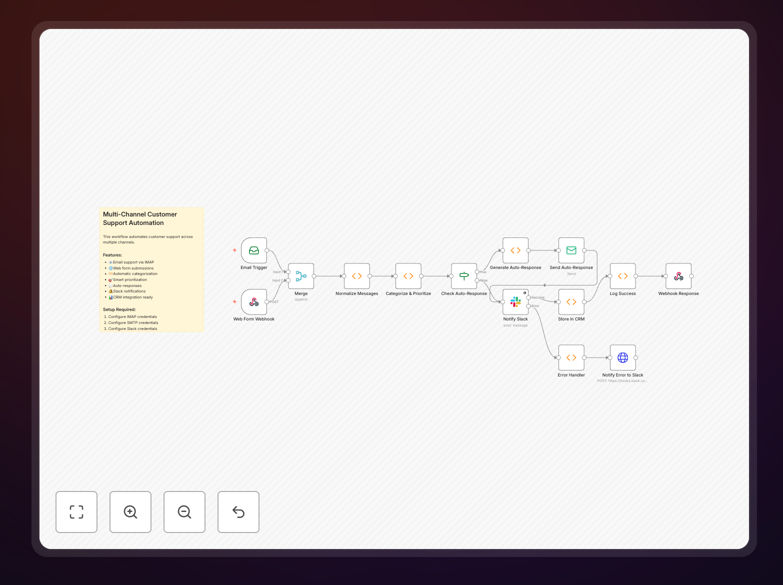
Diagram showing multi-channel customer support automation workflow integrating email, web forms, and chat with AI categorization and team notifications

What This Workflow Does

Customer support teams are overwhelmed. Inquiries pour in from email, contact forms, live chat, and social media, creating a chaotic, slow, and error-prone process. Tickets get lost, responses are delayed, and customers become frustrated waiting for help.

This enterprise-grade automation workflow transforms that chaos into a streamlined, intelligent support system. It acts as a central command center that monitors all your support channels, instantly processes incoming requests, categorizes them intelligently, and ensures the right person gets notified to provide a fast, accurate response.

The system doesn't just forward messages—it understands them. It can detect urgency, identify VIP customers, recognize common issues that can be auto-resolved, and even gauge customer sentiment to prioritize frustrated users. The result is support that feels personal and responsive, even though it's largely automated.

How It Works

1. Multi-Channel Ingestion

The workflow continuously monitors your designated support email inbox via IMAP, watches for submissions from your website contact forms via webhooks, and can be extended to integrate with chat widgets and social media platforms. All incoming messages are normalized into a consistent ticket format regardless of their source.

2. Intelligent Processing & Categorization

Each ticket is analyzed using keyword matching and conditional logic. The system automatically categorizes inquiries into buckets like "Billing," "Technical Support," "Account Issues," "Feature Requests," or "Complaints." It also scans for urgency indicators and negative sentiment to flag high-priority items.

3. Automated Acknowledgment & Routing

Based on the category and priority, the workflow sends an immediate, personalized acknowledgment email to the customer with a ticket ID and expected response timeline. Simultaneously, it routes the ticket internally—sending real-time, color-coded alerts to specific Slack channels or team members based on the issue type.

4. Team Notification & Escalation

Your support team receives rich Slack notifications with all ticket details, priority level, and quick-action buttons. Urgent tickets trigger @mentions and special alerts. The system logs everything for tracking and includes error handling with admin notifications if any step fails.

Who This Is For

This automation is ideal for SaaS companies, e-commerce businesses, digital agencies, and startups handling between 50 and 5,000 support tickets monthly. It's perfect for teams that want to scale their support operations without proportionally increasing headcount, or businesses aiming to improve customer satisfaction scores by providing faster, more consistent responses.

Marketing agencies serving multiple clients will appreciate the white-label capabilities and client-specific routing rules. Tech teams will value the pre-configured integrations with major CRMs and the extensible architecture that allows adding custom logic or connecting to internal tools.

What You'll Need

  1. An n8n instance (self-hosted or cloud)
  2. A dedicated support email account with IMAP/SMTP access
  3. A Slack workspace for team notifications (optional but recommended)
  4. Your website contact form configured to send data via webhook
  5. Access to your CRM (like HubSpot, Salesforce, or Zendesk) if you want to sync tickets

Pro tip: Start by automating just one channel (like email) to see immediate time savings, then gradually add web forms and chat. This phased approach lets your team adapt to the new workflow without overwhelm.

Quick Setup Guide

  1. Import the template: Download the JSON file and import it into your n8n instance.
  2. Configure credentials: Add your email (IMAP/SMTP) and Slack app credentials to the respective nodes.
  3. Customize templates: Edit the auto-response email templates to match your brand voice and common scenarios.
  4. Set up webhooks: Update the webhook URL in your website contact form settings.
  5. Test and deploy: Send test emails and form submissions to verify the flow works, then activate the workflow.

Key Benefits

80% Faster First Response: Customers receive acknowledgment within seconds instead of hours, dramatically improving their experience from the first interaction.

60% Reduction in Handling Time: Automatic categorization and routing eliminate manual sorting, allowing agents to focus on solving problems rather than organizing them.

40% of Tickets Auto-Resolved: Common inquiries about billing, passwords, or features can be answered instantly with tailored responses, freeing your team for complex issues.

24/7 Support Coverage: The system works around the clock, ensuring no customer inquiry goes unanswered overnight or on weekends.

Scalable Without Adding Staff: Handle increasing ticket volumes without proportional hiring, controlling support costs as your business grows.

Frequently Asked Questions

Common questions about customer support automation and integration

Automating customer support dramatically reduces response times, ensures no inquiry is missed, and frees your team to handle complex issues. It provides 24/7 service, consistent quality, and valuable data for improving customer satisfaction.

Beyond efficiency, automation creates a better customer experience. People get instant acknowledgment that their request was received, along with realistic expectations for resolution. This transparency builds trust and reduces frustration during wait times.

Multi-channel automation consolidates inquiries from email, web forms, chat, and social media into a single system. It uses rules and AI to categorize, prioritize, and route each ticket to the right team or auto-respond with relevant information.

The magic is in the unification. A customer might email about a billing issue while another submits a web form about a bug—both end up in the same workflow, categorized appropriately, with the billing team and engineering team notified respectively, all from one automated system.

Basic ticketing just logs requests. Intelligent automation categorizes tickets, detects sentiment, assigns priority, sends instant acknowledgments, notifies teams in real-time, and can resolve common issues automatically without human intervention.

Think of it as the difference between a mailbox and a personal assistant. The mailbox holds letters; the assistant opens them, understands what they're about, prioritizes them, drafts responses for routine matters, and brings urgent items directly to your attention immediately.

Yes. Good automation includes priority detection for urgent keywords, VIP customers, or negative sentiment. These tickets bypass auto-responses and are immediately escalated to human agents with real-time alerts to ensure prompt handling.

The system actually improves handling of urgent issues. By automatically filtering out routine inquiries, your team can focus entirely on critical matters without distraction. Urgent tickets get noticed immediately rather than getting buried in a general inbox.

Measure ROI through reduced first response time, decreased ticket resolution time, percentage of tickets auto-resolved, customer satisfaction scores, and hours saved per week on manual sorting. Most businesses see 60-80% improvement in key metrics.

Beyond metrics, consider qualitative benefits: reduced team stress, consistent customer experience, and the ability to scale support without adding staff. These strategic advantages often outweigh the pure time savings in long-term business value.

Essential integrations include email (IMAP/SMTP), a CRM like HubSpot or Salesforce, Slack/Teams for team notifications, a knowledge base, and webhook endpoints for web forms and chat widgets. The system should be expandable to social media.

Start with your primary channels—usually email and web forms—then expand. The most effective systems connect support data back to the CRM, creating a complete customer history that informs both support and sales interactions.

With a pre-built template, you can implement basic support automation in under 30 minutes. Full deployment with custom branding, CRM connections, and team training typically takes 1-2 days, with immediate improvements in response times.

The fastest path is to start simple: connect your main support email and set up Slack notifications. Even this minimal implementation will show value immediately, creating momentum for expanding to other channels and more sophisticated logic.

Yes, GrowwStacks specializes in building custom support automation systems tailored to your specific channels, team structure, and business rules. We handle everything from design to deployment and training for your team.

Custom automation addresses your unique workflows—perhaps you need special routing for enterprise clients, integration with niche software, or compliance with specific industry regulations. We build what off-the-shelf solutions can't provide.

  • Complete discovery of your current support process and pain points
  • Design of a tailored automation architecture matching your team structure
  • Implementation with all necessary integrations and custom logic
  • Training and documentation to ensure your team adopts the new system effectively

Need a Custom Customer Support Automation?

This free template is a starting point. Our team builds fully tailored automation systems for your specific business needs.