What This Workflow Does
This automation solves the common problem of forgotten tasks and manual follow-up. Teams often rely on ad-hoc reminders via different channels—some tasks get mentioned in Slack, others emailed, some noted in Telegram chats—leading to inconsistency and missed deadlines.
The workflow centralizes task creation through a Telegram bot, stores tasks securely in a database, and automatically sends scheduled reminders via the user's preferred channel: Email for formal notifications, Slack for team alerts, or Telegram for quick prompts. It validates inputs, handles errors gracefully, and updates task statuses, creating a seamless, reliable reminder system.
How It Works
1. Task Creation via Telegram Bot
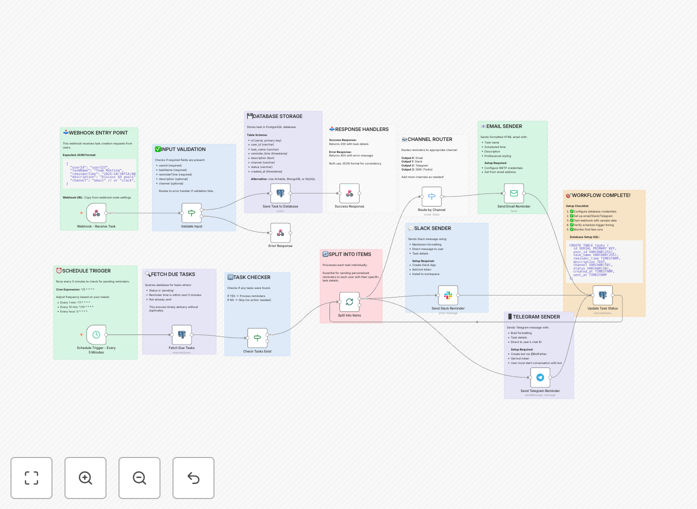
Users interact with a Telegram bot to create tasks. They provide details like description, due time, and preferred reminder channel. The bot sends this data to a webhook endpoint.
2. Input Validation & Storage
The workflow validates required fields (user ID, description, channel). Valid tasks are saved to a database (PostgreSQL, MySQL, or MongoDB) for persistence. Invalid inputs trigger an error response.
3. Scheduled Reminder Checks
A schedule trigger runs every few minutes to query the database for tasks due within the upcoming window. Each due task is processed individually to avoid conflicts.
4. Multi-Channel Delivery
Based on the task's channel setting, the reminder is routed appropriately: Email reminders are sent via SMTP with HTML formatting, Slack messages are posted via webhook with user mentions, and Telegram messages are delivered via bot API.
5. Status Update & Completion
After successful delivery, the task status is updated in the database (e.g., "reminded" with timestamp). The workflow logs completion and prepares for the next cycle.
Who This Is For
This automation is ideal for teams managing deadlines, customer follow-ups, or internal processes. Project managers can ensure milestone reminders reach all stakeholders. Sales teams can automate client follow-up sequences. Support teams can schedule check-in reminders. Any business that relies on timely actions across dispersed communication channels will benefit.
What You'll Need
- A Telegram bot created via BotFather, with webhook configuration.
- A database instance (PostgreSQL, MySQL, MongoDB) for task storage.
- Email SMTP credentials (Gmail, SendGrid, etc.) for email reminders.
- A Slack workspace with a webhook URL for channel notifications.
- An n8n instance (cloud or self-hosted) with webhook and scheduling enabled.
- Basic understanding of API connections for bot and channel setup.
Quick Setup Guide
- Import the downloaded JSON template into your n8n workspace.
- Configure the Webhook node with your Telegram bot's webhook URL and authentication.
- Set up database credentials in the "Save to Database" and "Fetch Due Tasks" nodes.
- Enter your Email SMTP details, Slack webhook URL, and Telegram bot token in the respective sender nodes.
- Adjust the schedule trigger interval (default: every 3 minutes) to match your reminder frequency.
- Test by sending a task creation request via Telegram and verifying reminders across channels.
- Monitor executions in n8n's dashboard and fine-tune validation rules as needed.
Pro tip: Add a "priority" field to tasks and configure the workflow to send high-priority reminders immediately via Slack, while low-priority ones go to Email daily digest.
Key Benefits
100% reminder reliability: Automated scheduling ensures every task gets a reminder at the exact due time, eliminating human forgetfulness.
Channel flexibility increases engagement: Delivering reminders via each team member's preferred platform (Slack, Email, Telegram) boosts response rates.
Centralized task management: All tasks are stored in a single database, providing a clear audit trail and easy reporting.
Time savings for managers: Eliminates hours of manual follow-up each week, freeing up time for strategic work.
Scalable for growing teams: The system handles hundreds of tasks seamlessly, supporting team expansion without process breakdown.