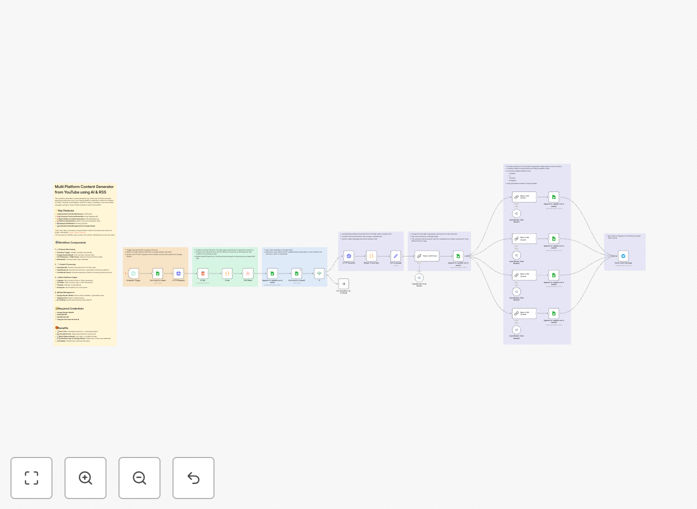
What This Workflow Does
Content creators and marketers spend hours manually extracting insights from YouTube videos and reformatting them for different social platforms. This process is repetitive, time-consuming, and limits your ability to scale content production.
This automation solves that by monitoring your YouTube channels, using AI to extract and summarize transcripts, then generating platform-optimized content for LinkedIn, X (Twitter), Threads, and Instagram automatically. It turns one video into multiple ready-to-publish posts, complete with tone adjustments for each platform's audience.
The workflow centralizes everything in Google Sheets for easy tracking and collaboration, sends previews via Telegram for quick approval, and prevents duplicate processing by checking existing records. It's like having a content assistant that works 24/7.
How It Works
1. YouTube Channel Monitoring
The workflow starts by reading your YouTube channel URLs from a Google Sheet. It extracts channel IDs, then uses an RSS reader to check for new videos periodically. This ensures you never miss fresh content from your monitored channels.
2. AI-Powered Transcript Processing
When a new video is detected, the workflow calls the Supadata API to extract the full transcript. This AI service converts speech to text accurately, even with background noise or multiple speakers. The transcript is then passed to OpenRouter AI for summarization and analysis.
3. Multi-Platform Content Generation
The AI generates four distinct content versions from the summarized transcript: a professional LinkedIn article (≤1300 characters), a punchy X/Twitter thread (≤280 characters per tweet), a conversational Threads post, and an Instagram caption focused on visual storytelling. Each version is optimized for platform-specific engagement patterns.
4. Centralized Management & Notification
All generated content, along with video metadata, is written back to Google Sheets for easy review and editing. A Telegram bot sends you a preview of the content for quick approval before publishing. The workflow tracks processed video IDs to avoid duplicates on future runs.
Pro tip: Customize the AI prompts in the workflow to match your brand voice. Adjust the tone parameters for each platform—more professional for LinkedIn, more conversational for Threads—to maximize engagement.
Who This Is For
This automation is ideal for content creators, social media managers, marketing agencies, and businesses with YouTube channels. If you produce video content and want to extend its reach across social platforms without multiplying your workload, this workflow is for you.
It's particularly valuable for solo entrepreneurs and small teams who need to maintain consistent social media presence but lack the time for manual content repurposing. Educational creators, podcasters, and thought leaders can use it to transform long-form video insights into digestible social content.
What You'll Need
- n8n instance (self-hosted version recommended for community nodes)
- Google Sheets account with OAuth2 credentials for reading/writing
- Supadata API key for YouTube transcript extraction
- OpenRouter API key or alternative AI service for content generation
- Telegram Bot Token & Chat ID for content preview notifications
- YouTube channel URLs you want to monitor in a Google Sheet
Quick Setup Guide
- Download and import the JSON template into your n8n instance.
- Configure credentials for Google Sheets, Supadata, OpenRouter, and Telegram in n8n's credentials management.
- Update the Google Sheet ID in the workflow to point to your tracking sheet.
- Adjust the schedule trigger to match your desired monitoring frequency (daily, hourly, etc.).
- Test with one YouTube video to ensure all connections work and content generation meets your standards.
- Review the Telegram preview and adjust AI prompts if needed before enabling full automation.
Pro tip: Start by monitoring just one or two YouTube channels. Once you're satisfied with the content quality and workflow reliability, add more channels gradually.
Key Benefits
Save 15-20 hours per week on manual content repurposing. What used to take hours of transcript review, editing, and platform formatting now happens automatically while you focus on strategy and engagement.
Maintain consistent cross-platform presence without the burnout. The workflow ensures your YouTube insights reach audiences on LinkedIn, X, Threads, and Instagram simultaneously, maximizing your content's impact.
Scale content production linearly as your video output grows. Each new YouTube video automatically becomes multiple social posts, allowing you to increase content volume without increasing team size.
Centralize tracking and collaboration through Google Sheets. Your entire team can review, edit, and approve generated content in one place, streamlining workflows and maintaining quality control.
Adapt content tone per platform using AI customization. The workflow automatically adjusts writing style, length, and focus for each platform's unique audience and best practices.