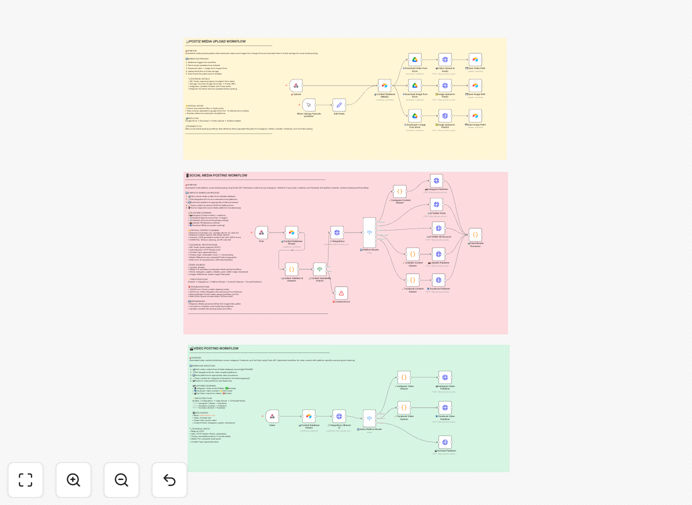
What This Workflow Does
Managing social media across multiple platforms is a time-consuming, error-prone task. This automation solves that by creating a seamless pipeline from content planning in Airtable to scheduled publishing on Instagram, LinkedIn, Twitter/X, and Facebook via Postiz.
The workflow pulls scheduled posts from your Airtable content calendar, fetches the corresponding images or videos from Google Drive, uploads them to Postiz's storage, and then publishes to each social platform with platform-optimized captions and formatting. It handles the entire process from asset management to distribution, ensuring consistency and freeing your team from manual posting.
By connecting these tools, you eliminate the need to log into each platform individually, manually upload files, or copy-paste captions. The automation ensures your social media strategy executes reliably, even when your team is focused on other priorities.
How It Works
The automation follows a structured, multi-step process to ensure error-free publishing across all connected social networks.
1. Content Trigger & Data Fetch
The workflow begins on a schedule or via webhook, querying your Airtable base for posts marked as "Ready to Publish." It retrieves all necessary post details: captions for each platform, associated Google Drive file IDs, scheduling preferences, and target platforms.
2. Media Download & Preparation
Using the Google Drive file IDs from Airtable, the workflow downloads the corresponding images or videos to the automation server. It validates file types and sizes to ensure compatibility with each social platform's requirements before proceeding.
3. Postiz Media Upload
Downloaded media files are uploaded to Postiz's storage system via their API. This step converts Google Drive links into Postiz-hosted URLs that can be embedded in social posts, as most platforms require media to be hosted on their own or approved CDNs.
4. Platform-Specific Content Cleaning
Before publishing, the workflow cleans and formats captions for each platform. It removes problematic characters (line breaks, tabs), trims text to appropriate lengths, and applies platform-specific formatting rules to prevent API errors and ensure optimal display.
5. Multi-Platform Publishing
The workflow routes each post to the appropriate social platform connectors in Postiz. It publishes to Instagram (feed and Reels), LinkedIn, Twitter/X (main and alt accounts), and Facebook simultaneously or according to your defined schedule, with built-in error handling for rate limits.
6. Status Update & Logging
After successful publishing, the workflow updates the Airtable record with publication status, post URLs, and timestamps. Failed posts are flagged for review, and detailed logs are stored for analytics and troubleshooting.
Who This Is For
This automation is ideal for marketing teams, content creators, agencies, and small businesses managing multiple social media accounts. It's particularly valuable for:
- Social Media Managers who spend hours each week manually uploading and scheduling content across platforms.
- Content Teams using Airtable as their editorial calendar and needing a streamlined publishing workflow.
- Small Business Owners wearing multiple hats who need consistent social presence without daily manual effort.
- Marketing Agencies managing client accounts who require reliable, scalable posting with clear audit trails.
- Startups building their brand presence efficiently with limited resources.
Pro tip: Start by automating just one or two platforms to validate the workflow, then expand to others. This reduces complexity during initial setup and troubleshooting.
What You'll Need
- An Airtable base with your social media content calendar, including fields for captions, platform targets, and Google Drive file IDs.
- A Google Drive account with your social media assets organized in accessible folders.
- A Postiz account with connected social media profiles (Instagram, LinkedIn, Twitter/X, Facebook).
- API credentials for Airtable, Google Drive, and Postiz with appropriate permissions.
- An n8n instance (cloud or self-hosted) to run the workflow.
Quick Setup Guide
Follow these steps to implement this automation in your n8n environment:
- Download the template using the button above and import it into your n8n instance.
- Configure credentials for Airtable, Google Drive, and Postiz in n8n's credentials management.
- Update the Airtable node with your base ID and table name where social posts are stored.
- Map your field names in the workflow to match your Airtable column names (caption fields, media IDs, status).
- Connect your social accounts in Postiz and note the integration IDs for each platform.
- Test with a single post using n8n's manual trigger before enabling scheduled execution.
- Set your schedule (daily, hourly, or custom) based on your posting frequency needs.
Key Benefits
Save 10+ hours weekly by eliminating manual uploads, formatting, and cross-posting across multiple platforms. What used to take an hour per platform now happens automatically in minutes.
Ensure brand consistency with centralized content management in Airtable and approved media in Google Drive. Every post uses the correct messaging and assets, reducing compliance risks.
Improve posting reliability with automated error handling and retry logic. The workflow manages API rate limits, connection issues, and formatting problems that often derail manual posting.
Scale your social presence without adding team members. The same workflow that handles 10 posts daily can manage 100 with minimal adjustment, supporting business growth.
Gain valuable insights through automated logging in Airtable. Track what content publishes successfully, identify patterns in failures, and optimize your strategy based on data.