Airtable Blotato AI Content Multi-Platform n8n

Multi-Platform Social Media Publisher with Blotato, GPT-4 Mini & Airtable

Automate social media posting across Instagram, YouTube, TikTok, and more using AI-generated content. Schedule, create, and publish from one workflow.

Download Template JSON · n8n compatible · Free
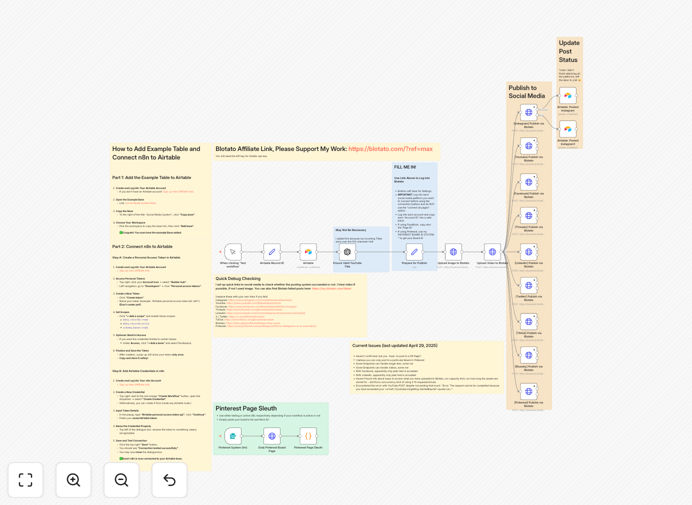
Visual diagram of the multi-platform social media automation workflow connecting Airtable, AI, and publishing platforms

What This Workflow Does

Managing social media across multiple platforms is a time-consuming, repetitive task that distracts from creating meaningful content and engaging with your audience. This automation solves that by connecting your content calendar in Airtable with AI-powered content generation and multi-platform publishing via Blotato.

The workflow automatically schedules and publishes posts to Instagram, YouTube, TikTok, and other platforms based on your Airtable calendar. It can generate captions and hashtags using GPT-4 Mini, handle both image and video uploads, and route content to specific accounts based on your rules. What used to take hours of manual work each week now runs completely autonomously.

How It Works

The automation follows a logical sequence that mimics how a social media manager would work, but without the manual effort.

1. Content Trigger & Scheduling

The workflow checks your Airtable base for scheduled posts that are due to publish. It looks for posts with specific status flags and scheduled times, ensuring only approved content goes live.

2. AI Content Enhancement

For each post, the workflow can optionally send the base caption to GPT-4 Mini to generate variations, add relevant hashtags, optimize for different platforms, or translate content. This ensures each post is platform-optimized.

3. Media Processing & Routing

The system retrieves any attached images or videos from your Airtable records, processes them if needed, and determines which social platform(s) each piece of content should be published to based on your configuration.

4. Multi-Platform Publishing

Using the Blotato API, the workflow publishes the content to the designated platforms (Instagram, YouTube, TikTok, etc.) with the correct formatting, tags, and scheduling. It handles API authentication and error recovery automatically.

5. Status Updates & Logging

After publishing, the workflow updates the Airtable record with the publication status, post URLs, and any errors. This creates a complete audit trail of what was published where and when.

Who This Is For

This template is ideal for marketing teams, content creators, agencies, and small businesses that manage social media across multiple platforms. If you're spending more than 5 hours per week on social media scheduling, dealing with different platform requirements, or struggling to maintain consistent posting, this automation will transform your workflow.

Specifically, it's perfect for: Social media managers juggling 3+ platforms, E-commerce brands promoting products across channels, Content creators repurposing content for different audiences, Agencies managing client social accounts, and Startups needing maximum impact with minimal team resources.

What You'll Need

  1. Airtable account with a base containing your social media content calendar (with fields for captions, media URLs, platforms, and schedule dates).
  2. Blotato account with API access configured for your target social platforms (Instagram, YouTube, TikTok, etc.).
  3. OpenAI API key (optional) for GPT-4 Mini if you want AI-generated caption enhancements.
  4. n8n instance (cloud or self-hosted) where you'll import and run this workflow.
  5. Media storage accessible via URL (like Google Drive, Dropbox, or S3) for your images and videos.

Pro tip: Start by automating just one or two platforms first to test your configuration. Once you're comfortable with how the workflow handles Instagram posts, for example, you can easily add YouTube and TikTok publishing to the same automation.

Quick Setup Guide

You can have this automation running in under 30 minutes by following these steps:

  1. Download the template using the button above and import it into your n8n instance.
  2. Configure Airtable node with your personal access token and connect it to your content calendar base.
  3. Set up Blotato node with your API key and configure which social platforms you want to publish to.
  4. Adjust scheduling logic to match how you flag posts as "ready to publish" in your Airtable.
  5. Test with one post by creating a test record in Airtable and running the workflow manually.
  6. Activate the workflow and set it to run on a schedule (every hour or as needed).

Key Benefits

Save 10-15 hours weekly by eliminating manual posting across multiple platforms. What used to be a daily chore becomes a fully automated process that runs in the background.

Maintain consistent posting even during busy periods or vacations. Your social media presence remains active and engaging without constant manual intervention.

Scale content production with AI assistance. Generate multiple caption variations, hashtag suggestions, and platform-optimized content in seconds rather than hours.

Reduce human error like missed posts, incorrect scheduling, or platform-specific formatting mistakes. The automation follows your rules exactly every time.

Centralize your strategy in Airtable where you can plan, collaborate, and visualize your entire social media calendar across all platforms in one place.

Frequently Asked Questions

Common questions about social media automation and integration

The best way is to use a workflow automation tool like n8n that connects your content database (like Airtable) with a social media publishing API (like Blotato). This allows you to schedule posts, generate AI content, and publish to Instagram, YouTube, TikTok, and more from a single dashboard, eliminating manual posting and ensuring consistent branding.

Unlike platform-specific schedulers, this approach gives you complete control over your logic, allows custom routing rules, and integrates with your existing tools. You can add conditional logic, error handling, and analytics tracking that off-the-shelf social media tools don't offer.

AI can generate post captions, suggest hashtags, create image descriptions, and even draft video scripts based on your topic. By integrating AI models like GPT-4 Mini into your automation, you can produce weeks of content in minutes, maintain a consistent brand voice, and adapt messaging for different platforms without hiring a copywriter.

The key is using AI as an assistant rather than a replacement. For example, you might provide a basic caption and have AI generate 3 variations optimized for Instagram, TikTok, and LinkedIn. This maintains your authentic voice while saving hours of brainstorming and writing time.

Airtable acts as a visual content calendar where you can plan posts, store media assets, add captions, and set publishing dates. When connected to an automation, it becomes the single source of truth for your social strategy, enabling collaboration, easy edits, and a clear overview of your content pipeline across all platforms.

Unlike dedicated social media tools, Airtable is completely customizable. You can add fields for approval status, performance metrics, target audience, or any other data you need. Team members can comment, attach files, and view the calendar in multiple formats (grid, calendar, kanban).

Manually posting to 4-5 platforms can take 2-3 hours daily. Automation reduces this to minutes by handling uploads, formatting, scheduling, and publishing automatically. This saves 10-15 hours per week, allows real-time engagement instead of admin work, and ensures you never miss a scheduled post due to human error.

The time savings compound when you consider content repurposing. A single video can be automatically published to YouTube, with clips going to TikTok and Instagram Reels, and still images to Pinterest—all from one workflow execution. What used to require separate processes for each platform now happens simultaneously.

Look for tools that support all your platforms (Instagram, TikTok, YouTube, etc.), offer flexible scheduling, integrate with AI for content generation, provide analytics on post performance, and allow custom logic for different content types. Avoid tools that lock you into specific templates or limit posting volume.

Key features include: API access for custom integrations, error handling and retry logic, support for both images and videos, ability to tag products or locations, and detailed logging for compliance. The tool should adapt to your workflow, not force you to change how you work.

  • Platform coverage for all your social channels
  • Flexible scheduling and queue management
  • Integration with your existing content databases
  • Comprehensive error handling and notifications

Use automation for scheduling and publishing, but keep content creation human-led. AI should assist, not replace, your unique voice. Batch-create content weekly, review AI suggestions before publishing, and use automation to handle repetitive tasks like posting times, while you focus on community engagement and strategy.

Authenticity comes from genuine interaction. Schedule posts automatically, but respond to comments personally. Use AI to generate caption ideas, but edit them to sound like you. The automation handles the logistics so you can focus on building relationships with your audience.

Yes, GrowwStacks specializes in building custom social media automation systems tailored to your specific platforms, content workflows, and business goals. We can integrate your existing tools, add custom AI prompts for your brand voice, and create dashboards for your team to manage everything in one place.

Our team will work with you to understand your content approval process, platform requirements, and performance tracking needs. We'll build a system that fits seamlessly into your existing workflow, with training and support to ensure your team can maintain and modify the automation as your needs evolve.

  • Custom integration with your current tech stack
  • Brand-specific AI training for content generation
  • Team training and documentation
  • Ongoing support and optimization

Need a Custom Social Media Automation?

This free template is a starting point. Our team builds fully tailored automation systems for your specific business needs.