What This Workflow Does
This automation solves the time-consuming challenge of creating extended video content from existing clips. Instead of manually editing or reshooting scenes, this workflow uses AI to analyze your starting video and generate logical scene extensions that continue the narrative.
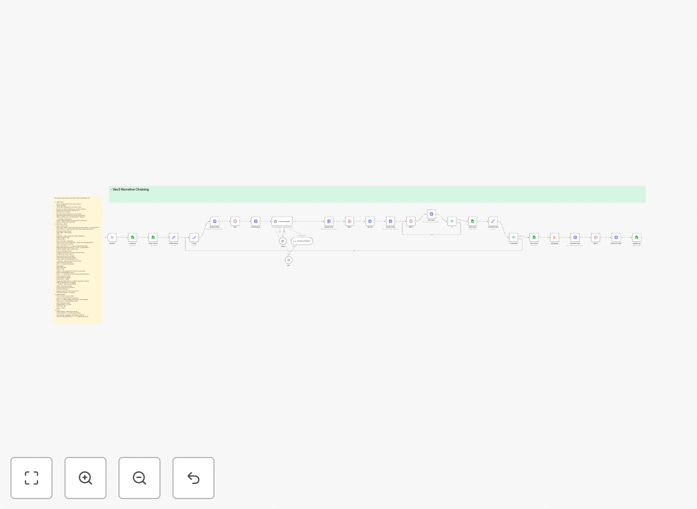
The system takes a control panel approach using Google Sheets, where you specify your starting video, how many scenes to extend, aspect ratio preferences, and narrative guidance. It then automatically processes each scene: analyzing the current clip, extracting the last frame, generating a prompt for the next scene, creating the new video with Veo3, and stitching everything together into a seamless final video.
For content creators, marketers, and businesses producing regular video content, this represents a 90% reduction in production time and costs. What used to require hours of editing and coordination can now be automated with consistent, high-quality results.
How It Works
1. Input Setup & Control Panel
A Google Sheet serves as your command center. You enter the starting video URL, number of scenes to generate, aspect ratio, model preference (V3 or V3 Fast), narrative theme, and specific scene instructions. The workflow checks for rows marked "For Production" and processes them automatically.
2. Scene Analysis & Understanding
The workflow sends your current video to File.AI's Video Understanding API, which analyzes the last frame, audio, and scene details. This creates a detailed context description that informs what should happen next in the narrative sequence.
3. AI Prompt Generation
An AI Agent node combines the video analysis with your narrative theme and scene instructions to create a precise prompt for the next scene. This ensures the generated content maintains visual consistency while advancing the story logically.
4. Frame Extraction & Scene Generation
The last frame is extracted from the current video and used as a reference image. This is sent to Key.AI (Veo3 Fast) along with the generated prompt to create the next scene. The system waits for generation completion and retrieves the new clip URL.
5. Looping & Final Assembly
The workflow loops through each requested scene, incrementally building your narrative chain. Once all scenes are generated, File.AI's Merge Videos API stitches everything together into a final MP4. The control sheet is updated with the final video URL and marked "Done."
Who This Is For
This template is ideal for content creators, social media managers, marketing agencies, e-learning developers, and businesses producing regular video content. If you create explainer videos, product demos, social media shorts, educational content, or brand storytelling videos, this automation will save you significant time and resources.
Marketing teams running campaigns with multiple video variations will find particular value. The ability to generate several logical extensions from a single starting clip enables A/B testing at scale without additional production costs. Educational content creators can extend tutorial sequences automatically, while social media managers can create longer narratives from trending short clips.
What You'll Need
- n8n instance (cloud or self-hosted)
- Google Sheets account for the control panel
- File.AI API access for video analysis and merging
- Key.AI API access for Veo3 video generation
- Starting video clips in MP4 format
- Clear narrative instructions for scene progression
Pro tip: Start with simple, well-lit scenes with clear subjects. AI generates best results when the starting video has good lighting, consistent framing, and unambiguous visual elements. Complex action sequences or rapidly changing scenes may require more specific instructions.
Quick Setup Guide
- Download and import the JSON template into your n8n instance.
- Create your Google Sheet with the required columns: Video URL, Scene Count, Aspect Ratio, Model, Narrative Theme, Special Requests, and Status.
- Configure API credentials for File.AI and Key.AI in the respective n8n nodes.
- Set up the Google Sheets node with your sheet ID and appropriate ranges.
- Test with a single scene extension using a simple starting video to verify the workflow.
- Adjust narrative instructions based on initial results to refine scene coherence.
- Schedule or trigger the workflow based on your content production needs.
Key Benefits
Reduce video production costs by 95%. Traditional video production costs $500-$5,000 per finished minute. AI-generated extensions cost $0.30-$1.50 per 8-second scene, representing massive savings for regular content production.
Scale content creation without scaling teams. One person can manage what previously required an entire production crew. Generate multiple video variations for different platforms, audiences, or testing scenarios from the same starting material.
Maintain brand consistency automatically. The AI uses your starting video as a visual reference, ensuring generated scenes match your established style, color palette, and aesthetic without manual oversight.
Turn ideas into finished videos in hours, not weeks. The entire process from concept to finished video happens automatically. What used to require weeks of planning, shooting, and editing now completes in a single automated workflow.
Integrate with your existing content systems. The Google Sheets control panel makes it easy to integrate with your content calendars, project management tools, and publishing workflows.