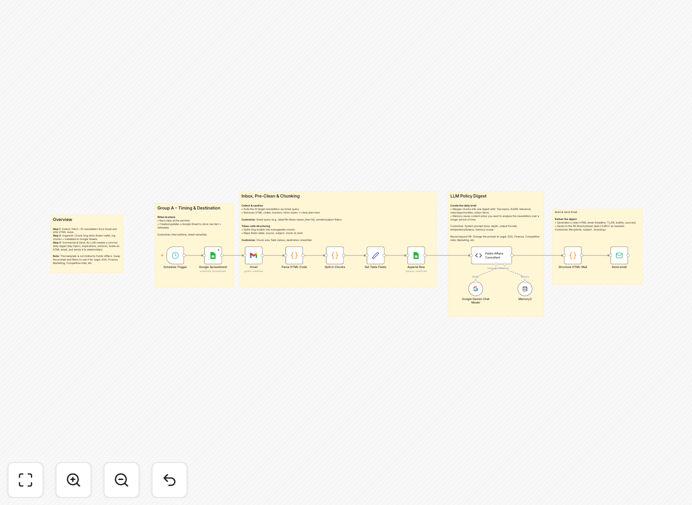
What This Workflow Does
Professionals today subscribe to dozens of industry newsletters covering finance, legal updates, market trends, and regulatory changes. While valuable, these emails create inbox overload, often going unread despite containing critical information. This workflow solves the newsletter overwhelm problem by automatically processing subscription emails, extracting key insights using AI, organizing the data in Google Sheets, and delivering concise daily briefings.
The system transforms hours of reading into minutes of actionable insights. Instead of skimming or skipping newsletters, you receive distilled versions highlighting only the most relevant information. The Google Sheets integration creates a searchable knowledge base, while scheduled email briefings ensure you never miss important updates.
How It Works
1. Newsletter Identification
The workflow monitors your Gmail inbox for incoming newsletters using sender addresses, subject line patterns, and labels you define. It filters out personal and non-newsletter emails to focus only on subscription content.
2. AI-Powered Summarization
Each identified newsletter passes through an AI processing step that extracts key points, identifies trends, and generates concise summaries. The AI preserves critical data like numbers, dates, and names while eliminating redundant content.
3. Google Sheets Organization
Summarized content gets logged in Google Sheets with metadata including source, date, keywords, and the full summary. This creates a structured knowledge base that's searchable and filterable by topic or date range.
4. Scheduled Briefing Delivery
At your preferred time (typically morning), the system compiles summaries from recent newsletters into a single briefing email. You can customize the format, grouping summaries by topic or priority level.
Pro tip: Train the AI by reviewing initial summaries and flagging any missed points. The system learns your preferences over time for increasingly accurate results.
Who This Is For
This workflow benefits professionals who need to stay current across multiple information streams but lack time to read everything. Ideal users include:
- Executives tracking industry trends
- Financial analysts monitoring market reports
- Legal professionals staying updated on regulations
- Consultants covering multiple client industries
- Researchers compiling data from various sources
What You'll Need
- A Gmail account receiving newsletter subscriptions
- Access to an AI summarization service (like OpenAI or similar)
- A Google Sheets spreadsheet for storing summaries
- An email address to receive daily briefings
- n8n account to host and run the workflow
Quick Setup Guide
- Download the template JSON file
- Import into your n8n instance
- Connect your Gmail account
- Configure your AI service credentials
- Set up the Google Sheets integration
- Define your briefing email preferences
- Test with sample newsletters
- Schedule the workflow to run daily
Key Benefits
Regain 2-5 hours weekly by eliminating manual newsletter reading. What took 10 minutes per email becomes a 30-second summary.
Never miss critical updates with reliable processing of every newsletter, even during busy periods when you'd normally skip reading.
Build an institutional knowledge base in Google Sheets that's searchable and shareable with colleagues.
Customizable prioritization lets you flag must-read summaries and defer less urgent content.
Morning readiness with pre-work briefings that prepare you for meetings and decisions.