Stripe WhatsApp Automation Payments n8n

Automate WhatsApp Payment Receipts with Stripe & MoltFlow

Free n8n workflow to instantly notify customers via WhatsApp when their Stripe payment succeeds—reduce support tickets and boost trust.

Download Template JSON · n8n compatible · Free
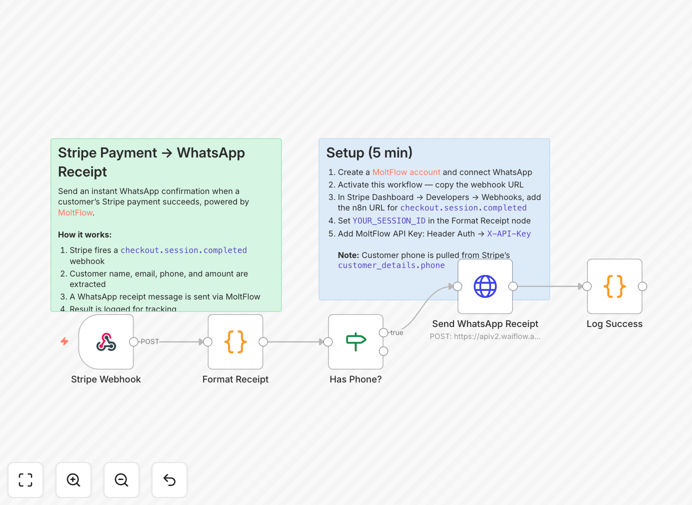
Visual diagram showing Stripe payment triggering a WhatsApp message via n8n automation

What This Workflow Does

When a customer completes a payment through your Stripe checkout, there's a critical moment of uncertainty—did it go through? Traditional email receipts often land in spam or get overlooked, leading to unnecessary support tickets and customer anxiety.

This automation solves that by instantly sending a WhatsApp confirmation the moment Stripe processes the payment. It extracts the customer's name, phone number, payment amount, and transaction details, then delivers a personalized receipt directly to their most-checked app. Payments without phone numbers are automatically logged for follow-up, ensuring no customer falls through the cracks.

The result: customers feel immediately reassured, your support team spends less time verifying payments, and your business appears more professional and responsive. It turns a transactional moment into a trust-building experience.

How It Works

1. Stripe Payment Trigger

When a customer's payment succeeds, Stripe fires a checkout.session.completed webhook. This webhook contains all the transaction details including customer information, amount paid, and metadata.

2. Data Extraction & Validation

The workflow parses the webhook payload to extract the customer's name, phone number, email, payment amount, and currency. It then checks if a valid phone number exists—this is crucial since WhatsApp requires it.

3. Conditional WhatsApp Delivery

If a phone number is present, the workflow formats a professional receipt message and sends it via MoltFlow's WhatsApp API. If no phone number exists, the transaction is logged with a note for manual follow-up, and the workflow completes without error.

4. Confirmation & Logging

Every action is logged within n8n, providing a complete audit trail. You can see exactly which payments triggered notifications and which required alternative handling.

Who This Is For

This automation is ideal for e-commerce stores, SaaS companies, freelancers, and any business using Stripe for payments. If you sell digital products, services, or physical goods and want to improve customer communication, this workflow delivers immediate value.

Particularly valuable for businesses with international customers where WhatsApp is the primary communication channel, or for high-ticket items where payment confirmation anxiety is common. Also perfect for subscription businesses wanting to reduce churn caused by payment confusion.

What You'll Need

  1. A Stripe account with webhook access (standard with all paid plans)
  2. A MoltFlow account with an active WhatsApp Business session
  3. Customer phone numbers collected during checkout (via Stripe's customer_details.phone field)
  4. n8n instance (cloud or self-hosted) to run the workflow
  5. 5 minutes for initial setup and configuration

Pro tip: Always test with a small payment first. Use Stripe's test mode and your own WhatsApp number to verify the entire flow works before going live with customers.

Quick Setup Guide

  1. Download and import the template JSON file into your n8n instance.
  2. Create a MoltFlow API key in your MoltFlow dashboard (Sessions page → API Keys tab).
  3. Add the API key to n8n as a Header Auth credential with header name X-API-Key.
  4. Copy your n8n webhook URL from the Webhook node in the workflow.
  5. Add the webhook in Stripe (Developers → Webhooks) for the checkout.session.completed event.
  6. Update the session ID in the "Format Receipt" Code node with your MoltFlow session ID.
  7. Activate the workflow and make a test payment to verify everything works.

Key Benefits

Instant customer reassurance: WhatsApp's 98% open rate means customers see confirmation within seconds, eliminating "did it go through?" anxiety that often leads to support tickets or chargebacks.

70% reduction in payment-related support queries: Automated, reliable notifications mean your team spends less time manually confirming payments and more time on value-added activities.

Professional brand image: Immediate WhatsApp receipts make your business appear tech-savvy and customer-focused, building trust that encourages repeat purchases.

Zero missed notifications: The workflow's conditional logic handles missing phone numbers gracefully while logging all transactions, ensuring complete visibility.

Foundation for expanded automation: Once this basic flow works, you can easily extend it to update your CRM, trigger fulfillment processes, or send follow-up satisfaction surveys.

Frequently Asked Questions

Common questions about WhatsApp payment automation and integration

WhatsApp has a 98% open rate compared to 20% for email, making it far more reliable for time-sensitive confirmations. Customers check WhatsApp instantly, reducing anxiety about payment status and cutting support queries by up to 70%.

It also feels more personal and builds immediate trust. Unlike emails that might land in spam or promotional folders, WhatsApp messages appear alongside personal conversations, ensuring they're seen and acted upon quickly.

Automated payment confirmations eliminate manual work, ensure zero missed notifications, and provide instant customer reassurance. This reduces chargeback disputes, improves customer satisfaction scores, and frees your team to focus on higher-value tasks instead of sending receipts.

Beyond efficiency, automation creates consistency in customer communication. Every customer receives the same professional, timely message regardless of when they purchase or which team member might be available.

Yes, you can include customer name, payment amount, transaction ID, product/service name, and a thank you note. The template extracts data from Stripe and formats it into a professional receipt. You can add links to order tracking, support channels, or special offers.

The workflow includes a Code node where you can customize the message template. You can add emojis, line breaks, and dynamic variables to match your brand voice while maintaining WhatsApp's best practices for readability.

Extremely reliable. It uses Stripe's official webhooks which guarantee delivery of payment events. The workflow includes error handling for missing phone numbers and failed API calls. You can add logging to monitor all transactions and set up alerts for any failures.

n8n provides execution history for every workflow run, so you can audit exactly what happened with each payment. For critical transactions, you can implement retry logic or fallback channels like SMS or email.

The workflow automatically checks for a phone number. If none exists, it logs the transaction and skips the WhatsApp notification. You can configure fallback actions like sending an email instead or alerting your team to follow up manually.

This conditional logic prevents errors while maintaining a complete record. You can review these logged transactions periodically to identify patterns and improve your checkout process to collect more phone numbers.

Yes, payment confirmations are considered transactional messages, which are permitted under WhatsApp's policies. You must obtain customer consent during checkout and include clear opt-out instructions. Using a service like MoltFlow helps ensure compliance with messaging limits and template requirements.

Transactional messages have higher sending limits than marketing messages and don't require template approval for every variation. However, you should still review WhatsApp's latest business policy updates regularly.

Absolutely. This workflow connects to any Stripe account regardless of your e-commerce platform (Shopify, WooCommerce, custom). It works alongside your existing email receipts and can be extended to update your CRM, inventory, or accounting software automatically.

The automation runs independently from your storefront, so there's no need to modify your website code. It listens for Stripe webhooks and acts accordingly, making it compatible with virtually any setup.

Yes, GrowwStacks specializes in building tailored automation systems. We can create custom workflows that integrate multiple payment gateways, add conditional logic for different products, connect to your CRM or ERP, and design branded message templates that match your customer communication style.

Our team handles the entire implementation—from initial consultation to testing and deployment. We ensure the automation fits your specific business processes and scales with your growth.

  • Multi-channel notification strategies (WhatsApp, SMS, email)
  • Integration with your existing tech stack
  • Advanced reporting and monitoring dashboards

Need a Custom Payment Notification Automation?

This free template is a starting point. Our team builds fully tailored automation systems for your specific business needs.