n8n Notion Pinecone AI Integration

Notion to Pinecone Vector Store Integration

Automatically sync your Notion knowledge base with Pinecone's vector database for AI-powered search and retrieval

Download Template JSON · n8n compatible · Free
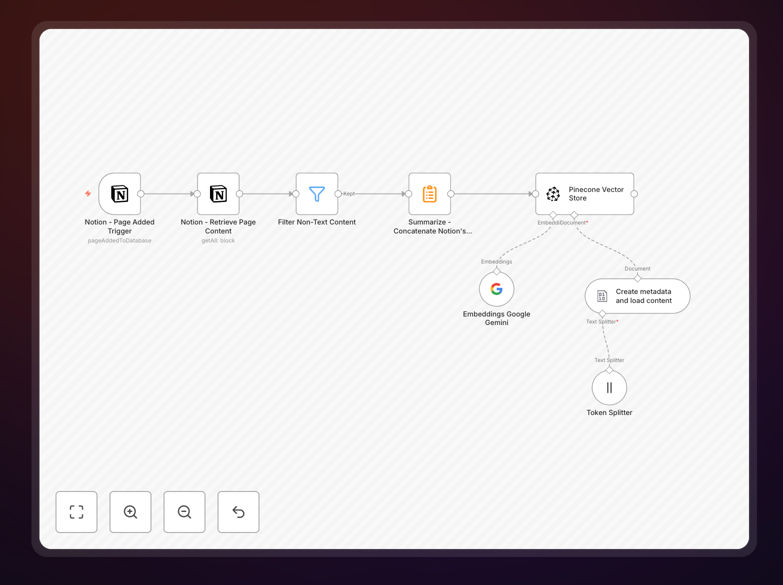
Notion to Pinecone integration workflow diagram

What This Workflow Does

This n8n automation solves the challenge of manually transferring knowledge from Notion documents into Pinecone's vector database. Many teams use Notion as their central knowledge base but struggle to leverage this content in AI applications that require vector embeddings.

The workflow automatically extracts text content from specified Notion pages, processes it into embeddings, and stores them in Pinecone. This enables semantic search, recommendation systems, and other AI features to work with your Notion knowledge base without manual data transfers.

How It Works

1. Notion Content Extraction

The workflow connects to your Notion account via API and retrieves content from specified pages or databases. It handles text extraction from all supported block types while preserving structure.

2. Text Processing

Content is cleaned and chunked into appropriate sizes for embedding generation. The workflow can optionally apply preprocessing like removing markdown formatting or splitting long documents.

3. Embedding Generation

Text chunks are sent to an embedding model (like OpenAI's text-embedding-ada-002) to convert them into numerical vector representations that capture semantic meaning.

4. Pinecone Upsert

The generated embeddings are uploaded to your Pinecone index with metadata linking them back to the original Notion content. This enables efficient similarity search and retrieval.

Who This Is For

This workflow is ideal for teams using Notion as their primary knowledge management system who want to:

  • Build AI-powered search over company documentation
  • Create chatbots that answer questions based on Notion content
  • Develop recommendation systems using internal knowledge
  • Enable semantic search capabilities for customer support

What You'll Need

  1. An n8n instance (cloud or self-hosted)
  2. Notion API access with proper permissions
  3. A Pinecone account with an existing index
  4. Access to an embedding model (OpenAI, Cohere, etc.)
  5. Basic understanding of vector databases

Quick Setup Guide

  1. Download the JSON template file
  2. Import into your n8n instance
  3. Configure Notion API credentials
  4. Set up Pinecone connection details
  5. Specify which Notion pages to sync
  6. Test with a small dataset before full sync

Key Benefits

Eliminate manual data transfers between Notion and your AI applications, saving hours of repetitive work each week.

Keep your AI systems current by automatically syncing the latest Notion content to Pinecone without developer intervention.

Enable powerful semantic search across all your Notion documentation with minimal setup time.

Reduce implementation costs compared to custom-built solutions while maintaining flexibility.

Pro tip: Schedule this workflow to run daily or weekly to keep your Pinecone index synchronized with Notion changes.

Frequently Asked Questions

Common questions about Notion and Pinecone integration

Connecting Notion to Pinecone enables AI-powered search and retrieval of your knowledge base content. While Notion has basic search, Pinecone allows semantic search that understands meaning rather than just keywords.

This integration is valuable for teams that want to build chatbots, recommendation systems, or advanced search capabilities using their Notion content. The vectors stored in Pinecone capture the semantic relationships between concepts in your documents.

  • Enables natural language queries
  • Powers context-aware AI applications
  • Scales better than manual tagging systems

Structured knowledge content works best for vector storage - documentation, FAQs, research notes, and process documentation. These content types typically contain complete thoughts and clear semantic relationships.

Avoid syncing highly formatted pages with many embedded media or tables without text context. The workflow handles most block types but works best with paragraphs, bullet points, and headings that form complete semantic units.

  • Focus on text-heavy pages
  • Prioritize evergreen content
  • Exclude temporary or personal pages

The sync frequency depends on how often your Notion content changes and how critical freshness is for your AI applications. For most knowledge bases, daily or weekly syncs provide good balance.

High-traffic knowledge bases might benefit from real-time syncs triggered by Notion page updates. The workflow can be scheduled or triggered based on your specific requirements and Pinecone's rate limits.

  • Daily syncs for active wikis
  • Weekly for stable documentation
  • Event-based for critical updates

The workflow is compatible with any embedding model that provides an API, including OpenAI's text-embedding-ada-002, Cohere's embed models, or open-source alternatives like sentence-transformers.

Different models have varying strengths - some handle technical jargon better, while others excel at general language understanding. The workflow can be configured to use whichever model best matches your content type and use case.

  • OpenAI for general content
  • Cohere for domain-specific terms
  • Custom models for specialized needs

Manual pipelines require developers to write custom scripts for extraction, cleaning, embedding generation, and database updates. This workflow handles all these steps automatically with minimal configuration.

Unlike one-off scripts, the workflow maintains itself - handling API changes, error recovery, and incremental updates. It also provides monitoring and logging out of the box, reducing maintenance overhead compared to custom solutions.

  • 90% faster implementation
  • Built-in error handling
  • Automatic schema evolution

Yes, the workflow supports flexible filtering options. You can specify particular pages, databases, or even use Notion's property filters to select content based on tags, status, or other metadata.

For large knowledge bases, selective syncing improves efficiency by only processing relevant content. The workflow can be configured to watch specific databases or apply content-based rules to determine what should be vectorized.

  • Filter by page properties
  • Exclude private content
  • Sync only approved documents

Absolutely. While this template provides a starting point, GrowwStacks specializes in building tailored automation solutions. We can create custom workflows that match your specific Notion structure, Pinecone configuration, and business requirements.

Custom solutions might include advanced features like incremental syncs, content preprocessing rules, multi-model embeddings, or integration with additional systems. Our team handles everything from initial consultation to deployment and maintenance.

  • Custom filtering logic
  • Enterprise security features
  • Performance optimization

Need a Custom Notion-Pinecone Integration?

This free template is a starting point. Our team builds fully tailored automation systems for your specific needs.