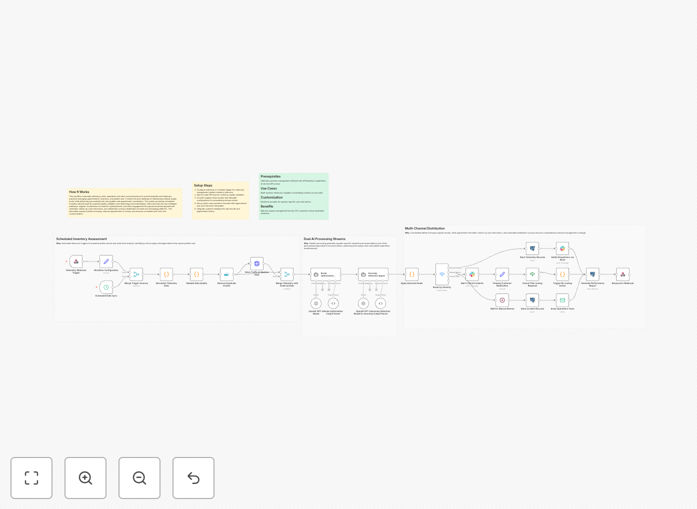
What This Workflow Does
Manual fleet management is a constant battle against inefficiency. Dispatchers juggle spreadsheets, drivers follow suboptimal routes, and anomalies like fuel spikes or delays go unnoticed until it's too late. This workflow solves these problems by creating an intelligent automation system that connects your fleet data with AI analysis and team communication.
The system continuously monitors vehicle locations, fuel consumption, and delivery schedules. Using GPT-4, it analyzes patterns to suggest optimal routes that consider traffic, weather, vehicle capacity, and delivery windows. When anomalies are detected—unusual idling, route deviations, or maintenance indicators—it automatically triggers Slack alerts to your operations channel and logs detailed findings in Postgres for analysis.
This transforms reactive fleet management into proactive optimization. Instead of manually checking multiple systems, your team receives intelligent recommendations and instant notifications, allowing them to focus on strategic decisions rather than administrative tracking.
How It Works
Step 1: Data Collection & Monitoring
The workflow begins by pulling real-time data from your fleet tracking systems (GPS devices, telematics, or manual driver reports). This includes location coordinates, fuel levels, speed, engine diagnostics, and scheduled delivery information. All incoming data is standardized and timestamped for processing.
Step 2: AI-Powered Route Analysis
Historical and current data is sent to GPT-4 with specific prompts to analyze efficiency patterns. The AI considers multiple variables: distance between stops, vehicle load capacity, driver hours, traffic conditions, and customer time windows. It generates optimized route suggestions ranked by estimated fuel savings and time efficiency.
Step 3: Anomaly Detection & Alerting
Concurrent with route analysis, the system compares current metrics against established baselines. Significant deviations trigger anomaly flags—for example, fuel consumption 20% above average for a specific route segment. These triggers are categorized by severity and type.
Step 4: Automated Team Notification
When anomalies are detected or optimized routes are ready, the workflow sends formatted alerts to designated Slack channels. High-priority issues @mention specific team members, while routine optimizations post to general operations channels. Each alert includes actionable details and suggested next steps.
Step 5: Database Logging & Reporting
Every event—data received, analysis performed, anomaly detected, alert sent—is logged in Postgres with complete context. This creates an auditable history for compliance, performance reporting, and further AI training. Scheduled reports can be generated automatically for management review.
Who This Is For
This automation is ideal for logistics companies, delivery services, field service operations, transportation fleets, and any business managing multiple vehicles. Specifically beneficial for:
- Last-mile delivery companies needing dynamic route optimization
- Service businesses with technicians traveling between appointments
- Transportation fleets wanting to reduce fuel costs and overtime
- Operations managers overwhelmed by manual dispatch coordination
- Companies already using GPS tracking but lacking intelligent analysis
What You'll Need
- n8n instance (cloud or self-hosted) with available API connections
- GPT-4 API access with available credits for analysis requests
- Slack workspace with permissions to create webhooks and post to channels
- Postgres database (or compatible SQL database) for logging
- Fleet data source—either GPS/telematics API or structured manual reporting system
- Basic understanding of your current route patterns and key performance metrics
Quick Setup Guide
- Import the template: Download the JSON file above and import it into your n8n instance through the workflow import function.
- Configure data sources: Replace the placeholder HTTP Request nodes with connections to your actual fleet data APIs or webhook endpoints.
- Set up AI analysis: Add your OpenAI API credentials to the GPT-4 node and adjust the analysis prompts to match your specific optimization goals.
- Connect Slack: Create a Slack webhook in your workspace and paste the URL into the Slack node. Configure which channels receive which alert types.
- Link your database: Enter your Postgres connection details in the database nodes. The workflow will create necessary tables automatically on first run.
- Test with sample data: Run the workflow with historical data to verify alerts and optimizations match your expectations before going live.
Pro tip: Start by optimizing just one route or vehicle type to establish baselines. Once the system learns patterns accurately, expand to your entire fleet. This phased approach reduces initial complexity and builds confidence in the automation.
Key Benefits
Reduce fuel costs by 15-25% through AI-optimized routes that minimize unnecessary mileage and idling time. The system continuously learns from actual consumption data to improve suggestions.
Cut overtime expenses by 20-30% by balancing driver schedules and optimizing route sequences. Automated compliance tracking ensures hours-of-service regulations are met.
Improve delivery reliability by 40% with dynamic rerouting around traffic incidents and proactive anomaly detection. Customers receive more accurate ETAs and fewer delayed shipments.
Reduce administrative workload by 60% by automating data collection, analysis, and reporting. Your team spends less time on spreadsheets and more on strategic improvements.
Gain actionable insights from existing data without additional software investments. The workflow transforms raw GPS coordinates into business intelligence that drives better decisions.