What This Workflow Does
This template solves one of the most common bottlenecks in business automation: sequential processing that turns minutes into hours. When workflows handle multiple independent tasks one after another, total execution time accumulates unnecessarily. This parallel processing pattern breaks that constraint by running all tasks simultaneously.
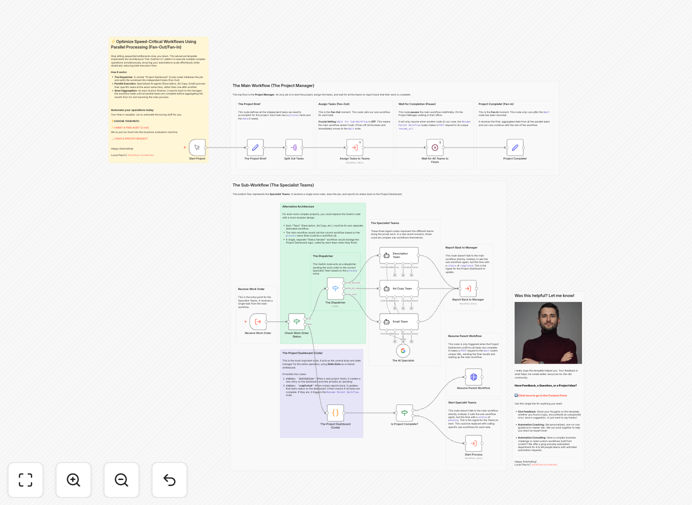
The workflow implements the Fan-Out/Fan-In architecture, where a main workflow (the "Project Manager") distributes tasks to multiple sub-workflows (the "Specialist Teams") that execute in parallel. A central status tracker monitors completion, and the main workflow resumes only when all tasks finish, aggregating results from all parallel operations.
This approach transforms workflows that might take hours into processes that complete in minutes, making it ideal for data enrichment, multi-API integrations, batch processing, and any scenario where tasks don't depend on each other's immediate results.
How It Works
The architecture follows a three-phase construction project analogy that makes complex parallel processing easy to understand and implement.
Phase 1: Fan-Out (Task Distribution)
The main workflow identifies all tasks that can run independently and initiates multiple sub-workflow executions simultaneously. Instead of waiting for each to complete, it immediately starts the next, creating parallel execution streams.
Phase 2: Asynchronous Execution
Each sub-workflow operates independently, performing its assigned task—whether that's calling an API, processing data, running AI analysis, or any other operation. Upon completion, each updates a central status tracker with its results.
Phase 3: Fan-In (Result Aggregation)
The main workflow, paused by a Wait node, monitors the status tracker. Only when all tasks report completion does it resume, collecting and processing the aggregated results from all parallel operations into a unified output.
Pro tip: Use this pattern for API calls to different services, data processing on multiple records, or any independent operations. The time savings compound dramatically as task count increases.
Who This Is For
This template is designed for businesses and technical teams facing workflow performance bottlenecks. It's particularly valuable for:
E-commerce operations processing multiple orders, checking inventory across warehouses, and calculating shipping rates simultaneously.
Marketing teams enriching lead data from multiple sources, generating personalized content variations, or distributing campaigns across channels concurrently.
Data-intensive businesses that need to process large datasets, synchronize information across multiple platforms, or run simultaneous analytics operations.
Customer service organizations handling multiple verification checks, document processing, or compliance requirements in parallel during onboarding.
What You'll Need
- n8n instance (cloud or self-hosted) with workflow execution permissions
- Basic understanding of n8n nodes and workflow concepts
- Independent tasks that can run concurrently without interfering with each other
- API credentials or access to the services you want to call in parallel (if applicable)
- A use case where sequential processing creates unacceptable delays
Quick Setup Guide
This template is designed as a hands-on tutorial with minimal setup required.
- Download and import the template JSON file into your n8n instance
- Review the architecture with the construction project analogy in mind
- Configure credentials for any external services you plan to call in parallel
- Execute the workflow from the Start Project node to see parallel processing in action
- Study the sticky notes on each node to understand its specific role in the pattern
- Adapt to your use case by replacing example tasks with your actual parallel operations
Implementation note: Start with 2-3 parallel tasks to test the pattern before scaling to larger numbers. Monitor resource usage and API rate limits as you increase parallelism.
Key Benefits
Dramatic time reduction: Transform workflows that take hours into processes that complete in minutes. If you have 10 tasks that each take 5 minutes sequentially, that's 50 minutes total. With parallel processing, it's just 5 minutes.
Better resource utilization: Instead of leaving computing resources idle between sequential tasks, parallel processing keeps them fully engaged, maximizing your automation investment.
Improved customer experience: Faster processing means quicker responses to customers, whether that's order confirmation, data delivery, or service completion.
Scalability foundation: Once implemented, this pattern scales effortlessly. Adding more parallel tasks doesn't proportionally increase total time—it just requires ensuring you have sufficient resources.
Competitive advantage: Businesses that process information faster make better decisions sooner, respond to opportunities more quickly, and deliver superior service experiences.