Security Automation AI-Powered Port Integration Jira Slack

Automated Security Vulnerability Remediation with Port, OpenAI, Jira & Slack

Complete end-to-end workflow that detects, analyzes, prioritizes, and remediates security vulnerabilities using AI and organizational context.

Download Template JSON · n8n compatible · Free
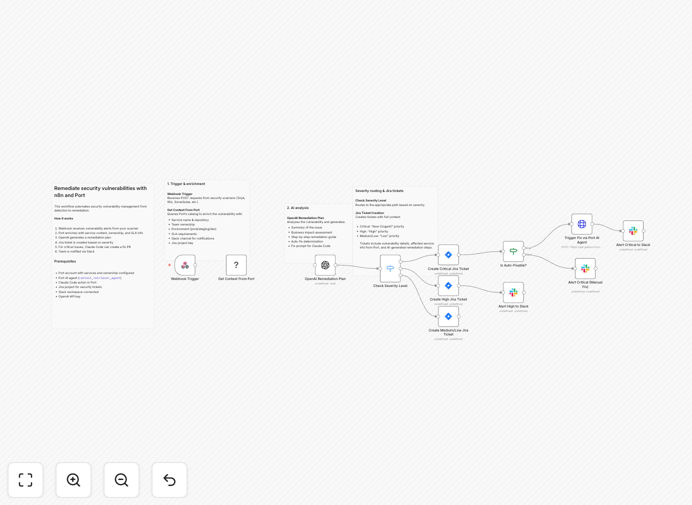
Security vulnerability remediation workflow diagram showing integration between Port, OpenAI, Jira, and Slack

What This Workflow Does

Security teams are overwhelmed with vulnerability alerts from multiple scanners like Snyk, Wiz, and SonarQube. Manually triaging each alert, determining business impact, creating tickets, and coordinating fixes consumes hours of engineering time daily. Critical vulnerabilities often get lost in the noise, while low-risk issues create unnecessary panic.

This automated workflow solves this problem by creating an end-to-end vulnerability management system. It receives alerts from security scanners, enriches them with organizational context from Port's software catalog, uses OpenAI to analyze and plan remediation, creates prioritized Jira tickets, and notifies the right teams in Slack. For critical auto-fixable vulnerabilities, it can even trigger Claude Code to create security patches automatically.

How It Works

1. Webhook Trigger & Context Enrichment

The workflow starts when a security scanner detects a vulnerability and sends a webhook alert. The workflow immediately queries Port's software catalog to retrieve complete context about the affected service: ownership team, environment (production/staging), dependencies, SLA requirements, and business criticality.

2. AI-Powered Analysis & Planning

OpenAI analyzes the vulnerability details combined with Port's organizational context. It generates a remediation plan, determines if automated fixing is possible, and assesses the true business risk considering the service's role and dependencies.

3. Severity-Based Routing

The workflow routes vulnerabilities through different paths based on severity and fixability. Critical issues go to immediate remediation paths, high severity gets prioritized attention, while medium/low issues are tracked systematically.

4. Automated Ticket Creation & Notification

Jira tickets are created with all context: vulnerability details, affected service information, AI-generated remediation steps, and proper priority. Simultaneously, Slack notifications are sent to the appropriate team channel with ticket references and actionable information.

5. Automated Remediation for Critical Issues

For critical vulnerabilities deemed auto-fixable, the workflow triggers Claude Code via Port actions to create pull requests with security patches. The automation references the Jira ticket and updates status as remediation progresses.

Pro tip: Start by automating only critical vulnerabilities first. Once the process is stable and teams are comfortable, expand to include high and medium severity issues. This phased approach builds confidence and demonstrates immediate value.

Who This Is For

This workflow is ideal for security teams at tech companies managing multiple services and repositories, DevOps engineers responsible for vulnerability management, platform teams maintaining internal developer portals, and any organization using Port for software catalog management. It's particularly valuable for companies with 10+ engineering teams, multiple security scanners, and a need to reduce mean time to remediation (MTTR).

What You'll Need

  1. Port Account: With services cataloged including ownership, environment, and dependency information
  2. Security Scanner: Snyk, Wiz, SonarQube, or any tool that can send webhook alerts
  3. n8n Instance: Cloud or self-hosted with Port's custom node installed
  4. Jira Cloud: With project permissions for ticket creation
  5. Slack Workspace: With bot permissions for posting to channels
  6. OpenAI API Key: For AI-powered analysis and planning

Quick Setup Guide

Follow these steps to implement this security automation in your environment:

  1. Import the workflow into your n8n instance and configure credentials for Port, Jira, Slack, and OpenAI
  2. Create Context Retriever Agent in Port following the official guide to enable catalog queries
  3. Configure Jira projects in each Jira node (Critical, High, Medium/Low paths)
  4. Update repository paths for Claude Code fixes with your default organization/repository
  5. Point security scanner webhooks to the workflow's webhook URL
  6. Test with sample payloads to ensure proper routing and notification
  7. Monitor and refine severity thresholds and notification channels based on initial results

Important: This template is designed for self-hosted n8n instances where you have full control over security scanner integrations and Port custom node installation.

Key Benefits

Reduce MTTR by 80%: Automated workflows move vulnerabilities from detection to remediation in minutes instead of days, dramatically reducing the window of exposure for critical security issues.

Eliminate Alert Fatigue: Security engineers stop drowning in generic alerts and instead focus on strategic work while automation handles routine triage and ticket creation with proper business context.

Ensure Consistent Response: Every vulnerability gets the same rigorous treatment regardless of when it's discovered or who's on call, with organizational context informing every decision.

Free Engineering Resources: Developers spend less time deciphering security tickets and more time building features, with AI-generated remediation plans providing clear, actionable guidance.

Improve Compliance Posture: Automated tracking and documentation of every vulnerability from detection to resolution creates audit trails that demonstrate proactive security management.

Frequently Asked Questions

Common questions about security vulnerability automation and integration

Security vulnerability remediation automation is the process of automatically detecting, analyzing, prioritizing, and fixing security weaknesses in software and systems. Instead of manual processes where security teams manually review alerts, create tickets, and coordinate fixes, automation uses workflows to handle the entire lifecycle from detection to resolution.

This includes pulling context from software catalogs, using AI to assess risk, creating tickets with proper priority, and even triggering automated code fixes for critical vulnerabilities. The goal is to reduce human intervention while ensuring consistent, context-aware responses to security threats.

Businesses should automate security vulnerability management to reduce mean time to remediation (MTTR), eliminate human error in prioritization, ensure consistent response across teams, and free up security engineers for strategic work. Manual processes often lead to alert fatigue, inconsistent ticket creation, and delayed fixes for critical issues.

Automation ensures every vulnerability gets appropriate attention based on actual risk, with full organizational context from software catalogs informing the response. This transforms security from a reactive cost center to a proactive business enabler that protects revenue and reputation.

AI improves security vulnerability remediation by analyzing vulnerability details with organizational context to generate intelligent remediation plans, determine if automated fixing is possible, and provide clear instructions for developers. AI can understand the business impact by considering service ownership, environment, dependencies, and SLA requirements from software catalogs.

This context-aware analysis leads to more accurate prioritization and actionable remediation steps than traditional severity scoring alone. AI can also identify patterns across vulnerabilities that humans might miss, suggesting systemic fixes rather than one-off patches.

Integrating Port with security tools provides complete organizational context for vulnerability management. Port's software catalog contains metadata about services, ownership, environments, dependencies, and SLAs. When a vulnerability is detected, the automation can query Port to understand which team owns the affected service, what environment it's in, what other services depend on it, and what SLA applies.

This context transforms generic security alerts into actionable business-aware incidents with proper routing and priority. It ensures the right team gets notified with all the information they need to fix the issue quickly and correctly.

Automated remediation with Jira and Slack works by creating context-rich tickets in Jira with appropriate priority based on severity and business impact, then notifying the right team in Slack with all necessary information. Critical vulnerabilities get highest priority tickets and immediate Slack alerts to security channels.

High severity issues get high priority tickets and team notifications. Medium/low issues get standard tickets for tracking. The automation includes Jira ticket references in Slack messages and can update status as remediation progresses, creating a closed-loop communication system that keeps everyone informed.

Vulnerabilities that can be automatically fixed typically include known dependency vulnerabilities with available patches, configuration issues with standard fixes, and code patterns with established remediation patterns. For example, outdated library versions can be updated via pull requests, insecure configuration settings can be corrected, and common code vulnerabilities can be patched using AI coding assistants.

The automation determines fixability by analyzing the vulnerability type, available fixes, and the codebase's structure before triggering automated remediation. This ensures automated fixes are safe and appropriate for the specific context.

Success of security automation is measured by reduced mean time to remediation (MTTR), decreased critical vulnerability dwell time, increased remediation rate, reduced manual effort per vulnerability, and improved team satisfaction. Key metrics include time from detection to ticket creation, time from ticket creation to fix, percentage of vulnerabilities auto-remediated, reduction in security team hours spent on triage, and developer feedback on ticket quality.

Successful automation should show measurable improvements across all these dimensions within 3-6 months. Regular reviews of these metrics help refine the automation rules and ensure continuous improvement.

Yes, GrowwStacks specializes in building custom security vulnerability automation systems tailored to your specific tech stack, security tools, and organizational structure. We analyze your current vulnerability management process, identify automation opportunities, design workflows that integrate with your existing security scanners, software catalog, ticketing system, and communication platforms, then implement and maintain the solution.

Our custom automations handle your unique business rules, team structures, and compliance requirements. We work with you to define success metrics, implement phased rollouts, and provide ongoing support to ensure the automation delivers maximum value.

  • Integration with your specific security tools and platforms
  • Custom severity thresholds and routing rules
  • Compliance with your industry regulations and internal policies
  • Ongoing optimization based on performance metrics

Need a Custom Security Vulnerability Automation?

This free template is a starting point. Our team builds fully tailored automation systems for your specific business needs.