What This Workflow Does
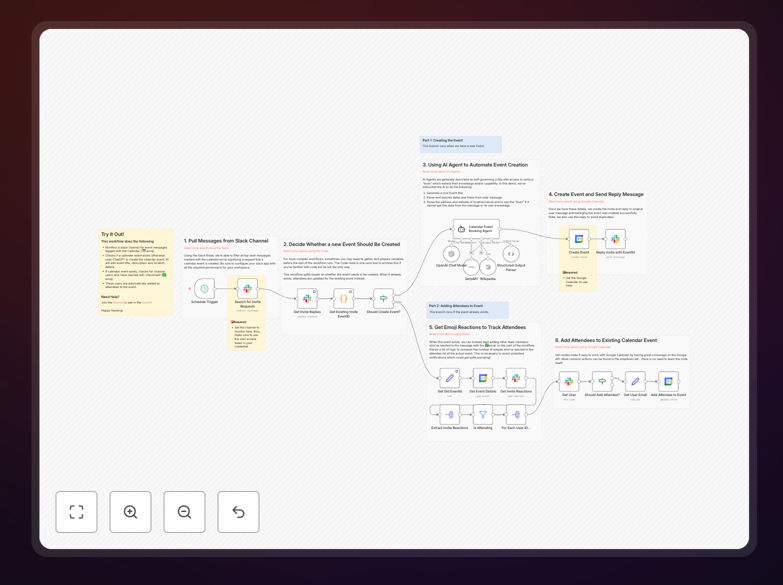
This automation solves the chaotic process of scheduling team events through chat conversations. Instead of manually copying details from Slack messages to Google Calendar—and dealing with back-and-forth RSVPs—this workflow automatically monitors Slack channels for event discussions, uses AI to understand the details, creates calendar invites with precise locations, and manages attendee responses through simple reactions.
When someone posts "Team lunch at Bunker 51 next Thursday at 1pm" with a 📅 reaction, the AI agent extracts the date, time, and location, finds the exact address via Google Maps, creates a Google Calendar event with all attendees invited, and posts the calendar link back to the channel. Team members can then RSVP with a ✅ reaction, automatically updating the calendar event.
How It Works
1. Slack Message Monitoring
The workflow monitors specified Slack channels for messages with the calendar emoji reaction (📅). This reaction acts as a trigger, indicating that the message contains event details that should be turned into a calendar invite.
2. AI-Powered Parsing
An AI agent analyzes the message content to extract structured information: event title, date, time, location, and description. The AI understands natural language, so it can interpret phrases like "next Thursday around 6pm" or "Bunker 51" with high accuracy.
3. Location Validation
Using the Location tool, the AI searches for precise address information from Google Maps. This ensures calendar events include accurate location details rather than just venue names, making it easier for attendees to find the venue.
4. Calendar Event Creation
The workflow creates a Google Calendar event with all extracted details, sets the organizer, and prepares the event for attendee management. The calendar link is posted back to the Slack channel for visibility.
5. RSVP Management
Team members RSVP by reacting with ✅ to the original message. The workflow periodically checks reactions, adding confirmed attendees to the calendar event and removing those who withdraw their reaction.
Who This Is For
This automation is ideal for teams that frequently schedule informal meetings, social events, or impromptu gatherings through chat. Marketing teams planning campaign syncs, development teams organizing retrospectives, sales teams coordinating client meetings, HR departments scheduling team-building activities, and remote teams coordinating virtual coffee chats will all benefit significantly.
Companies with 10-250 employees see the most immediate value, as manual scheduling overhead grows disproportionately with team size. The workflow is particularly valuable for distributed teams across time zones where scheduling complexity increases.
What You'll Need
- Slack workspace with appropriate permissions to read messages and reactions in your chosen channels
- Google Calendar account with API access to create and update events
- OpenAI API key or compatible AI service for natural language processing
- Google Maps API key (optional but recommended for location validation)
- n8n instance (self-hosted or cloud) to run the workflow
Pro tip: Start with a single test channel before rolling out to entire teams. This lets you refine the AI's parsing accuracy with your team's specific communication style before full deployment.
Quick Setup Guide
1. Download the template using the button above and import it into your n8n instance.
2. Configure Slack credentials to connect to your workspace and specify which channels to monitor.
3. Set up Google Calendar connection with OAuth authentication for the calendar where events should be created.
4. Add your OpenAI API key in the AI agent node configuration.
5. Test with a simple message like "Coffee chat tomorrow at 3pm" with the 📅 reaction in your designated Slack channel.
6. Monitor the first few events to ensure accurate parsing, then expand to additional channels as needed.
Key Benefits
Save 15-30 minutes per scheduled event by eliminating manual calendar creation, location lookup, and attendee management. What typically takes multiple messages and manual entry becomes completely automated.
Reduce scheduling errors with AI-powered parsing that understands context better than humans copying information. The system catches ambiguous dates and finds precise locations automatically.
Improve team participation through frictionless RSVP management. Team members simply react with an emoji rather than navigating calendar interfaces or responding to email chains.
Centralize event visibility by keeping the planning conversation and the resulting calendar event linked. Everyone can see who's attending directly in Slack without checking multiple calendars.
Scale across departments with a consistent scheduling process that works the same way for marketing meetings, engineering syncs, company socials, and client calls.