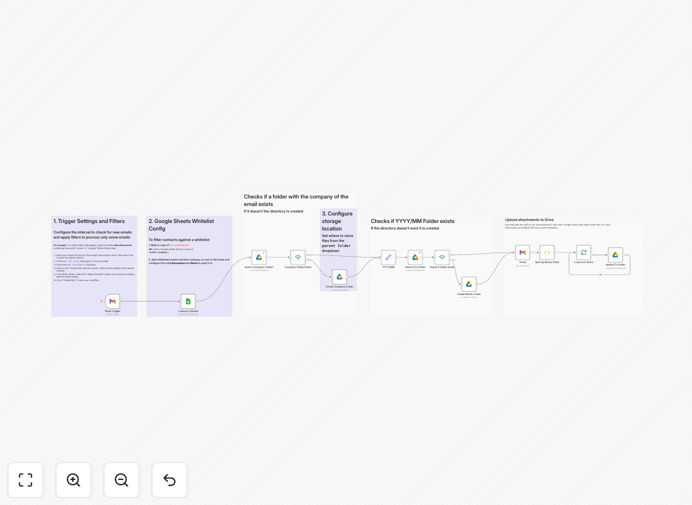
What This Workflow Does
This automation solves the frustrating, time-consuming task of manually downloading and organizing email attachments. Instead of searching through cluttered inboxes or desktop folders, the workflow automatically processes labeled emails with attachments and files them into organized Google Drive folders structured by company or client name.
When an email arrives with an attachment (like an invoice, contract, or document), the system checks if the sender is on your approved whitelist via Google Sheets, creates a dedicated folder for that company if it doesn't exist, saves all attachments with timestamped filenames to prevent duplicates, and logs everything for tracking. This transforms chaotic email attachments into a structured, searchable document management system.
How It Works
Step 1: Email Trigger & Filtering
The workflow monitors your Gmail inbox for emails with specific labels (like "To File" or "Attachments"). You configure Gmail filters to automatically apply these labels to incoming emails from clients, vendors, or specific senders. The automation only processes emails that match your criteria, ensuring irrelevant emails don't trigger the workflow.
Step 2: Sender Verification & Company Lookup
Each email sender is checked against a Google Sheets whitelist that maps email addresses to company names. This serves dual purposes: security (only processing emails from approved senders) and organization (determining which company folder to use). If a sender isn't on the list, the email can be flagged for review or ignored.
Step 3: Folder Creation & Organization
The system checks if a folder exists for the identified company in your designated Google Drive parent folder. If not, it creates one with a standardized naming convention. This ensures consistent folder structures across your entire organization, making document retrieval intuitive for everyone on your team.
Step 4: Attachment Processing & Storage
All attachments are downloaded, renamed with timestamps and descriptive names, and uploaded to the appropriate company folder. The workflow handles multiple attachments per email, various file types (PDFs, images, spreadsheets), and maintains the original file integrity while adding organizational metadata.
Pro tip: Use this workflow not just for client documents but also for internal processes like saving employee submissions, expense receipts, or marketing assets. The same automation logic applies to any scenario where files arrive via email and need organized cloud storage.
Who This Is For
This automation is ideal for businesses and professionals who regularly receive documents via email: accounting firms processing client invoices and receipts, legal practices handling case documents, marketing agencies receiving creative assets from clients, consultants managing project deliverables, sales teams processing orders, and healthcare providers organizing patient forms.
Teams spending more than 30 minutes daily manually downloading, renaming, and filing email attachments will see immediate productivity gains. The system is particularly valuable for businesses with compliance requirements, those needing audit trails of document receipt, or teams collaborating on client files where consistent organization is critical.
What You'll Need
- Google Workspace accounts with access to Gmail, Google Drive, and Google Sheets
- n8n instance (cloud or self-hosted) with OAuth2 connections configured for Google services
- Whitelist spreadsheet mapping email addresses to company names (template provided)
- Gmail labels configured to identify emails with attachments that should be processed
- Designated Google Drive parent folder where company subfolders will be created
Quick Setup Guide
- Download and import the JSON template into your n8n instance using the import function.
- Configure credentials for Gmail, Google Drive, and Google Sheets using OAuth2 authentication.
- Create your whitelist spreadsheet with columns for email addresses and corresponding company names.
- Set up Gmail filters to apply labels to emails with attachments from specific senders or with certain criteria.
- Update node configurations in the workflow to point to your spreadsheet, parent folder, and email labels.
- Test with sample emails to verify attachments are correctly sorted into the right company folders.
- Activate the workflow and let it run automatically on your preferred schedule (every 15 minutes is typical).
Pro tip: Start with a small whitelist of trusted senders and expand gradually. This allows you to refine the system with minimal risk and ensures the automation handles edge cases properly before scaling to your entire email flow.
Key Benefits
Save 5-10 hours monthly per employee by eliminating manual attachment management. What used to be a daily chore becomes an automated background process, freeing your team for higher-value work.
Eliminate lost documents with consistent, searchable organization. Every attachment is stored in predictable locations with clear naming conventions, making retrieval instant instead of a search mission.
Improve team collaboration through centralized document access. Instead of attachments trapped in individual inboxes, files are available in shared Drive folders where everyone with permissions can access the latest versions.
Enhance document security with whitelist verification and structured storage. Unauthorized emails are filtered out, and sensitive documents are stored in access-controlled folders rather than scattered across personal accounts.
Create audit-ready documentation with automatic timestamps and organization. The system maintains clear records of when documents were received and where they're stored, simplifying compliance and audit preparation.