Shopify GraphQL n8n Pagination Automation

Paginate Shopify products with GraphQL cursor-based navigation

Efficiently process large product catalogs with reliable cursor-based pagination in your Shopify automations

Download Template JSON · n8n compatible · Free
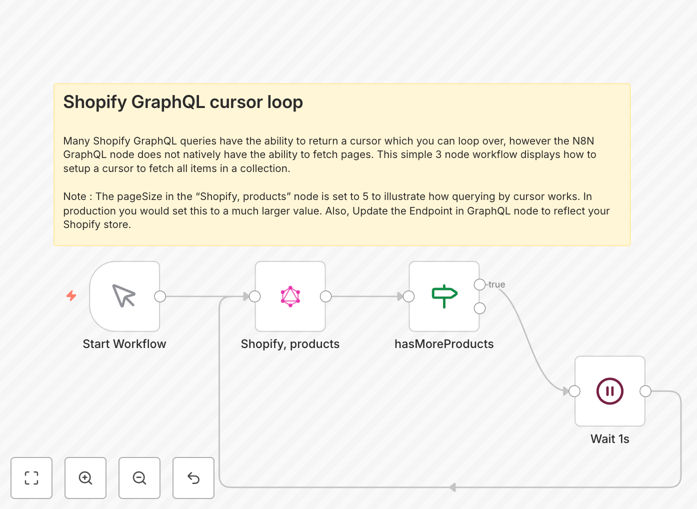
Shopify GraphQL cursor pagination workflow in n8n

What This Workflow Does

This n8n workflow solves a common challenge when working with Shopify's GraphQL API: efficiently paginating through large product catalogs. Traditional offset-based pagination becomes inefficient and unreliable with thousands of products, especially when products are added or removed between requests.

The template implements cursor-based navigation, which uses Shopify's built-in pagination system to reliably traverse your entire product catalog. It automatically handles the cursor passing between requests, ensuring you process every product exactly once, even if your catalog changes during the operation.

How It Works

Initial GraphQL Query

The workflow starts with an initial GraphQL query to Shopify's API requesting the first page of products. The query specifies which fields to return and includes parameters for pagination control.

Cursor Extraction

Each response includes a cursor pointing to the next page of results. The workflow extracts this cursor and stores it for the next iteration.

Pagination Loop

Using n8n's loop functionality, the workflow continues making requests with the latest cursor until all products are processed. The loop automatically terminates when no more cursors are returned.

Pro tip: Adjust the 'first' parameter in your GraphQL query to control how many products each page returns. Larger values reduce API calls but increase memory usage.

Who This Is For

This workflow benefits Shopify merchants, developers, and agencies who need to reliably process large product catalogs. It's particularly valuable for:

  • Stores with 1,000+ products needing batch operations
  • Developers building custom Shopify integrations
  • Agencies managing multiple client stores
  • Businesses syncing products to external systems
  • Teams performing regular catalog exports or migrations

What You'll Need

  1. An n8n instance (cloud or self-hosted)
  2. Shopify store admin access
  3. GraphQL API permissions for products
  4. Basic understanding of GraphQL queries

Quick Setup Guide

  1. Download and import the JSON template into your n8n instance
  2. Configure the Shopify GraphQL node with your store credentials
  3. Adjust the initial GraphQL query to request your desired product fields
  4. Test with a small batch size before processing your full catalog
  5. Add any post-processing steps needed for your use case

Key Benefits

Reliable processing: Cursor-based pagination ensures you never miss or duplicate products, even if your catalog changes during processing.

API efficiency: Reduces Shopify API calls compared to traditional pagination methods, helping you stay within rate limits.

Scalable solution: Handles catalogs of any size without performance degradation as the dataset grows.

Time savings: Automates what would otherwise require manual pagination handling in custom code.

Flexible integration: Easily connects with other n8n nodes for complete automation workflows.

Frequently Asked Questions

Common questions about Shopify GraphQL integration and automation

Cursor-based pagination is a GraphQL technique that uses pointers (cursors) to track position in a dataset rather than page numbers. It's more efficient than offset pagination for large Shopify product catalogs because cursors are stable even when products are added or removed between queries. This method prevents duplicate or missing items during pagination.

In Shopify's implementation, each product edge in the connection includes a cursor that points to its position. The API returns these cursors along with the product data, allowing you to request the next page by providing the last cursor from the previous response. This creates a reliable chain through your catalog regardless of changes.

GraphQL provides more flexibility than REST when querying Shopify product data. You can request exactly the fields you need in a single query, reducing over-fetching. GraphQL also handles complex relationships better and offers real-time updates through subscriptions. For large catalogs, GraphQL's cursor-based pagination performs better than REST's offset-based pagination.

For example, when updating product prices, a GraphQL query can fetch just the ID, title, and price fields rather than entire product objects. This reduces payload size and speeds up processing. GraphQL's type system also makes it easier to evolve your API without versioning breaks.

  • Reduces data transfer by 50-70% compared to REST
  • Single request gets all needed data
  • Better support for complex nested queries

Cursor pagination makes Shopify automations more reliable when processing large product catalogs. Traditional pagination can skip or duplicate items if products change between requests. Cursor-based navigation maintains consistency even with catalog updates, ensuring complete data synchronization. This is critical for inventory updates, product exports, or batch processing operations.

Consider a nightly product export: with offset pagination, adding new products could shift positions and cause duplicates. Cursor pagination tracks each product's actual position in the catalog, unaffected by additions or removals elsewhere. This reliability is why Shopify recommends cursors for all paginated GraphQL queries.

Common use cases include syncing product catalogs to external systems, batch updating product attributes, generating reports, migrating products between stores, and processing inventory updates. Any scenario requiring reliable access to Shopify's complete product catalog benefits from cursor-based pagination, especially with thousands of products.

For instance, a multi-channel retailer might use this to sync products to a PIM system daily. The cursor approach ensures all products transfer exactly once, even if new items are added during the sync. Another example would be bulk price adjustments during sales events, where consistency is critical.

  • Catalog exports for analytics
  • Bulk image processing
  • Inventory synchronization

n8n handles GraphQL cursor pagination through workflow loops that pass the cursor between requests. The template demonstrates how to extract the cursor from each response and feed it into subsequent queries until all products are processed. This approach maintains state across paginated requests while allowing transformation of each product batch.

The workflow uses n8n's item linking to chain requests together. After each GraphQL query, it checks for a cursor in the response. If found, it generates a new query with that cursor, creating a loop that continues until no more cursors are returned. This pattern can process millions of products with minimal configuration.

Cursor pagination reduces Shopify API load by eliminating redundant data transfers. It processes large catalogs faster than offset pagination since the database can optimize cursor-based queries. Performance gains are most noticeable with catalogs exceeding 1,000 products, where traditional pagination becomes inefficient due to increasing query times per page.

Benchmarks show cursor pagination can be 2-3x faster for catalogs over 10,000 products. The efficiency comes from how databases internally track records - cursors map directly to internal pointers while offsets require counting through records. This difference becomes significant at scale.

Yes, GrowwStacks specializes in custom Shopify automation solutions. Our team can design tailored GraphQL workflows for your specific product data requirements, whether you need advanced filtering, conditional processing, or integration with other business systems. Custom automations ensure optimal performance for your catalog size and business processes.

We've built solutions for clients needing real-time product syncs, complex inventory management, and multi-platform publishing. Custom workflows can incorporate error handling, rate limit management, and specialized transformations that generic templates can't address. Our experts handle the technical complexity while you focus on your business.

  • Tailored to your catalog size and structure
  • Integration with your existing systems
  • Ongoing support and optimization

Need a Custom Shopify GraphQL Integration?

This free template is a starting point. Our team builds fully tailored automation systems for your specific needs.