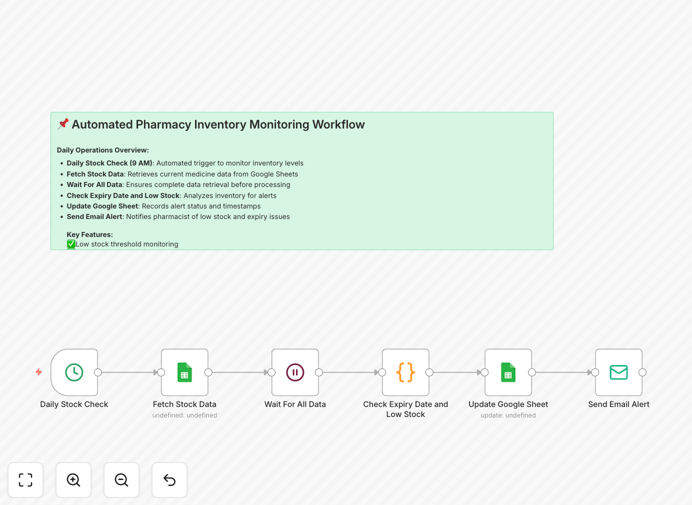
What This Workflow Does
Manual pharmacy inventory tracking is error-prone, time-consuming, and risky. Missing a low stock alert can lead to treatment delays, while overlooking expiry dates causes financial waste and potential safety issues.
This automation solves these problems by connecting your Google Sheets inventory list to a daily monitoring system. It runs automatically every morning, checks each medicine's stock quantity and expiry date against your predefined thresholds, and sends immediate email alerts to the pharmacist when action is needed.
The workflow transforms reactive manual checking into proactive automated oversight. Instead of spending hours counting bottles and checking dates, you receive concise alerts only when attention is required—freeing up time for patient care and business operations.
How It Works
Step 1: Daily Scheduled Trigger
A Cron node triggers the workflow daily at 9 AM (configurable). This ensures consistent monitoring without manual initiation.
Step 2: Fetch Inventory Data from Google Sheets
The workflow reads your pharmacy inventory Google Sheet, retrieving medicine names, current stock levels, expiry dates, and other relevant columns.
Step 3: Analyze for Low Stock & Near-Expiry
Each row is evaluated against your configured thresholds. Medicines with stock below your minimum (e.g., less than 10 units) or expiry within your warning window (e.g., 30 days) are flagged.
Step 4: Generate Alert Messages
For each flagged item, a clear alert message is created specifying the medicine, issue (low stock/expiry), current value, and required action.
Step 5: Send Email Notification
All alerts are compiled into a single email sent to the pharmacist or inventory manager, providing a complete morning briefing on inventory status.
Step 6: Update Tracking Status
The Google Sheet is updated with "Alert Sent" status and timestamp, creating an audit trail of all automated checks.
Who This Is For
This workflow is ideal for independent pharmacies, clinic dispensaries, hospital pharmacy departments, and healthcare suppliers who manage physical medicine inventory.
It's particularly valuable for businesses without expensive inventory management software, those relying on spreadsheets or paper records, and pharmacies experiencing stockouts or expiry waste. Healthcare administrators overseeing multiple locations will benefit from centralized alerting.
Pro tip: Start with your top 20% most critical or expensive medicines first. This delivers immediate value while you refine your process before scaling to full inventory.
What You'll Need
- A Google Sheets document structured with medicine names, stock quantities, and expiry dates.
- Google account with Sheets API access (free with any Gmail or Google Workspace account).
- Email service credentials (Gmail SMTP, Outlook, or any SMTP provider) for sending alerts.
- An n8n instance (cloud or self-hosted) with the Google Sheets and Email nodes installed.
- 5-10 minutes to configure thresholds matching your business rules.
Quick Setup Guide
- Download the template using the button above and import it into your n8n instance.
- Connect your Google Sheets account in n8n credentials and update the workflow with your specific Sheet ID and range.
- Configure your email service (SMTP settings) in n8n's email node.
- Adjust the thresholds in the "Check Expiry Date and Low Stock" node to match your pharmacy's minimum stock levels and expiry warning period.
- Test with a sample row by manually triggering the workflow, then activate the scheduled trigger for daily automation.
Key Benefits
Prevent treatment delays by ensuring critical medicines are never out of stock when patients need them. Automated alerts give you days or weeks of advance notice to reorder.
Reduce financial waste by identifying near-expiry medicines early. This allows for strategic use, supplier returns where possible, or targeted promotions—turning potential losses into managed outcomes.
Save 5-10 hours weekly on manual inventory checks. Pharmacists and technicians can redirect this time to patient consultations, medication reviews, and business development activities.
Improve compliance & safety with systematic expiry monitoring. Automated tracking creates an audit trail that demonstrates proactive management to regulatory bodies.
Scale without complexity as your pharmacy grows. The same system works for 100 or 10,000 medicine lines—just expand your Google Sheet rather than investing in new software.