What This Workflow Does
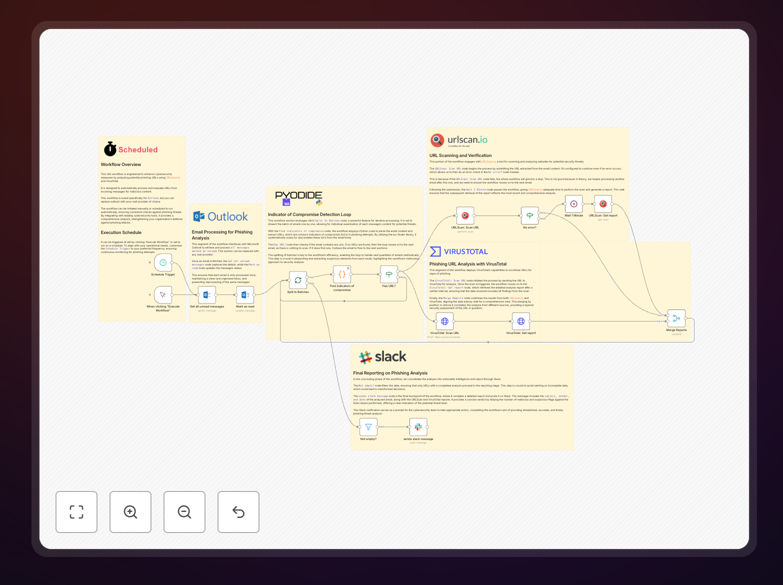
This n8n workflow automates the critical security task of phishing email analysis. It continuously monitors your Microsoft Outlook inbox for suspicious emails, extracts any URLs contained within them, and runs those URLs through two powerful security scanning services: URLScan.io and VirusTotal. The system then compiles the results and sends intelligent alerts to your Slack channel when potential threats are detected.
Manual phishing analysis is time-consuming and inconsistent—security teams can miss subtle indicators of compromise when reviewing dozens of emails daily. This automation solves that by providing systematic, 24/7 monitoring that doesn't suffer from fatigue or oversight. It transforms what was a manual, error-prone process into a reliable, automated security layer that works while your team focuses on higher-value tasks.
The workflow is designed to run on a schedule (typically daily or hourly) and processes up to 100 emails per execution. It marks analyzed emails as read to prevent duplicate processing, handles errors gracefully with retry logic, and provides clear, actionable intelligence to your security team through structured Slack notifications.
How It Works
The automation follows a logical pipeline that mimics how a security analyst would investigate suspicious emails, but with machine speed and consistency.
1. Email Retrieval & Preparation
The workflow starts by connecting to your Microsoft Outlook account and fetching recent emails (configurable as read or unread). It extracts key metadata like sender, subject, date, and most importantly—any URLs found in the email body. These URLs become the indicators of compromise (IOCs) for further analysis.
2. URL Extraction & Batch Processing
Using n8n's text processing capabilities, the workflow parses email content to identify all URLs. These are then split into individual items for parallel processing, ensuring efficient scanning even when multiple suspicious links are found in a single email.
3. Dual-Scanner Security Analysis
Each URL undergoes simultaneous scanning through two industry-leading services. URLScan.io provides behavioral analysis—showing how the website loads, what resources it requests, and any malicious infrastructure patterns. VirusTotal aggregates scans from over 70 antivirus engines and URL scanners, offering crowd-sourced threat intelligence.
4. Result Aggregation & Threat Scoring
The workflow merges results from both scanning services, creating a comprehensive threat assessment. It applies logic to determine if a URL should be flagged based on combined intelligence—reducing false positives that might occur from relying on a single scanner.
5. Intelligent Alerting & Reporting
When threats are confirmed, the workflow generates detailed Slack notifications including the original email details, scanning results, and direct links to the full analysis reports. This gives your security team immediate context for investigation without needing to manually access multiple security portals.
Who This Is For
This automation is ideal for security teams, IT administrators, and compliance officers in organizations of all sizes. Small businesses without dedicated security staff benefit from enterprise-grade threat detection that would otherwise be cost-prohibitive. Larger enterprises can use it to augment their existing security operations center (SOC) capabilities, providing an additional layer of defense.
Companies in regulated industries like finance, healthcare, and legal services find particular value, as it creates an audit trail of security monitoring activities. Remote teams and distributed organizations also benefit significantly, as the automated system works consistently regardless of team location or time zone.
What You'll Need
- n8n instance (cloud or self-hosted) with workflow execution capabilities
- Microsoft Outlook account with API access (Office 365 business account recommended)
- URLScan.io API key (free tier available with daily limits)
- VirusTotal API key (community API free, premium recommended for business use)
- Slack workspace with permissions to create incoming webhooks
- Basic understanding of n8n node configuration (credentials and webhook setup)
Pro tip: For production use, consider upgrading to paid API tiers for URLScan.io and VirusTotal. The free tiers have rate limits that may be insufficient for organizations receiving high volumes of email. Paid tiers also provide faster scanning and more comprehensive results.
Quick Setup Guide
Follow these steps to implement this phishing analysis automation in your environment:
- Download the template using the button above and import it into your n8n instance
- Configure credentials for Microsoft Outlook, URLScan.io, VirusTotal, and Slack in n8n's credential management
- Adjust the email filter to target specific folders or sender patterns relevant to your organization
- Set the execution schedule based on your email volume (start with daily, adjust to hourly if needed)
- Test with safe URLs first to ensure the workflow connects properly to all services
- Monitor initial runs and adjust threat scoring thresholds based on your risk tolerance
- Train your team on responding to the Slack alerts the workflow generates
Key Benefits
Reduced Response Time: What takes security analysts 15-30 minutes per suspicious email now happens automatically in seconds, dramatically shrinking your threat exposure window.
Consistent Analysis Quality: Automated scanning applies the same rigorous criteria to every email, eliminating human fatigue and oversight that can lead to missed threats.
24/7 Protection: The workflow runs on your schedule—nightly, hourly, or continuously—providing constant monitoring even outside business hours when attacks often occur.
Audit Trail Creation: Every scan creates a documented record of analysis, useful for compliance reporting and post-incident investigations.
Scalable Security: The system handles increasing email volumes without additional staffing costs, growing with your organization's needs.