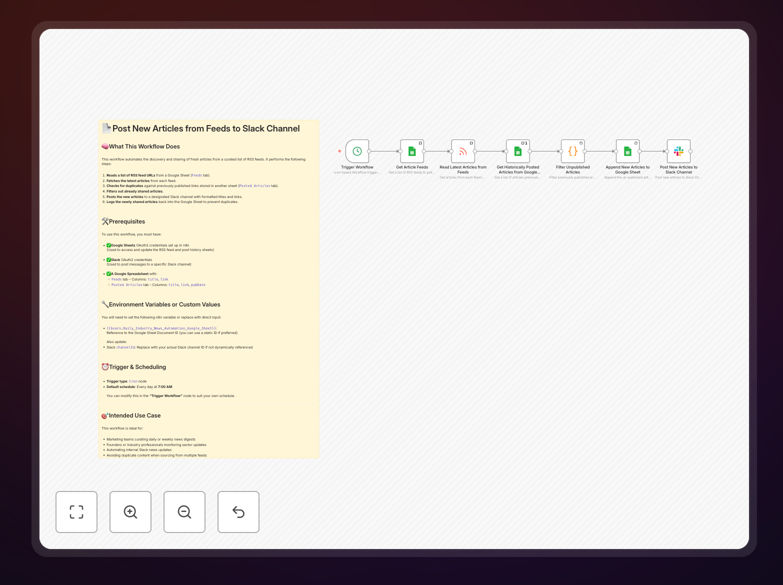
What This Workflow Does
Manually checking multiple websites for updates and sharing relevant articles with your team is a time-consuming task that often gets deprioritized. This automation solves that problem by connecting your curated list of RSS feeds directly to Slack, creating a hands-free news distribution system.
The workflow reads from a Google Sheet containing your favorite industry blogs, news sites, and content sources. It checks for new articles, filters out anything already shared, and posts clean, formatted updates to your designated Slack channel. This ensures your team stays informed about market changes, competitor moves, and industry trends without anyone needing to manually browse the web.
Beyond simple sharing, this template includes duplicate prevention by logging all posted articles back to Google Sheets. This creates a searchable archive of shared content and prevents the same article from being posted multiple times, even if it appears across different feeds.
How It Works
Step 1: Scheduled Trigger
A Cron node initiates the workflow on your preferred schedule—daily at 7 AM, hourly, or whatever interval makes sense for your needs. This automated trigger replaces manual initiation.
Step 2: Fetch Feed List
The workflow reads your curated list of RSS feed URLs from a Google Sheet. This centralized management approach lets you easily add or remove sources without modifying the automation itself.
Step 3: Retrieve Latest Articles
For each feed URL, the RSS Read node fetches the most recent articles, capturing titles, links, publication dates, and descriptions. This happens simultaneously for all feeds, saving significant time compared to manual checking.
Step 4: Check Against History
Before posting, the workflow compares new articles against your "Posted Articles" Google Sheet. This duplicate checking ensures your Slack channel doesn't get cluttered with repeats and maintains content quality.
Step 5: Format & Post to Slack
Unique articles are formatted into clean Slack messages with clear titles, source indicators, and direct links. The Slack node then posts these to your designated channel, keeping the format consistent and professional.
Step 6: Update History Log
Finally, the newly posted articles are appended to your Google Sheets history log. This creates a permanent record of shared content and enables the duplicate checking for future runs.
Who This Is For
This automation template is ideal for marketing teams needing to share industry news, founders tracking competitor activity, research departments monitoring publications, community managers curating content, and any team that benefits from staying current with external information sources.
Particularly valuable for agencies serving multiple clients (who can maintain separate feed lists for each client), investment teams tracking portfolio companies, and tech teams monitoring security advisories or software updates. If your team currently uses manual "link sharing" channels or email digests, this automation will save hours each week.
What You'll Need
- n8n instance (self-hosted version required for community nodes)
- Google Sheets credentials with access to a spreadsheet containing your feed URLs
- Slack workspace with appropriate permissions to post messages
- RSS feed URLs for the sources you want to monitor
- Basic understanding of n8n's interface for configuration
Quick Setup Guide
- Download the template using the button above and import it into your n8n instance.
- Create a Google Sheet with two tabs: "Feeds" (columns: title, link) and "Posted Articles" (columns: title, link, pubDate).
- Configure Google Sheets credentials in n8n to access your spreadsheet.
- Set up Slack OAuth2 credentials in n8n with appropriate channel posting permissions.
- Adjust the Cron schedule to match your preferred checking frequency.
- Test with one feed to ensure everything works before adding your full list.
- Activate the workflow and let it run automatically according to your schedule.
Pro tip: Start with 2-3 high-value feeds to test the system. Once confirmed working, expand to your full list of 10-15 sources. Consider categorizing feeds by topic if you want to post to different Slack channels.
Key Benefits
Saves 5-10 hours monthly per team member who would otherwise manually browse and share articles. That time can be redirected to analysis and strategy rather than collection.
Ensures consistent information flow even during busy periods or vacations. The automation doesn't take breaks, keeping your team informed regardless of workload cycles.
Improves content quality through systematic sourcing from curated feeds rather than ad-hoc discovery. This creates a more reliable and valuable news stream for your organization.
Creates searchable knowledge base in Google Sheets of all shared content. This archive becomes valuable for retrospectives, reporting, and identifying trending topics.
Scalable across teams with minimal additional effort. Once configured for one Slack channel/team, replicating for additional teams takes minutes rather than hours.