What This Workflow Does
Customer churn is a silent revenue killer. Most businesses discover a customer has left only after the subscription cancels or the contract ends. This reactive approach misses the opportunity to intervene early, often when the customer is still open to solutions.
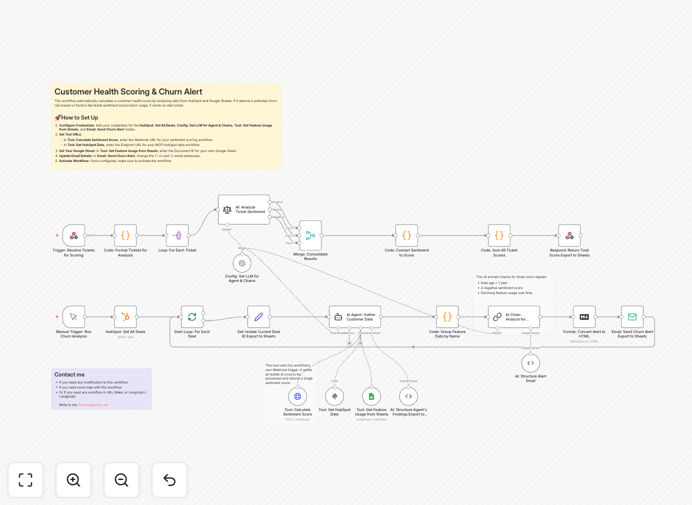
This automation workflow solves that by creating a proactive customer health monitoring system. It continuously pulls data from your HubSpot CRM (deals, contacts), Google Sheets (feature usage metrics), and support tickets, then uses AI to analyze sentiment and patterns. The system calculates a composite health score for each customer and automatically flags those showing at-risk signals. When a risk threshold is crossed, it sends a detailed alert email to your customer success or account management team with the customer's profile, risk factors, and suggested next steps.
The outcome is a shift from firefighting cancellations to preventing them. Your team gets data-driven alerts weeks or months before a customer likely churns, enabling personalized retention efforts that save revenue and strengthen relationships.
How It Works
Step 1: Data Collection
The workflow fetches all active deals from HubSpot, linking them to customer records. Simultaneously, it retrieves feature usage data from a designated Google Sheets spreadsheet that tracks login frequency, key feature adoption, and engagement metrics.
Step 2: Sentiment Analysis
For each customer, the workflow gathers recent support tickets (via an integrated support platform or HubSpot tickets). An AI model performs sentiment analysis on the ticket content, converting textual feedback into a quantitative sentiment score (positive, neutral, negative).
Step 3: Health Score Calculation
A custom code node combines the deal age (how long since last meaningful update), usage trend (up/down over last 30 days), and sentiment score into a single customer health score. Weighting can be adjusted based on what historically predicts churn in your business.
Step 4: AI Risk Evaluation
An AI agent reviews the health score against predefined thresholds. It considers context like "deal stagnant for 60 days + sentiment negative + usage drop > 20%" to determine if this constitutes a high churn risk. The agent outputs a clear risk classification (High, Medium, Low) and a reasoning summary.
Step 5: Alert Delivery
If risk is High, the workflow compiles a comprehensive alert email containing customer details, risk factors, health score breakdown, and AI-generated recommendation (e.g., "Schedule training on Feature X"). It sends this email directly to the assigned team member via SMTP, ensuring immediate visibility.
Who This Is For
Customer Success Teams at SaaS companies who manage subscription renewals and need to proactively engage at-risk accounts.
Account Managers in service-based businesses who retain clients through ongoing projects and want to spot disengagement early.
Growth & Retention Leads who are responsible for reducing churn rate and improving customer lifetime value (LTV).
Businesses using HubSpot CRM combined with any usage tracking system (Google Sheets, internal database, analytics platform).
Teams that have support ticket data and want to leverage AI to extract sentiment trends automatically.
What You'll Need
- HubSpot Account with API access to Deals and Contacts.
- Google Sheets document tracking customer usage metrics (you can adapt your existing tracking sheet).
- An LLM Provider Account (like OpenAI, Anthropic, or Google AI) for sentiment analysis and risk evaluation.
- n8n Instance with LangChain community nodes enabled (for AI agent functionality).
- SMTP Email Credentials to send alert emails (can use your company email service or a service like SendGrid).
Quick Setup Guide
- Download & Import the JSON template into your n8n instance.
- Configure Credentials in n8n for HubSpot, Google Sheets, your LLM provider, and SMTP email.
- Update Tool URLs as described in the template notes, pointing to your own webhook endpoints if needed.
- Map Your Google Sheet by entering its Document ID in the "Get Feature Usage from Sheets" node.
- Customize Thresholds in the AI Chain node to match your business's risk tolerance (e.g., adjust deal age or score cutoff).
- Set Recipient Email in the "Send Churn Alert" node to your team's actual email address.
- Test & Activate by running the workflow manually on a few customer records, then schedule it to run weekly automatically.
Pro tip: Start with conservative thresholds to avoid alert fatigue. After a month, review which alerts actually correlated with churn and refine your scoring model. Iteration is key to accurate prediction.
Key Benefits
Reduce churn by 15–30%. Proactive intervention can significantly increase retention rates, directly boosting monthly recurring revenue (MRR) and customer lifetime value.
Save 10+ hours per week on manual review. Automating data collection and analysis eliminates the need for CSMs to manually comb through usage reports and ticket sentiment, freeing them for high-value engagement.
Improve customer satisfaction scores. Addressing concerns before they escalate shows customers you're attentive and proactive, often improving NPS and CSAT scores.
Enable data-driven retention strategies. Instead of generic "check-in" emails, your team can act on specific risk factors—like offering training on an underused feature or addressing a support complaint directly.
Scale retention efforts without scaling headcount. The system works for hundreds or thousands of customers simultaneously, allowing your existing team to manage a larger portfolio effectively.