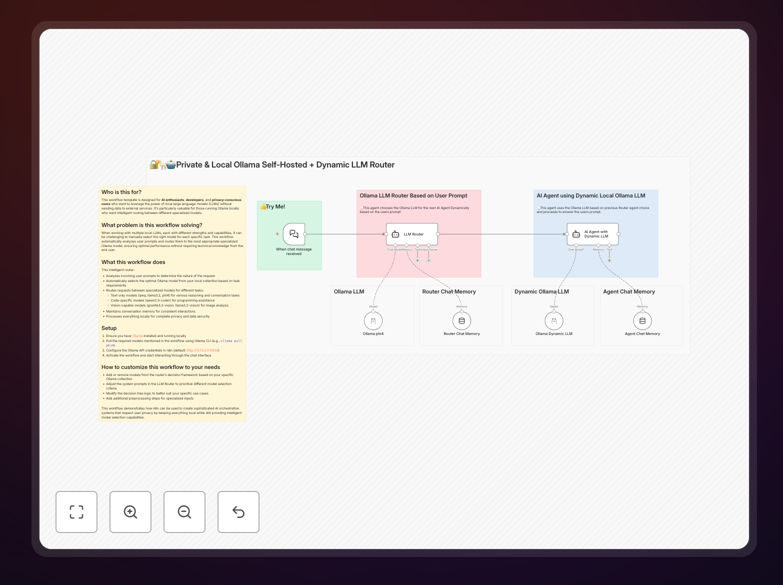
What This Workflow Does
This intelligent AI router solves a critical problem for businesses and developers using local AI models: manual model selection. When you have multiple specialized models—some optimized for coding, others for conversation, others for vision tasks—it's inefficient and technically demanding to constantly choose the right one.
The workflow automatically analyzes incoming prompts, determines the nature of the request, and routes it to the most appropriate Ollama model in your local collection. It maintains conversation memory for consistent interactions while keeping all data processing completely private on your infrastructure.
Unlike cloud-based AI services that send your data to third-party servers, this system ensures complete data sovereignty. Your proprietary information, customer data, and internal communications never leave your control, addressing critical privacy and compliance requirements.
How It Works
1. Prompt Analysis & Classification
The workflow first analyzes each incoming prompt to determine its nature. It identifies whether the request involves coding, general conversation, technical documentation, image analysis, or specialized tasks. This classification happens locally using lightweight models or rule-based systems.
2. Intelligent Model Selection
Based on the classification, the router selects the optimal model from your local Ollama collection. Code requests go to programming-specialized models like qwen2.5-coder. Conversation prompts route to general-purpose models like llama3.2. Image analysis tasks direct to vision-capable models like granite3.2-vision.
3. Local Processing & Response Generation
The selected model processes the request entirely on your hardware. No data travels over the internet to external servers. The system maintains context and memory where needed, ensuring coherent multi-turn conversations and consistent task handling.
4. Response Delivery & Logging
Generated responses return through your chosen interface—whether that's a chat application, API endpoint, or internal tool. The system can optionally log interactions for quality analysis while keeping all logs within your controlled environment.
Who This Is For
This template is ideal for privacy-conscious businesses in regulated industries like healthcare, finance, and legal services where data sovereignty is non-negotiable. It's perfect for development teams who want consistent AI assistance without API costs or rate limits.
AI researchers and enthusiasts benefit from experimenting with multiple models without manual switching. Startups and SMBs can deploy affordable AI capabilities without compromising on data security. Even educational institutions can provide AI tools to students while maintaining complete control over data.
What You'll Need
- Ollama installed locally – The open-source framework for running local LLMs
- Selected AI models pulled – At least 2-3 specialized models from the Ollama library
- n8n instance – Either self-hosted or cloud version with local network access
- Basic hardware – Computer/server with sufficient RAM for your chosen models
- Network configuration – Local network access between n8n and Ollama (typically http://127.0.0.1:11434)
Quick Setup Guide
- Install Ollama on your local machine or server following the official documentation
- Pull your desired models using commands like
ollama pull llama3.2andollama pull qwen2.5-coder - Import this JSON template into your n8n instance using the import workflow feature
- Configure the Ollama node credentials in n8n to point to your local Ollama instance
- Test the workflow with sample prompts to verify model routing works correctly
- Connect your preferred interface (webhook, chat app, API) to start using the system
Pro tip: Start with 2-3 models that cover your most common use cases. You can always add more specialized models later as your needs evolve. Monitor system resources initially to ensure your hardware can handle concurrent model usage.
Key Benefits
Complete data privacy: Your information never leaves your infrastructure, eliminating compliance risks and protecting intellectual property. This is crucial for businesses handling sensitive customer data or proprietary information.
Eliminated API costs: No per-token charges or subscription fees. Once your hardware is in place, you can process unlimited requests without worrying about escalating costs from cloud AI providers.
Optimal performance matching: Each task gets handled by the model specifically optimized for that type of work. Code generation uses coding-specialized models, conversations use chat-optimized models, and analysis uses reasoning-focused models.
No rate limits or throttling: Cloud AI services often impose strict usage limits. With local processing, you control the throughput and can handle burst workloads without service degradation or additional charges.
Customizable and extensible: Add new models as they're released, fine-tune existing models on your proprietary data, and create specialized routing rules for your unique business processes.