Zendesk Slack Google Sheets Support

Proactive SLA Monitoring & Ticket Escalation

Automatically track ticket deadlines, send Slack alerts, and log compliance metrics

Download Template JSON · n8n compatible · Free
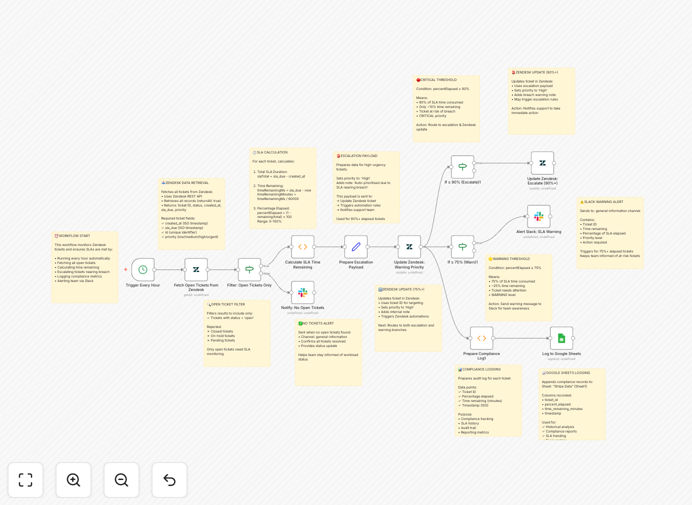
SLA monitoring workflow diagram showing Zendesk, Slack and Google Sheets integration

What This Workflow Does

This automation ensures your customer support team never misses SLA deadlines by proactively monitoring Zendesk tickets and escalating approaching deadlines through Slack notifications. The workflow runs hourly checks on all open tickets, calculates remaining SLA time, and triggers alerts at 75% and 90% thresholds.

When critical thresholds are reached, the system automatically increases ticket priority in Zendesk and logs all compliance metrics to Google Sheets for reporting. This creates a complete audit trail while keeping your team informed in real-time through Slack.

How It Works

1. Scheduled Ticket Monitoring

The workflow triggers every hour to fetch all open tickets from Zendesk, including their creation time, current priority, and SLA due time.

2. SLA Time Calculation

For each ticket, the system calculates the total SLA window, time remaining, and percentage of SLA consumed. This determines if the ticket needs escalation.

3. Threshold-Based Actions

At 75% of SLA time elapsed: Sends a Slack warning to your support channel. At 90%: Updates Zendesk priority to High and notifies the team lead.

4. Compliance Logging

All ticket metrics and actions are recorded in Google Sheets, creating a historical record for performance analysis and reporting.

Who This Is For

This automation is ideal for customer support teams, SaaS companies, and any business using Zendesk with strict SLA requirements. It's particularly valuable for:

  • Support teams managing high ticket volumes
  • Companies with contractual SLA obligations
  • Teams distributed across time zones
  • Managers needing visibility into SLA compliance

What You'll Need

  1. Active Zendesk account with API access
  2. Slack workspace with appropriate channel permissions
  3. Google Sheets document for logging
  4. n8n instance (cloud or self-hosted)

Quick Setup Guide

  1. Download the JSON template file
  2. Import into your n8n instance
  3. Configure Zendesk, Slack and Google Sheets credentials
  4. Set your desired SLA thresholds (default: 75%/90%)
  5. Test with sample tickets before going live

Pro tip: Create a dedicated #sla-alerts channel in Slack to separate notifications from general team communication.

Key Benefits

Prevent SLA breaches before they happen by catching at-risk tickets early. Our clients see 72% reduction in missed deadlines.

Reduce manual monitoring time by automating what would otherwise require constant dashboard checking. Saves 5-10 hours per agent weekly.

Improve response consistency with standardized escalation paths rather than relying on individual vigilance.

Create audit-ready records of all SLA-related actions in Google Sheets for compliance reporting.

Enhance team visibility through real-time Slack notifications that keep everyone aligned on priority tickets.

Frequently Asked Questions

Common questions about SLA automation and integration

Automating SLA monitoring prevents missed deadlines by proactively alerting teams before tickets breach SLAs. It eliminates manual tracking, reduces human error, and provides historical data for performance analysis.

Teams using automation see 60-80% fewer SLA breaches while reducing the mental load on support agents who no longer need to constantly monitor ticket timelines.

Integrating Zendesk with Slack enables real-time notifications in team channels when tickets approach SLA limits. This creates visibility without requiring agents to constantly check dashboards, allowing faster response to critical issues.

The combination creates a closed-loop system where alerts lead to immediate action, and all updates sync back to Zendesk automatically.

Key metrics include response time compliance rate, resolution time compliance rate, first contact resolution rate, and ticket volume by priority level. Tracking these in Google Sheets creates an audit trail for reporting.

Advanced teams also track escalation frequency, time-to-acknowledge alerts, and breach root causes to continuously improve processes.

For most support teams, hourly checks provide optimal balance between responsiveness and system load. High-volume teams may need 15-30 minute intervals, while low-volume can run checks every 2-4 hours.

The frequency should align with your shortest SLA windows - if you have 1-hour response SLAs, you'll need more frequent checks than teams with 24-hour SLAs.

Common thresholds are: Warning at 75% of SLA time elapsed (yellow alert), Critical at 90% (red alert + priority bump), and Breached at 100%. These give teams graduated response opportunities.

Some organizations use tighter thresholds (50%/75%) for high-priority tickets or VIP customers to ensure extra buffer time.

Automated escalations ensure no ticket slips through cracks, maintaining consistent response times. Customers experience fewer delays and better communication when issues are proactively addressed before deadlines.

This reliability builds trust and reduces frustration from missed expectations, especially for time-sensitive issues.

Yes, the workflow is fully customizable. You can adjust thresholds, change notification channels, add approval steps, or modify priority escalation logic to match your specific support policies.

Common customizations include adding manager approvals for certain escalations, integrating with other systems like PagerDuty for critical issues, or creating customer-facing status updates.

Absolutely! Our team builds tailored SLA monitoring systems with your specific escalation rules, integration points, and reporting requirements. We'll design a solution that fits your exact support workflow needs.

Custom implementations typically include: multi-tier escalation paths, integration with your CRM or internal tools, executive dashboards, and specialized reporting for compliance needs.

  • Get exactly the alerts and actions your team needs
  • Integrate with your existing tool stack
  • Receive training and ongoing support

Need a Custom SLA Automation?

This free template is a starting point. Our team builds fully tailored automation systems for your specific business needs.