n8n OCR Gemini AI Document Automation

Process large documents with OCR using SubworkflowAI and Gemini

Automate the extraction and analysis of text from large scanned documents. This n8n workflow intelligently processes multi-page files using OCR technology and Gemini AI for advanced document understanding.

Download Template JSON · n8n compatible · Free
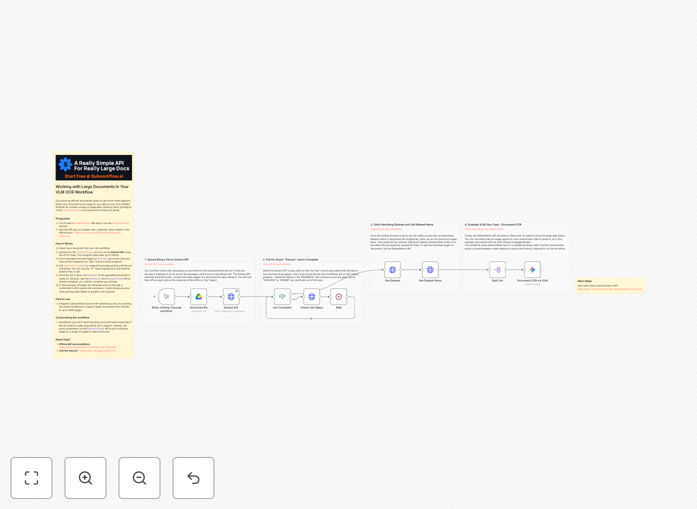
Document processing workflow diagram showing OCR and AI analysis steps

What This Workflow Does

This automation solves the challenge of processing large documents that exceed standard OCR and AI processing limits. Many businesses struggle with multi-page contracts, research papers, or financial reports that are too large to analyze in one piece. The workflow intelligently breaks documents into manageable sections, processes each part with OCR, then uses Gemini AI to analyze and reconstruct the complete document with full context.

Traditional document processing often fails with files over 50 pages or complex layouts. This solution maintains accuracy while handling documents of virtually any size, making it ideal for legal firms, research institutions, and enterprises dealing with voluminous paperwork. The output provides structured data extraction, semantic analysis, and actionable insights from previously unwieldy document collections.

How It Works

1. Document intake and preparation

The workflow receives documents through your preferred channel (email, cloud storage, or direct upload). It automatically detects file size and prepares it for processing by validating format and quality.

2. Intelligent document splitting

Using SubworkflowAI, the system analyzes document structure and splits it into logical sections while preserving context. This maintains relationships between sections that would be lost in simple page-by-page splitting.

3. Parallel OCR processing

Each document section processes simultaneously through OCR engines, converting scanned text to machine-readable format. The system handles different languages and special characters while maintaining original formatting cues.

4. Gemini AI analysis

Processed text sections feed into Gemini AI for contextual understanding. The model extracts key information, identifies relationships between sections, and builds a comprehensive analysis of the complete document.

5. Results compilation

The workflow reassembles analyzed sections into a coherent output, providing both the processed text and AI-generated insights in your preferred format (database, report, or integrated into other systems).

Who This Is For

This solution benefits any organization handling large volumes of documents requiring analysis:

  • Legal firms processing multi-page contracts and case files
  • Financial institutions analyzing lengthy reports and statements
  • Research organizations working with academic papers and studies
  • Healthcare providers managing patient records and medical literature
  • Government agencies processing permits, applications, and filings

What You'll Need

  1. An n8n instance (cloud or self-hosted)
  2. Access to SubworkflowAI or similar document processing service
  3. Google Cloud account with Gemini API access
  4. Storage solution for documents (Google Drive, Dropbox, etc.)
  5. Documents in PDF, JPG, PNG, or TIFF format

Quick Setup Guide

  1. Download the JSON template file
  2. Import into your n8n instance
  3. Configure your document source (email, cloud storage, etc.)
  4. Connect your SubworkflowAI and Gemini API credentials
  5. Set up output destinations for processed documents
  6. Test with sample documents and adjust chunking parameters as needed

Key Benefits

Process documents 5-10x faster than manual methods by automating OCR and analysis at scale. What took hours becomes minutes.

Handle documents of any size without losing context or accuracy. The system intelligently manages multi-page files that would choke standard processors.

Extract actionable insights from previously unmanageable document volumes. Gemini AI identifies patterns, relationships, and key information across entire document collections.

Reduce human error in document processing. Automated systems maintain consistent accuracy without fatigue or oversight.

Integrate with existing systems to feed processed data directly into your CRM, ERP, or document management platforms.

Pro tip: For best results with legal documents, train Gemini on sample contracts from your organization to improve clause recognition and analysis accuracy.

Frequently Asked Questions

Common questions about document processing integration and automation

AI document processing automates text extraction and analysis from scanned documents, saving hours of manual work. It can understand context, categorize content, and extract key information with high accuracy.

Businesses use this for contracts, invoices, research papers, and legal documents where manual review would be time-consuming and error-prone. The technology learns from each document processed, continually improving its recognition capabilities.

  • Reduces data entry costs by 70-90%
  • Processes documents 24/7 without fatigue
  • Identifies patterns humans might miss

OCR (Optical Character Recognition) converts scanned documents into machine-readable text. For large documents, the system breaks files into manageable chunks, processes each section, then combines results.

This approach maintains accuracy while handling files too large for single processing, like multi-page contracts or research papers with hundreds of pages. Advanced systems preserve formatting, tables, and document structure across sections.

  • Maintains context between document sections
  • Processes complex layouts and tables accurately
  • Scales to documents of virtually any size

Gemini AI excels at analyzing structured and semi-structured documents including contracts, financial reports, academic papers, and legal filings. It can extract key clauses, summarize content, identify anomalies, and even compare documents.

The system works particularly well with documents containing tables, numbered sections, or standardized formats. For example, it can analyze a 200-page research paper and produce a concise summary highlighting key findings and methodologies.

  • Best for documents with clear structure
  • Excels at technical and legal language
  • Can compare multiple documents

Modern AI document processing achieves 90-95% accuracy for standard document types, often surpassing human speed while matching quality. The system never gets tired or distracted, maintaining consistent performance.

For critical documents, we recommend a hybrid approach where AI handles initial processing and humans review flagged items or final outputs. In tests, this combination reduces processing time by 80% while maintaining 99%+ accuracy.

  • More consistent than human reviewers
  • Improves with more data processed
  • Flags uncertain interpretations

Enterprise-grade document processing systems use encryption in transit and at rest, role-based access controls, and data retention policies. For highly sensitive materials, some systems offer private cloud deployment or on-premise options.

Always verify your provider's SOC 2 compliance and data handling policies before processing confidential documents. Many legal and financial firms use AI processing only after thorough vetting of security protocols and data governance practices.

  • Encryption for all document transfers
  • Optional private cloud deployment
  • Audit trails for all document access

While OCR works best with clean typed documents, modern systems can process handwriting with about 80% accuracy depending on legibility. For poor-quality scans, preprocessing tools can enhance images before OCR extraction.

We recommend testing sample documents to gauge accuracy for your specific use case before full implementation. Some systems allow training custom models to improve recognition of particular handwriting styles or document formats.

  • Works best with clear handwriting
  • Image enhancement improves poor scans
  • Custom training boosts accuracy

Businesses typically save 70-90% of time spent on manual document review. A process that took 8 hours manually might complete in 30-60 minutes with automation.

The biggest savings come from eliminating repetitive tasks like data entry, cross-checking information, and creating standardized reports from document content. One legal firm reduced contract review time from 6 hours per document to 45 minutes while improving consistency.

  • Scales to any document volume
  • Reduces overtime costs
  • Allows staff to focus on analysis

Yes, GrowwStacks specializes in building tailored document processing solutions. Our team will analyze your specific document types, workflows, and integration needs to design an automation system that fits your business processes perfectly.

We handle everything from OCR setup to AI model training and system integration. Clients receive a complete solution configured for their document formats, security requirements, and output needs with ongoing support and optimization.

  • Custom-trained AI models
  • Integration with existing systems
  • Ongoing performance optimization

Need a Custom Document Processing Integration?

This free template is a starting point. Our team builds fully tailored automation systems for your specific needs.