What This Workflow Does
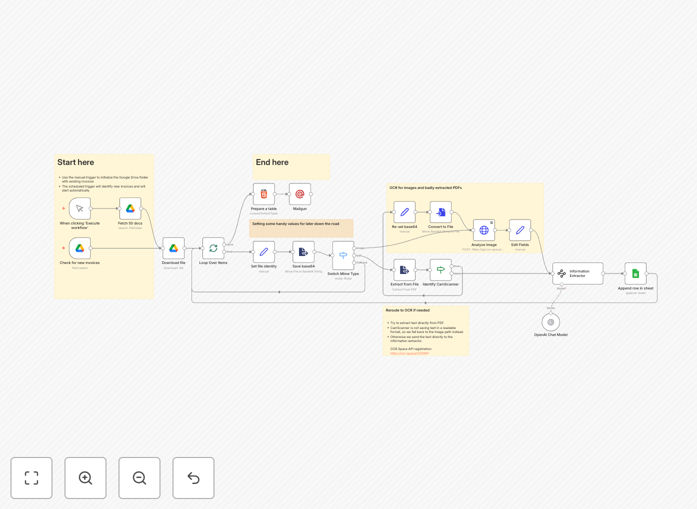
Manual invoice processing is a time-consuming, error-prone task that plagues businesses of all sizes. This automation template transforms that tedious process into a seamless, hands-off operation. It monitors a designated Google Drive folder for new invoice uploads—whether PDFs or image files—uses OCR technology to extract text, applies AI to intelligently identify and structure key information, and automatically logs everything into a Google Sheet while sending email notifications.
The system handles the complete pipeline: from file detection and format recognition (PDF vs. image) to text extraction, data parsing, and organized storage. It even includes smart fallback mechanisms for challenging documents like CamScanner PDFs that often defeat basic extraction tools. What used to take an employee 10-15 minutes per invoice now happens automatically in seconds, with consistent accuracy and complete audit trails.
Beyond simple data entry elimination, this workflow creates a searchable, sortable database of all your invoices, complete with links back to the original scanned documents. This transforms your invoice management from a reactive, manual chore into a proactive, automated system that provides real-time visibility into your accounts payable status.
How It Works
The automation follows a logical sequence that mimics—and improves upon—human invoice processing, but at digital speed and scale.
1. File Monitoring & Detection
The workflow continuously watches a specified Google Drive folder using a scheduled trigger. When new files are uploaded (whether by email forwarding, mobile app scanning, or manual upload), the system immediately detects them and initiates processing. This eliminates the need for anyone to manually notify accounting or move files between systems.
2. Intelligent File Processing
Upon detection, the workflow downloads the invoice file and determines its type through a smart switch mechanism. It distinguishes between native PDFs (which may contain embedded text), image-based PDFs (scans), and standard image files (JPG, PNG). This classification determines the optimal extraction path for maximum accuracy.
3. Multi-Stage Text Extraction
For native PDFs, the system first attempts direct text extraction. For images and problematic PDFs, it routes documents through the OCR.Space API, which specializes in converting visual documents into machine-readable text. This dual-path approach ensures high success rates across various invoice formats and qualities.
4. AI-Powered Data Parsing
The extracted text is sent to OpenAI's language model with a carefully crafted prompt that instructs it to identify and extract specific invoice elements: vendor/company name, invoice date, invoice number, total amount, currency, and any other specified fields. The AI understands context—distinguishing between subtotals and totals, recognizing dates in various formats, and handling different invoice layouts.
5. Structured Data Storage
Extracted information is automatically appended to a Google Sheet with consistent column formatting. Each entry includes a timestamp, processing status, and a direct link back to the original document in Google Drive for verification. The sheet becomes a living database of all processed invoices, searchable and filterable by any field.
6. Notification & Error Handling
Upon successful processing, formatted email notifications are sent via Mailgun to designated team members, providing an HTML summary of the extracted data. If extraction fails or produces low-confidence results, the system can flag the invoice for manual review, ensuring no documents fall through the cracks.
Who This Is For
This automation delivers value across multiple business functions and industries. Small business owners and solopreneurs can reclaim hours spent on bookkeeping each week. Accounting teams in mid-sized companies can process vendor invoices faster with fewer errors. Freelancers and consultants can automatically track client invoices and expenses. E-commerce businesses handling numerous supplier invoices will find particular efficiency gains.
The solution is especially valuable for service-based businesses, agencies, consultancies, and any organization that receives invoices from multiple vendors in various formats. If you're currently manually entering data from scanned invoices into accounting software or spreadsheets—or worse, keeping paper invoices in filing cabinets—this automation will transform your financial operations.
What You'll Need
- Google Workspace Account – For Drive folder access and Sheets integration
- OpenAI API Key – For intelligent data extraction (GPT-3.5 or GPT-4)
- OCR.Space API Key – Free tier available for image-to-text conversion
- Mailgun Account – For email notifications (or substitute with another email service)
- n8n Instance – Self-hosted or cloud version
- Dedicated Google Drive Folder – Where invoices will be uploaded
- Google Sheet Template – Pre-formatted with columns for extracted data
Pro tip: Start with the free tiers of OCR.Space and OpenAI to test the workflow. The OCR.Space free plan includes 25,000 requests per month, which is sufficient for most small to medium businesses processing dozens of invoices weekly.
Quick Setup Guide
Getting this automation running requires configuration rather than coding. Follow these steps to deploy the template in your environment.
- Import the Template – Download the JSON file from this page and import it into your n8n instance through the workflow import function.
- Configure Google Drive Connection – Set up OAuth2 credentials for Google Drive API access and specify the folder ID to monitor for new invoices.
- Set Up Google Sheets – Create your destination spreadsheet and connect it using Google Sheets OAuth2 credentials. Map the columns to match the extracted data structure.
- Add API Credentials – Enter your OpenAI API key, OCR.Space API key, and Mailgun credentials in their respective nodes.
- Customize Extraction Prompt – Modify the OpenAI node prompt to extract exactly the fields you need from your invoices.
- Test with Sample Invoices – Upload a few test invoices to your Google Drive folder and trigger the workflow manually to verify extraction accuracy.
- Activate & Schedule – Enable the workflow and set the Google Drive trigger to check for new files at your preferred interval (every 5-15 minutes is typical).
Key Benefits
Eliminate Manual Data Entry – What typically takes 5-15 minutes per invoice becomes fully automated, saving dozens of hours monthly for businesses processing regular invoices.
Reduce Processing Errors – Human data entry errors (misplaced decimals, transposed numbers, missed invoices) are virtually eliminated, improving financial accuracy.
Accelerate Payment Cycles – Faster invoice processing means you can take advantage of early payment discounts and maintain better vendor relationships.
Centralize Invoice Management – All invoice data lives in a searchable, filterable Google Sheet with links to original documents, creating a single source of truth.
Scale Without Adding Staff – Process hundreds of invoices monthly without increasing administrative overhead, allowing your team to focus on higher-value work.