Shopify HubSpot Gmail CRM Automation

Process Shopify Lead Emails from Gmail to HubSpot

Automatically convert Shopify inquiries into HubSpot contacts and deals

Download Template JSON · n8n compatible · Free
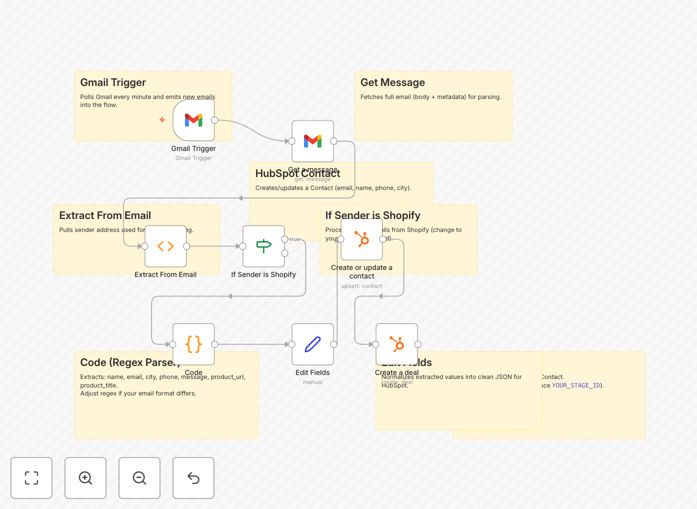
Shopify to HubSpot lead processing workflow diagram

What This Workflow Does

This automation solves the common problem of Shopify leads getting lost in email inboxes or requiring manual data entry into HubSpot. It captures customer inquiries from Shopify/Gmail and automatically creates complete contact records and deals in HubSpot.

The workflow eliminates repetitive copy-paste work for sales teams while ensuring no lead falls through the cracks. By connecting these systems, you'll have all customer interactions tracked in HubSpot from the first touchpoint.

How It Works

1. Gmail Trigger

The workflow monitors your Gmail inbox for new Shopify lead emails, checking every 5 minutes for new messages.

2. Email Parsing

A code node extracts key information (name, email, phone, product details) from the email body using regex patterns.

3. HubSpot Integration

The workflow first creates or updates the contact in HubSpot, then creates a new deal associated with that contact including all product details from the inquiry.

Who This Is For

This workflow is ideal for:

  • Ecommerce businesses using Shopify with sales teams
  • Marketing agencies managing multiple Shopify stores
  • Businesses transitioning from manual CRM entry to automation
  • Teams wanting better visibility into Shopify lead conversions

What You'll Need

  1. A Shopify store generating lead emails
  2. Gmail account receiving Shopify notifications
  3. HubSpot account with API access
  4. n8n instance (cloud or self-hosted)

Pro tip: Before going live, test with sample emails to ensure all fields are correctly mapped to HubSpot properties.

Quick Setup Guide

  1. Download and import the JSON template into your n8n instance
  2. Connect your Gmail and HubSpot accounts
  3. Configure the deal pipeline stage in the HubSpot node
  4. Test with sample Shopify lead emails
  5. Activate the workflow

Key Benefits

Save 5-10 hours per week by eliminating manual data entry from emails to CRM.

Improve response times with instant lead capture and notification.

Reduce errors from manual copying of customer information.

Gain better insights with all customer interactions tracked in HubSpot.

Scale your sales process without adding administrative staff.

Frequently Asked Questions

Common questions about Shopify-HubSpot automation and integration

Automating Shopify lead processing eliminates manual data entry, reduces errors, and ensures leads are captured instantly in your CRM. This speeds up follow-up times and improves conversion rates.

Sales teams can focus on selling rather than administrative work, while managers get accurate real-time data on lead volume and quality.

Connecting Gmail with HubSpot centralizes all lead communications in your CRM, provides better tracking of customer interactions, and enables automated follow-up sequences based on email content.

This integration creates a complete customer journey record from first contact through to sale, improving both sales effectiveness and customer experience.

The workflow checks for existing contacts by email before creating new ones, preventing duplicates while still updating any changed information from new leads.

If a contact already exists, the workflow updates their record and creates a new deal while maintaining all historical interactions in HubSpot.

Yes, the workflow logic can be adapted for WooCommerce, BigCommerce or other platforms by adjusting the email parsing rules while maintaining the HubSpot integration structure.

The core functionality of capturing leads from email and creating CRM records remains the same - only the source email format needs modification.

The workflow includes a code node with regex parsing that can be easily updated to match new email formats while maintaining all other automation steps.

We recommend testing any email format changes in a development environment before updating the production workflow.

The workflow uses official API connections between services with proper authentication. No customer data is stored outside these secured platforms.

All data transfer occurs through encrypted connections, and you maintain control over what information is shared between systems.

Yes, GrowwStacks specializes in building tailored automation solutions. We can customize this workflow for your specific Shopify-HubSpot integration needs.

Our team can adapt the workflow to your unique business processes, add additional steps like lead scoring or assignment rules, and integrate with other systems in your stack.

  • Custom field mapping for your HubSpot properties
  • Additional validation steps for data quality
  • Integration with your support or fulfillment systems

Need a Custom Shopify-HubSpot Automation?

This free template is a starting point. Our team builds fully tailored automation systems for your specific business needs.