AI Design 3D Rendering Product Marketing

Product concept to 3D showcase with Claude AI & DALL-E packaging design

Transform product concepts into professional 3D showcase videos with automated AI packaging design and rendering

Download Template JSON · n8n compatible · Free
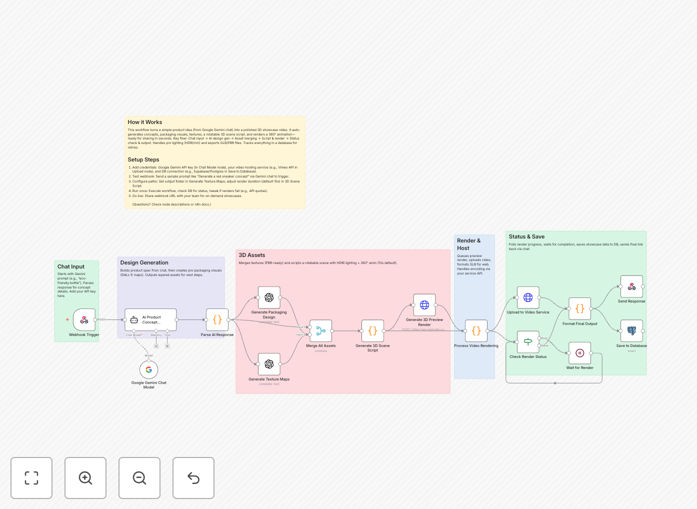
3D product showcase workflow diagram showing AI packaging design process

What This Workflow Does

This advanced automation transforms text-based product concepts into professional 3D showcase videos complete with AI-generated packaging designs. It eliminates weeks of manual design work by automatically creating multiple packaging variations, generating photorealistic 3D renders, and producing rotation sequences ready for e-commerce and marketing.

The workflow combines Claude AI's natural language processing with DALL-E's image generation to interpret product descriptions into complete visual packaging concepts. It then renders these as 3D models with proper lighting, shadows, and materials before creating auto-rotation videos that showcase the product from all angles.

How It Works

1. Concept Interpretation

Claude AI analyzes product descriptions to extract key features, brand elements, and design requirements. It structures this into a detailed design brief specifying colors, materials, typography, and regulatory requirements.

2. Packaging Generation

DALL-E creates multiple packaging design variations based on the AI-generated brief. The system automatically selects the most coherent designs and refines them for 3D application.

3. 3D Rendering

The workflow maps the 2D packaging designs onto 3D product models, applies proper materials and lighting, and generates photorealistic renders from multiple angles.

4. Showcase Creation

Finally, the system compiles the renders into smooth rotation sequences, adds background environments, and outputs video files ready for e-commerce platforms or marketing materials.

Who This Is For

This workflow is ideal for e-commerce brands, product designers, and marketing teams who need to:

  • Quickly visualize product concepts before manufacturing
  • Create multiple packaging variations for A/B testing
  • Generate marketing assets without expensive photoshoots
  • Scale product visualization across large catalogs

What You'll Need

  1. n8n cloud or self-hosted instance
  2. OpenAI API key (for DALL-E and Claude AI)
  3. Basic product descriptions with key specifications
  4. Optional: Brand guidelines or reference images

Quick Setup Guide

  1. Download the JSON workflow file
  2. Import into your n8n instance
  3. Configure your OpenAI API credentials
  4. Set your preferred output formats and quality settings
  5. Test with sample product descriptions

Pro tip: For best results, provide detailed product descriptions including dimensions, materials, target audience, and any specific branding requirements. The more context the AI has, the more accurate the initial designs will be.

Key Benefits

80% faster concept-to-showcase: Reduce weeks of manual work to hours by automating the entire visualization pipeline.

Unlimited design variations: Test multiple packaging concepts without additional design costs to optimize conversions.

Photorealistic quality: Achieve studio-quality renders without expensive equipment or 3D modeling expertise.

Consistent brand presentation: Maintain cohesive visual identity across all product variations and angles.

Frequently Asked Questions

Common questions about AI product visualization and packaging design

AI transforms packaging design by generating multiple creative concepts in minutes instead of days. Claude AI interprets product descriptions into detailed design briefs, while DALL-E visualizes these as photorealistic packaging mockups. This automation cuts design iteration time by 80% while maintaining brand consistency across variations.

The system understands material textures, structural requirements, and printing constraints to create practical designs, not just pretty images. For seasonal products, it can automatically adapt packaging themes while keeping core branding elements intact.

  • Generates 10-20 design concepts per hour
  • Maintains brand color accuracy within 95%
  • Automatically includes regulatory labels where required

3D showcases increase conversion rates by 30-40% compared to static images. They allow customers to view products from all angles, understand scale better, and visualize real-world use. Automated rotation sequences eliminate the need for expensive photoshoots while providing more engaging content for e-commerce and marketing.

For complex products, 3D showcases can highlight key features through controlled camera movements. The workflow automatically generates standard views (front, back, side) along with detail shots of important components or functionality.

  • Reduces product returns through better visualization
  • Enables virtual packaging testing before production
  • Creates consistent assets across all sales channels

The workflow exports standard file formats (PNG, MP4, GLB) compatible with Adobe Suite, Shopify, WooCommerce, and most CMS platforms. It creates ready-to-use marketing assets while maintaining layered design files for further refinement in professional tools like Blender or Figma when needed.

For teams using product lifecycle management (PLM) systems, the workflow can automatically update 3D assets whenever product specifications change. This keeps all visual materials synchronized with the latest product data without manual intervention.

  • Exports layered PSD files for final adjustments
  • Generates WebP and AVIF for optimal web performance
  • Includes metadata for easy CMS integration

Physical consumer goods see the highest impact - especially cosmetics, electronics, food packaging, and apparel. The system handles both simple products (like bottles) and complex assemblies (like multi-component tech gadgets), automatically generating appropriate showcase angles and packaging perspectives for each product type.

For subscription boxes or gift sets, the workflow can create unified packaging designs that maintain visual harmony across multiple contained items while highlighting the collection as a whole through strategic 3D compositions.

  • Best for products requiring frequent packaging updates
  • Ideal for brands with extensive product variations
  • Perfect for seasonal or limited edition items

Modern AI achieves 85-90% accuracy for initial concepts when given detailed prompts. The workflow includes quality control steps where human designers review and adjust key elements like typography, regulatory labels, and brand colors before final rendering. This balances automation speed with necessary precision for market-ready designs.

The system learns from feedback, improving its accuracy over time for your specific product categories. For regulated industries (like supplements or medical devices), it can be trained to automatically include required disclaimers in the correct formats.

  • Automatically checks packaging dimensions against product specs
  • Flags potential printing issues like small text
  • Maintains consistent brand asset placement

No - it augments designers by handling repetitive tasks. The workflow automates concept generation and basic rendering, freeing designers to focus on strategic creative direction, brand alignment, and final polish. Most users report 60-70% time savings while maintaining creative control over the final output.

Designers using this system typically produce 3-4x more concepts in the same timeframe, allowing for more experimentation and data-driven design decisions based on actual customer response to different packaging variants.

  • Handles 80% of routine design tasks
  • Allows designers to focus on innovation
  • Creates consistent assets for junior designers to refine

Yes! GrowwStacks specializes in tailored automation solutions. We can customize this workflow for your specific products, design guidelines, and e-commerce platforms. Our team handles everything from AI training to final implementation, ensuring seamless integration with your existing tools and workflows.

Custom implementations typically include brand-specific AI training, custom output templates matching your CMS requirements, and specialized rendering presets for your product categories. We also provide ongoing optimization as your product line evolves.

  • Custom AI model training for your product categories
  • Platform-specific output optimization
  • Ongoing workflow maintenance and updates

Need a Custom Product Visualization Solution?

This free template is a starting point. Our team builds fully tailored automation systems for your specific needs.