Google Workspace Slack Notion HR Automation

Automate Employee Onboarding Across Google Workspace, Slack & Notion

Provision accounts, send invites and track progress automatically when new hires join

Download Template JSON · n8n compatible · Free
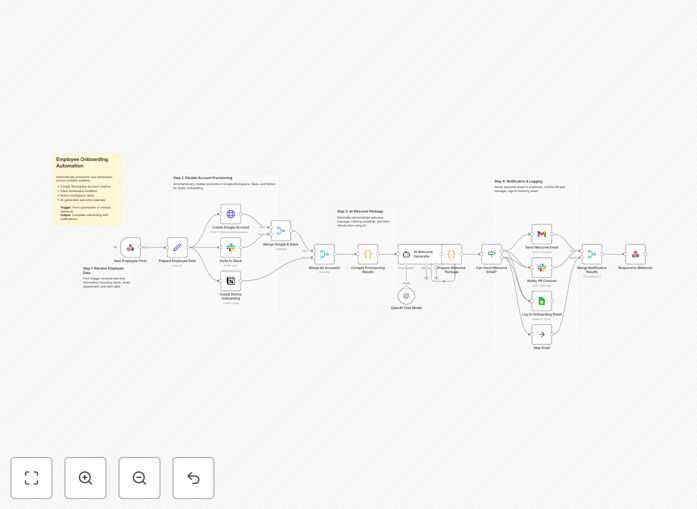
Employee onboarding automation workflow diagram showing connections between HR systems

What This Workflow Does

This end-to-end automation transforms your employee onboarding process by automatically provisioning new hires across all necessary systems the moment they're added to your HR platform. It eliminates manual account creation, reduces IT support requests, and ensures every new employee has consistent access to all required tools from day one.

The workflow handles Google Workspace account creation, Slack channel invitations, Notion access provisioning, welcome email generation, and onboarding progress tracking - all while maintaining security controls and providing audit trails for compliance.

How It Works

1. New Hire Data Collection

Triggers when a new employee record is created in your HR system or via manual entry form. Captures all essential details including name, email, department, start date, manager, and role-specific requirements.

2. Account Provisioning

Creates Google Workspace accounts with proper organizational unit assignments, generates Slack invitations with role-appropriate channel access, and sets up Notion pages with department-specific onboarding materials.

3. Welcome Package Generation

Automatically produces personalized welcome emails containing first-day instructions, login credentials, and customized resources based on the employee's role and location.

Pro tip: Add a delay step to send account details 1-2 days before the employee's start date for optimal readiness.

Who This Is For

This automation is ideal for:

  • HR teams managing high-volume hiring
  • IT departments wanting to reduce manual provisioning work
  • Startups scaling their team rapidly
  • Companies with distributed teams needing consistent onboarding

What You'll Need

  1. Admin access to Google Workspace
  2. Slack workspace owner permissions
  3. Notion integration configured
  4. HR system with API/webhook capabilities
  5. Basic understanding of n8n or similar automation tools

Quick Setup Guide

  1. Download the template file
  2. Import into your n8n instance
  3. Configure credentials for each connected service
  4. Map your organizational structure (departments, teams etc.)
  5. Test with a dummy employee record
  6. Connect to your live HR system

Key Benefits

80% faster onboarding: Reduce time-to-productivity by ensuring all accounts and access are ready before day one.

Error elimination: Automated provisioning removes human mistakes in account setup and permissions assignment.

Centralized tracking: Monitor all onboarding activities from a single dashboard with automatic completion alerts.

Scalable processes: Handle 5 or 500 new hires with identical efficiency and consistency.

Enhanced security: Automated deprovisioning when employees leave and audit trails for compliance.

Frequently Asked Questions

Common questions about employee onboarding automation

Automating onboarding reduces manual work by 80%, ensures consistency across all new hires, eliminates human errors in account provisioning, and provides a better first-day experience for employees.

Companies using automated onboarding report 40% faster time-to-productivity for new hires and 60% fewer IT support tickets related to access issues in the first month.

It synchronizes employee data across all required platforms instantly, removes the need for manual data entry in each system, and provides centralized tracking of onboarding progress.

Multi-system automation also enables role-based access provisioning where different employee types (full-time, contractors, interns) automatically receive appropriate access levels.

Use role-based access controls, implement approval steps for sensitive systems, audit all provisioning actions, and ensure proper credential management for API connections.

  • Require manager approval for elevated access
  • Log all provisioning actions for compliance
  • Use service accounts with minimal permissions

Yes, most modern automation platforms can connect with HRIS like Workday, BambooHR or ADP to trigger onboarding flows when new hires are added.

Key integration points include new hire events, role changes, and termination events to manage the complete employee lifecycle automatically.

Create conditional workflows that branch based on employee attributes like department, location or role to provide customized onboarding paths.

For example: Engineering hires might get GitHub access while Sales receives CRM training materials - all automated based on their role data.

Measure time-to-provision, system adoption rates, first-week productivity, and IT support tickets related to access issues.

Advanced metrics might include engagement with onboarding materials, completion rates for required training, and manager feedback on new hire readiness.

Yes, our team specializes in building tailored onboarding solutions that match your specific HR tech stack and company policies.

We'll analyze your current processes, identify automation opportunities, and implement a solution that integrates seamlessly with your existing systems while meeting all security and compliance requirements.

  • Customized for your HR tools and policies
  • Includes testing and training
  • Ongoing support and optimization

Need a Custom Onboarding Automation?

This free template is a starting point. Our team builds fully tailored automation systems for your specific business needs.