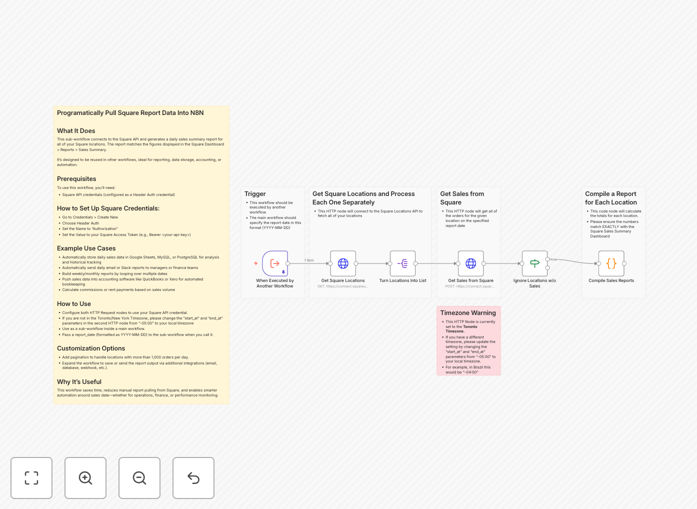
What This Workflow Does
Manual sales reporting is time-consuming, error-prone, and delays critical business insights. This n8n workflow solves that by automatically connecting to the Square API to generate daily sales summary reports that match exactly what you see in Square's dashboard.
The workflow fetches completed orders across all your Square locations for a specified date, processes the data, and outputs a clean, consistent summary. It's designed as a reusable sub-workflow that can be integrated into larger automation systems for reporting, data storage, accounting synchronization, or performance monitoring.
Instead of logging into Square daily to download reports, this automation runs on schedule, extracts the data you need, and delivers it wherever your business requires—saving hours each week and ensuring accuracy.
How It Works
The workflow follows a logical sequence to extract, transform, and deliver your sales data.
1. Trigger & Date Input
The workflow starts as a sub-workflow, requiring a report_date input (formatted as YYYY-MM-DD). This allows you to call it from parent workflows or schedule it to run automatically for yesterday's sales, last week's totals, or any date range you specify.
2. Fetch Square Locations
An HTTP Request node calls Square's Locations API to retrieve all business locations linked to your account. This ensures the workflow works for single-location businesses and multi-location operations alike.
3. Retrieve Completed Orders
For each location, another HTTP Request node pulls all completed orders for the specified report_date. The node filters by order status and date range to match Square's own sales summary logic.
4. Filter & Process Data
Locations with no sales activity are filtered out to streamline processing. A Code node then aggregates the order data—calculating gross sales, net totals, tax amounts, tip totals, and item counts—producing a summary identical to Square's built-in report.
5. Output Clean Summary
The final output is a structured data object containing the sales summary, ready to be consumed by other nodes. This could be sent to Google Sheets, a database, accounting software, or notification channels.
Who This Is For
This automation is ideal for retail businesses, restaurants, service providers, and any company using Square for payments that needs better reporting workflows. Finance teams, business owners, operations managers, and accountants benefit most from automated sales data.
If you're manually exporting CSV files from Square, copying numbers into spreadsheets, or struggling to get timely sales reports to stakeholders, this workflow eliminates those pain points. It's also perfect for businesses that need to combine Square data with other systems (like inventory or CRM) for comprehensive analytics.
What You'll Need
- Square Developer Account: Access to Square's Developer Dashboard to create an application and generate API credentials.
- Square Access Token: An OAuth token or personal access token with appropriate permissions to read location and order data.
- n8n Instance: A running n8n environment (cloud or self-hosted) where you can import and execute workflows.
- Basic API Knowledge: Understanding of how to set up API credentials in n8n using Header Authentication.
Pro tip: Create a dedicated Square application for automation purposes in your Square Developer Dashboard. This lets you set specific permissions and monitor API usage separately from your main Square account.
Quick Setup Guide
Follow these steps to get your automated Square reporting running in minutes.
- Download the template using the button above and import it into your n8n instance.
- Create Square credentials in n8n: Go to Credentials → New → Header Auth. Name it "Authorization" and set the value to
Bearer YOUR_SQUARE_ACCESS_TOKEN. - Configure both HTTP Request nodes to use your new Square credential by selecting it from the "Authentication" dropdown.
- Adjust timezone parameters if needed: In the second HTTP node, check the
start_atandend_atparameters. Change the timezone offset from "-05:00" to your local timezone if you're not in Eastern Time. - Test the workflow by executing it manually with a recent date. Check the output matches your Square dashboard sales summary for that day.
- Integrate into your automation by using it as a sub-workflow in a larger process, or add a Schedule Trigger node to run it daily automatically.
Key Benefits
Save 2-5 hours weekly by eliminating manual report generation. What used to be a daily chore becomes a fully automated process that runs while you focus on growing your business.
Eliminate human error in data transcription. Automated data extraction ensures numbers match Square exactly, removing mistakes from manual entry or copy-paste errors.
Get real-time insights faster with scheduled daily reports delivered automatically to stakeholders via email, Slack, or directly into your data warehouse for immediate analysis.
Scale with your business—the workflow handles multiple locations automatically, aggregating data across all your stores, restaurants, or service points without additional configuration.
Integrate with your stack by connecting Square data to accounting software (QuickBooks, Xero), databases (PostgreSQL, MySQL), spreadsheets (Google Sheets), or notification systems (Slack, Microsoft Teams).