HTTP Request API Integration Web Scraping Data Extraction n8n

Connect Any App with HTTP Requests

Pull data from services without pre-built n8n integrations using universal API calls. This template handles pagination, authentication, and data parsing.

Download Template JSON · n8n compatible · Free
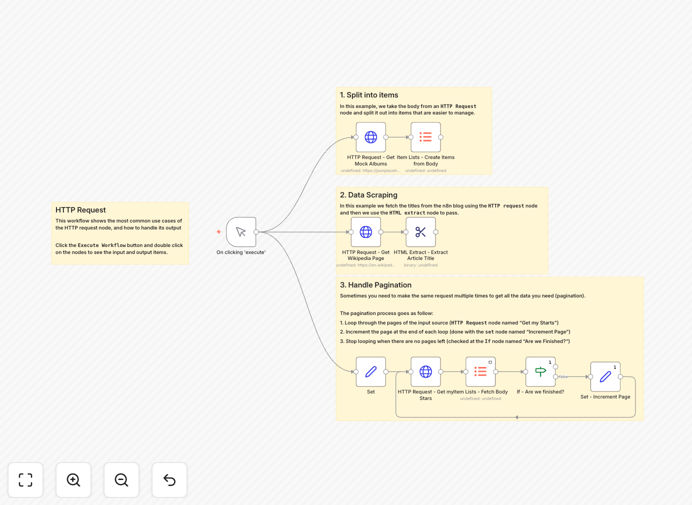
n8n workflow diagram showing HTTP Request nodes connecting to various APIs and processing data

What This Workflow Does

Many businesses use niche tools, custom-built systems, or services that don't have pre-built integrations in automation platforms. This creates data silos and manual work. This n8n template solves that problem by showing you how to connect to ANY web service using HTTP Request nodes.

The workflow demonstrates three practical use cases: pulling structured data from a REST API (mock albums), scraping content from websites (Wikipedia), and handling pagination for large datasets (GitHub stars). It transforms raw API responses into usable business data that can feed into your CRM, database, or reporting tools.

Instead of waiting for official integrations or writing custom code, you can immediately connect your unique tech stack. This template provides the foundation for unlimited integrations beyond what's available in standard connector libraries.

How It Works

The workflow is divided into three parallel branches, each demonstrating a different HTTP integration pattern.

1. Basic API Data Retrieval

The first branch makes a simple GET request to a mock API endpoint (JSONPlaceholder albums). It receives JSON data, then uses the Item Lists node to split the response into individual records for processing. This pattern works for most REST APIs that return arrays of objects.

2. Web Scraping with HTML Extraction

The second branch fetches a random Wikipedia page using HTTP Request, then uses the HTML Extract node to parse the page title from the HTML. This shows how to work with non-API sources and extract specific data points from web pages for monitoring or content aggregation.

3. Pagination Handling for Complete Datasets

The third branch demonstrates professional API integration by handling pagination. It calls the GitHub API to list starred repositories, checks if more pages exist, increments the page counter, and loops until all data is retrieved. This ensures you get complete datasets even when APIs limit responses per request.

Who This Is For

This template is essential for businesses using specialized software that lacks standard integrations. Marketing agencies connecting client reporting tools, e-commerce stores syncing with custom inventory systems, SaaS companies pulling data from partner APIs, and IT teams automating internal tool connections.

Developers will appreciate the code-like control without writing actual code. Business users gain the ability to connect their unique stack without technical dependencies. Agencies can deliver custom integrations for clients faster than building from scratch.

Pro tip: Start with the pagination branch if you're pulling large datasets. Many APIs limit responses to 50-100 items per request, and missing pagination logic is the most common reason for incomplete data syncs.

What You'll Need

  1. A running n8n instance (cloud or self-hosted)
  2. API documentation for the service you want to connect to
  3. Authentication credentials (API keys, OAuth tokens, or username/password)
  4. The endpoint URL you want to call
  5. Basic understanding of HTTP methods (GET, POST) and response formats (JSON, XML)

Quick Setup Guide

Import this template into your n8n instance and follow these steps to adapt it for your needs:

  1. Replace the example URLs with your actual API endpoints in the HTTP Request nodes
  2. Configure authentication by adding API keys to request headers or using credential nodes
  3. Adjust response parsing based on your API's data structure (JSON, XML, or custom format)
  4. Test each branch separately before connecting them to your production systems
  5. Add error handling with additional IF nodes to manage API rate limits or temporary failures

Pro tip: Use n8n's "Execute Workflow" button to test each HTTP Request node individually. Check the response data structure before building downstream processing logic.

Key Benefits

Break free from integration limitations. Connect to any web service with an API, not just those with pre-built nodes. This future-proofs your automation as your tech stack evolves.

Reduce manual data work by 80%. Automate what would otherwise be copy-paste operations between systems. The pagination handling alone saves hours when syncing large datasets.

Maintain data consistency across systems. Automated API calls ensure timely and accurate data flow between your tools, eliminating version conflicts and stale information.

Scale integrations without coding. Add new API connections using the same patterns shown here. Once you understand HTTP Request nodes, you can integrate virtually anything.

Improve business agility. Respond quickly to new integration needs without waiting for developer resources or third-party connector updates.

Frequently Asked Questions

Common questions about API integration and HTTP Request automation

The HTTP Request node is a universal connector in n8n that lets you call any web API endpoint. Use it when you need to integrate with a service that doesn't have a dedicated n8n node, when you need to access a specific API endpoint not covered by existing nodes, or when you want to scrape data from websites.

It gives you complete control over API calls with custom headers, authentication, and parameters. Unlike pre-built nodes that simplify common operations, HTTP Request nodes require more configuration but offer unlimited flexibility.

  • Perfect for niche SaaS tools without standard connectors
  • Essential for accessing custom/internal APIs
  • Great for web scraping and data extraction tasks

Most APIs require authentication. For HTTP Request nodes, you typically use API keys in headers (like 'Authorization: Bearer YOUR_KEY'), basic authentication with username/password, or OAuth 2.0. The workflow template includes examples of setting authentication headers.

Always store sensitive credentials in n8n's credential system rather than hardcoding them in your workflow. For OAuth flows, you may need to set up initial authorization separately, then use refresh tokens in your automated calls.

  • API keys go in request headers
  • Use n8n credentials for secure storage
  • Test authentication separately before building full workflows

Pre-built nodes are easier to use with pre-configured operations and authentication, but they only cover specific services and endpoints. HTTP Request nodes require more setup but work with ANY web service. The trade-off is flexibility vs convenience.

For common services like Google Sheets or Slack, use pre-built nodes for simplicity. For niche tools, custom APIs, or web scraping, use HTTP Request nodes. Many businesses use a combination: pre-built nodes for mainstream services and HTTP Request nodes for everything else.

  • Pre-built: easier, limited to supported services
  • HTTP Request: more setup, works with anything
  • Choose based on your specific integration needs

Many APIs limit responses to 50-100 items per request. To get all data, you need pagination handling. This template shows how to check for 'next page' tokens or links in API responses, increment page numbers, and loop until all data is retrieved.

The key is examining the API response for pagination indicators—some APIs include a 'next' URL, others use page numbers with total page counts. Implement a loop that continues until no more data is available, being careful to respect API rate limits between calls.

  • Check for 'next_page' or 'cursor' fields in responses
  • Implement loops with exit conditions
  • Add delays between calls to avoid rate limiting

Yes, HTTP Request nodes can fetch webpage HTML, which you can then parse with n8n's HTML Extract node. This template includes a web scraping example that fetches a Wikipedia page and extracts the article title.

For production scraping, add rate limiting to avoid overwhelming target sites, respect robots.txt files, and handle dynamic content that might require browser automation instead of simple HTTP requests. Always consider the legal and ethical implications of scraping particular websites.

  • Combine HTTP Request with HTML Extract nodes
  • Add delays between requests
  • Check website terms before scraping

Common challenges include handling API rate limits, managing authentication token expiration, parsing different response formats (JSON, XML, CSV), dealing with API version changes, and error handling when APIs are temporarily unavailable.

This template demonstrates best practices like implementing retry logic, storing pagination state, and validating responses before processing data further. Always build robust error handling since external APIs can fail unexpectedly.

  • Implement retry logic for failed calls
  • Monitor for API version changes
  • Validate data before processing

Yes, GrowwStacks specializes in building custom automation systems that connect your unique stack of business tools. Our team can create tailored workflows with proper authentication handling, error recovery, data transformation, and monitoring.

We handle everything from simple API connections to complex multi-system integrations with custom logic and reporting. If you have multiple systems that need to work together or require reliable data sync between platforms, we can design and implement a complete solution.

  • Custom authentication and security setup
  • Error handling and monitoring
  • Ongoing maintenance and support

Need a Custom API Integration Automation?

This free template is a starting point. Our team builds fully tailored automation systems for your specific business needs.