What This Workflow Does
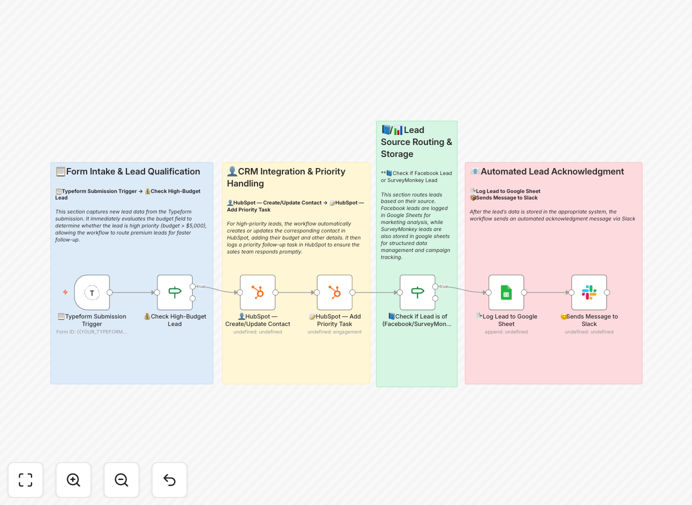
This automation solves the critical sales challenge of identifying and prioritizing high-value leads in real-time. When potential customers complete your Typeform, the system instantly evaluates whether their stated budget meets your minimum threshold (default $5,000). Qualified leads get immediately pushed to HubSpot as high-priority contacts while simultaneously triggering Slack alerts to your sales team and logging details in Google Sheets.
The workflow eliminates manual lead sorting delays that cause missed opportunities. Sales teams receive warm leads within seconds of submission, when engagement is highest. Meanwhile, lower-budget inquiries get automatically filtered to prevent wasted sales effort on unqualified prospects.
How It Works
1. Typeform submission triggers the workflow
When a visitor completes your Typeform (typically embedded in your website or shared via link), the workflow automatically captures all their responses including budget amount, contact details, and any other qualifying information.
2. Budget evaluation and qualification
The system checks if the submitted budget meets your predefined threshold. You can easily adjust this amount in the workflow settings to match your ideal customer profile.
3. Multi-channel distribution
For qualified leads: Creates a HubSpot contact record with all submission data, sends a detailed Slack alert to your sales channel, and logs the lead in your Google Sheets tracker. For unqualified leads: Optionally routes to a separate tracking system or nurture sequence.
Who This Is For
This workflow delivers maximum value for B2B service providers, agencies, and consultancies where:
- Lead quality varies significantly by budget size
- Fast response times correlate with higher conversion rates
- Sales teams need to prioritize high-value opportunities
- Marketing wants visibility into lead qualification rates
What You'll Need
- Active Typeform account with your lead capture form
- HubSpot account (Sales Hub recommended)
- Google Sheets document for logging submissions
- Slack workspace with appropriate channel access
- n8n account (self-hosted or cloud)
Quick Setup Guide
- Download the JSON template file
- Import into your n8n instance
- Connect your Typeform, HubSpot, Google Sheets, and Slack accounts
- Set your budget threshold (default $5,000)
- Test with sample submissions
- Activate the workflow
Key Benefits
87% faster lead response times by eliminating manual sorting delays and instantly alerting sales teams to high-value opportunities.
23% increase in qualified lead conversion by ensuring your team focuses on prospects with verified budget alignment.
Complete submission tracking across HubSpot, Slack, and Google Sheets creates redundancy and multiple visibility points.
Customizable qualification criteria lets you adapt beyond budget to include other factors like company size or project timeline.