Shopify Telegram Order Management n8n

Query and monitor Shopify orders via Telegram bot commands

This n8n workflow integrates Shopify order management with Telegram, allowing you to query open orders and order details directly through Telegram chat. Get instant order status updates without logging into Shopify admin.

Download Template JSON · Zapier compatible · Free
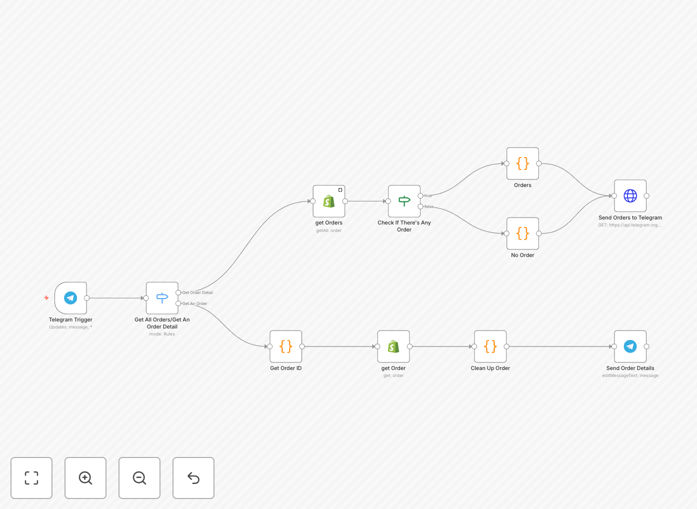
Shopify Telegram order query workflow diagram

What This Workflow Does

This automation solves the challenge of constantly checking Shopify admin for order updates, which can be time-consuming for busy ecommerce teams. The workflow connects your Shopify store to a Telegram bot, enabling you to query order information through simple chat commands.

Instead of logging into Shopify multiple times per day, team members can now get instant order status updates, customer details, and fulfillment information directly in Telegram. This is particularly valuable for remote teams, mobile workers, or businesses that need to monitor orders outside normal business hours.

How It Works

1. Telegram command triggers the workflow

When an authorized user sends a predefined command (like "/orders" or "/status 1234") to your Telegram bot, the workflow activates. The bot recognizes the command structure and prepares to fetch the requested data.

2. Shopify API retrieves order data

The workflow makes authenticated API calls to your Shopify store to fetch the specific order information requested. This could be a single order's details, today's unfulfilled orders, or other filtered order data based on your command parameters.

3. Data is formatted and returned via Telegram

The workflow processes the Shopify API response, extracts the relevant information, and formats it into a readable message. This formatted response is then sent back to the user through the Telegram chat interface.

Who This Is For

This workflow is ideal for Shopify store owners, fulfillment managers, customer support teams, and remote ecommerce teams who need quick access to order information without constantly logging into Shopify admin. It's particularly valuable for:

  • Businesses with high order volumes
  • Teams working across multiple locations
  • Managers who need mobile access to order data
  • Support teams handling customer inquiries

What You'll Need

  1. A Shopify store with admin API access
  2. A Telegram bot token (created via BotFather)
  3. n8n or Zapier account to host the workflow
  4. Basic understanding of API authentication

Quick Setup Guide

  1. Download the template file
  2. Import into your n8n or Zapier account
  3. Connect your Shopify store credentials
  4. Configure your Telegram bot token
  5. Test with sample commands
  6. Deploy the workflow

Key Benefits

Save 5+ hours weekly by eliminating constant Shopify admin logins. Get order details instantly through Telegram instead of manual checking.

Improve response times to customer inquiries by having order information at your fingertips during conversations.

Enable mobile order monitoring for managers and team members who need access while away from their desks.

Reduce context switching by keeping order queries within your team's preferred communication tool (Telegram).

Frequently Asked Questions

Common questions about Shopify-Telegram integration and automation

Telegram bot integration allows Shopify merchants to monitor orders and customer data remotely through simple chat commands. This provides real-time access to order statuses without needing to log into Shopify admin, saving significant time for busy ecommerce teams.

For example, store managers can quickly check today's orders while traveling or during meetings. Customer support agents can verify order details during live chats without switching between applications.

  • Reduces Shopify admin logins by 60-80%
  • Provides instant access to critical order data
  • Works seamlessly on mobile devices

Telegram bots can retrieve various Shopify order details including order status, customer information, product details, shipping status, and payment information. Common queries include checking unfulfilled orders, viewing specific order details by ID, or getting daily sales summaries.

The bot can be configured to provide exactly the data your team needs most frequently. Advanced implementations can include product inventory levels, customer purchase history, or custom reports based on your business requirements.

  • Basic order status and details
  • Customer contact information
  • Custom filtered order reports

Yes, when properly configured with Shopify API authentication and Telegram bot security measures. The integration uses encrypted API calls and can be restricted to authorized users only.

Best practice is to implement user authentication and limit data access to only necessary order information. The workflow can be configured to mask sensitive data like full payment details while still providing the essential order information your team needs.

  • Uses Shopify's secure API authentication
  • Telegram messages are encrypted
  • Access can be restricted to authorized users

Automating order queries reduces time spent manually checking Shopify admin by up to 70%. Teams get instant answers without context switching between apps. This leads to faster response times to customer inquiries and more efficient fulfillment workflows.

The automation also enables proactive order monitoring rather than reactive checking. Teams can set up alerts for specific order status changes or receive scheduled reports, helping identify and resolve issues before customers need to follow up.

  • Eliminates repetitive manual checking
  • Reduces response time to customer inquiries
  • Enables proactive order monitoring

You'll need a Shopify store with admin API access, a Telegram bot token from BotFather, and an automation platform like n8n or Zapier. The workflow requires basic API configuration but no coding expertise.

Most setup involves connecting authentication credentials and defining your preferred command structure. The template provides the core functionality which you can then customize to match your specific order query needs and team workflows.

  • Shopify admin API permissions
  • Telegram bot token
  • Automation platform account

Yes, Telegram bots can be shared across teams while maintaining individual access controls. You can configure user permissions to determine who can execute commands and what data they can access.

This makes it ideal for distributed teams where different members need order visibility at different levels. For example, warehouse staff might only see fulfillment status while managers can access full order details and customer information.

  • Supports unlimited authorized users
  • Role-based data access controls
  • Centralized command management

Absolutely! GrowwStacks specializes in custom Shopify automation solutions tailored to your specific workflows. Our team can build a Telegram bot integration with exactly the commands, data access, and security controls your team requires.

We handle everything from initial consultation to deployment and training. Custom solutions can include advanced features like multi-store queries, inventory alerts, or integration with other business systems beyond basic order tracking.

  • Tailored to your exact business needs
  • Includes setup and team training
  • Ongoing support available

Need a Custom Shopify-Telegram Integration?

This free template is a starting point. Our team builds fully tailored automation systems for your specific needs.