What This Workflow Does
This automation solves a common productivity drain for customer-facing teams: constantly switching between Slack and HubSpot to look up contact information. When a sales rep is on a call or a support agent is handling a ticket, they need instant access to customer context without breaking their workflow.
With this n8n template, team members can simply type a slash command in Slack (like /lookup [email protected]) and immediately receive a formatted card with the contact's details from HubSpot. The workflow intelligently handles both email addresses and HubSpot contact IDs, searches your CRM, and returns key information including name, company, phone number, deal stage, and recent activity—all within seconds.
Beyond just saving clicks, this automation ensures your team always has the most up-to-date information at their fingertips, reduces errors from manual data entry, and keeps customer conversations flowing smoothly without interruption.
How It Works
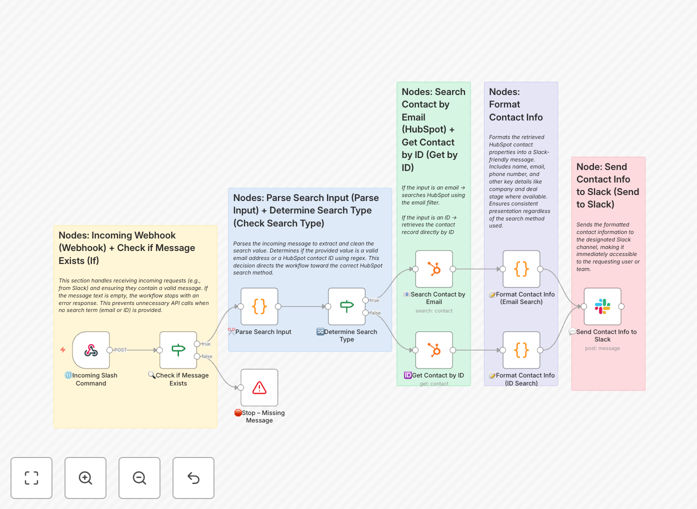
The workflow follows a logical sequence that transforms a simple Slack command into actionable customer intelligence.
1. Slack Slash Command Trigger
A team member initiates the lookup by typing a custom slash command in any Slack channel or direct message. The workflow captures this trigger along with the search query (email or contact ID).
2. Input Validation & Parsing
The workflow first checks if the user provided any input. If the message is empty, it returns an error prompt asking for a valid email or ID. It then cleans and parses the input to determine whether it's an email address or a HubSpot contact ID.
3. HubSpot Contact Search
Based on the parsed input type, the workflow queries your HubSpot CRM using the appropriate search method. For emails, it searches the contact database; for IDs, it fetches the specific contact record directly.
4. Data Extraction & Formatting
Once HubSpot returns the contact data, the workflow extracts the most relevant fields—name, email, phone, company, deal stage, last activity date, and any custom properties you've configured. This data is then structured into a clean, visually organized format suitable for Slack's message blocks.
5. Slack Response Delivery
The formatted contact card is posted back to the same Slack channel where the command was issued, providing immediate visibility to the entire team. The response includes clear labels and is designed for quick scanning during fast-paced conversations.
Who This Is For
This automation delivers the most value to customer-facing teams who need rapid access to CRM data during live interactions. Sales teams can instantly pull up prospect details before calls or during deal negotiations. Support teams can quickly access customer history and context when troubleshooting issues. Account managers can reference client information during check-in meetings without leaving their communication platform.
Businesses using both HubSpot and Slack for their operations will see immediate productivity gains. The workflow is particularly beneficial for distributed teams where quick information sharing is crucial, and for organizations where reducing context switching directly impacts customer satisfaction and deal velocity.
Pro tip: Consider extending this workflow to log each lookup as an activity in HubSpot. This creates an audit trail of when team members accessed contact information, providing valuable insights into customer engagement patterns.
What You'll Need
- n8n instance (cloud or self-hosted) with webhook capabilities enabled
- HubSpot account with API access and appropriate contact permissions
- Slack workspace with permission to create slash commands
- Admin access to configure the Slack slash command and webhook URL
- Basic understanding of how to import and activate n8n workflows
Quick Setup Guide
Get this automation running in your environment in under 15 minutes with these straightforward steps:
- Download the template using the button above and import it into your n8n instance.
- Configure the Slack trigger by creating a new slash command in your Slack workspace and pointing it to your n8n webhook URL.
- Connect your HubSpot account in n8n using OAuth or an API key with appropriate contact read permissions.
- Test the workflow by using your new slash command in Slack with a known contact email from your HubSpot.
- Customize the response format to include the specific contact fields most relevant to your team's workflow.
- Activate the workflow and train your team on the new slash command and its capabilities.
Key Benefits
Save 2-3 minutes per customer lookup by eliminating the manual process of switching to HubSpot, searching, and copying information back to Slack. For a team making 20 lookups daily, this adds up to nearly an hour of saved productivity every day.
Improve response times by 40% for customer-facing teams who no longer need to pause conversations to search for information. The instant access to CRM data means questions can be answered immediately during calls or chats.
Reduce context switching fatigue by keeping your team focused in one application. Studies show that frequent app switching can reduce productivity by up to 40% due to mental reloading time.
Ensure data consistency across your team by providing everyone with the same up-to-date information directly from your single source of truth in HubSpot, eliminating version confusion and outdated notes.
Scale your onboarding process by giving new team members instant access to customer context without extensive HubSpot training. The simple slash command interface requires minimal learning curve.