AI Agent QuickBooks OpenAI Accounting Chatbot

QuickBooks Online AI Agent – Chat with QuickBooks Data Using GPT

Free n8n workflow template to build an AI chatbot that answers natural language questions about your QuickBooks data. Automate accounting insights and customer queries instantly.

Download Template JSON · n8n compatible · Free
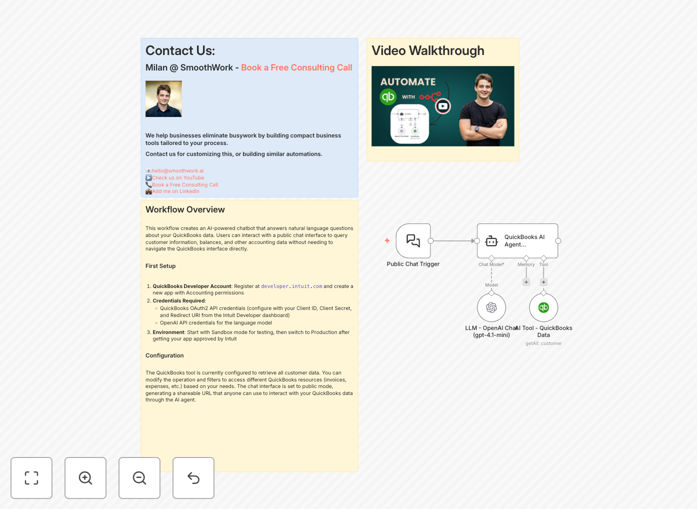
QuickBooks Online AI agent workflow interface screenshot showing AI chatbot integration with QuickBooks data

What This Workflow Does

This workflow creates an AI-powered chatbot that answers natural language questions about your QuickBooks data in real-time. Instead of manually navigating through reports or searching for specific numbers, your team can simply ask questions like “How many customers do we have?” or “What’s the total balance across all customers?” and receive instant, accurate answers.

The AI agent uses OpenAI’s language model to understand the intent behind each query, then automatically retrieves the relevant data from QuickBooks Online. It bridges the gap between complex accounting software and everyday business users, making financial insights accessible to sales teams, executives, and support staff without requiring them to learn QuickBooks.

You can share a public chat URL with stakeholders, enabling them to query customer information, invoice statuses, expense categories, and other accounting data without direct system access. This transforms QuickBooks from a backend tool into a conversational assistant.

How It Works

Step 1: Natural Language Input

A user submits a question through a chat interface (webhook, Slack, or a simple web form). The question is passed to the workflow as a text input.

Step 2: AI Interpretation

The OpenAI Chat Model node analyzes the question, identifies the intent (e.g., “customer count,” “invoice total,” “balance query”), and structures a query for QuickBooks.

Step 3: QuickBooks Data Fetch

The QuickBooks Online node executes the query, retrieving the relevant data—customers, invoices, expenses, bills, etc.—based on the AI’s interpretation.

Step 4: Response Generation

The AI formats the retrieved data into a clear, conversational answer and sends it back to the user through the same chat interface.

Step 5: Continuous Learning

The workflow can be extended to log queries and improve answer accuracy over time, creating a smarter, more responsive financial assistant.

Pro tip: Start with the Sandbox environment in QuickBooks Developer to test the workflow without affecting live data. Once approved by Intuit, switch to Production mode.

Who This Is For

This template is ideal for small businesses, accounting firms, sales teams, and executives who need quick access to financial data without diving into QuickBooks.

  • Accountants & Bookkeepers: Automate repetitive data queries for clients or internal reporting.
  • Sales Teams: Check customer balances or invoice statuses before making calls or sending reminders.
  • Business Owners & Executives: Get real-time financial snapshots without waiting for manual reports.
  • Support Staff: Answer customer questions about invoices or payments instantly.
  • Consultants & Agencies: Provide clients with a self-service financial insights portal.

What You'll Need

  1. QuickBooks Developer Account: Register at developer.intuit.com and create an app with Accounting permissions.
  2. QuickBooks OAuth2 Credentials: Client ID, Client Secret, and Redirect URI from the Intuit Developer dashboard.
  3. OpenAI API Key: Access to GPT models for natural language processing.
  4. n8n Instance: Self-hosted or cloud version of n8n to run the workflow.
  5. Chat Interface: A webhook endpoint, Slack bot, or simple web form to accept user questions.

Quick Setup Guide

  1. Import the Template: Download the JSON file and import it into your n8n workspace.
  2. Configure QuickBooks: Add your QuickBooks OAuth2 credentials in the QuickBooks Online node. Set the operation (e.g., “Get All Customers”) and any filters.
  3. Set Up OpenAI: Enter your OpenAI API key in the Chat Model node and select the appropriate model (GPT‑3.5 or GPT‑4).
  4. Test the Flow: Trigger the workflow with a sample question like “Show me all customers with overdue invoices.” Verify the response matches your QuickBooks data.
  5. Deploy the Chat Interface: Connect the workflow to a public webhook or chat platform. Share the URL with your team.
  6. Monitor & Iterate: Review logs to improve query accuracy and add new QuickBooks resources as needed.

Pro tip: Use the Sticky Note node within the workflow to document common question patterns and corresponding QuickBooks queries. This creates a knowledge base for future enhancements.

Key Benefits

Instant Financial Insights: Reduce query time from minutes to seconds. Non‑accounting staff get answers without training or manual searches.

Reduced Manual Errors: Automated data retrieval eliminates mistakes from manual extraction, ensuring consistent, accurate responses.

Scalable Self‑Service: Share a single chat URL with your entire team. No need to grant individual QuickBooks access or provide training.

Enhanced Customer Service: Sales and support teams can check customer balances or invoice statuses on‑the‑fly, improving response times and client satisfaction.

Future‑Proof Architecture: The AI agent can be extended to other accounting systems (Xero, Sage) or integrated with CRM, ERP, or reporting tools.

Frequently Asked Questions

Common questions about QuickBooks AI automation and integration

An AI agent for QuickBooks is an automated chatbot that uses natural language processing to answer questions about your accounting data. Instead of manually searching through reports, you can ask questions like 'What's our total outstanding invoice balance?' or 'How many customers have overdue payments?' and get instant answers.

It combines OpenAI's language understanding with QuickBooks API access, turning complex financial queries into simple conversational interactions. This makes accounting data accessible to anyone in your organization, regardless of their technical or accounting background.

Automating QuickBooks queries saves significant time for accountants, sales teams, and managers who need quick financial insights. It eliminates manual data extraction, reduces errors, and provides a self-service interface for non-technical staff to access financial data without training on QuickBooks.

For example, a salesperson can instantly check a customer's outstanding balance before making a follow‑up call, instead of waiting for an accountant to pull the report. This speeds up decision‑making and improves operational efficiency across departments.

Yes. The workflow uses OpenAI's GPT model to interpret complex questions, then queries QuickBooks for specific data like customer balances, invoice totals, expense categories, or bill statuses. It can be configured to retrieve different QuickBooks resources based on your needs.

You can extend the logic to handle multi‑step queries—for instance, “Show me customers with invoices over $5,000 that are overdue by more than 30 days.” The AI breaks down the request, fetches the relevant data, and returns a structured answer.

The workflow uses QuickBooks OAuth2 API credentials, ensuring secure access. You can restrict data access by configuring the QuickBooks tool to retrieve only specific resources. The AI agent operates within your n8n instance, keeping data flows internal and controlled.

Best practices include using QuickBooks Sandbox for testing, limiting API scopes to necessary endpoints, and deploying the workflow on a secure n8n instance with proper authentication. No financial data is exposed to external AI services beyond the query parameters.

Key benefits include: faster decision‑making with real‑time financial insights, reduced training overhead for non‑accounting staff, improved accuracy by eliminating manual data extraction, and enhanced customer service by enabling sales teams to check balances instantly.

Businesses also gain a scalable way to democratize financial data. Instead of relying on a single accountant for reports, multiple teams can access the information they need independently, reducing bottlenecks and improving overall productivity.

After importing the template into n8n, configure QuickBooks and OpenAI API credentials. Set up a public chat interface (like a webhook or chat widget) that triggers the workflow. Share the URL with your team—they can ask questions and receive answers without logging into QuickBooks.

For internal use, you can integrate the workflow with Slack, Microsoft Teams, or a simple web page. For external stakeholders, consider a secure web portal with authentication to control access levels.

Absolutely. The same AI agent architecture can be adapted for Xero, Sage, FreshBooks, or other accounting platforms by replacing the QuickBooks node with their respective API integrations. The natural language interface remains the same, making it versatile across accounting software.

You can even create a multi‑platform agent that queries different systems based on the question context—for example, “Get invoice data from QuickBooks for US clients and from Xero for UK clients.” This flexibility makes the template valuable for businesses using multiple accounting tools.

Yes. GrowwStacks specializes in building tailored AI automation solutions for QuickBooks and other accounting systems. We can design workflows that integrate with your CRM, generate custom reports, automate invoice reminders, or create multi‑step financial analysis pipelines.

Our team will assess your specific needs, configure the AI agent to match your data structure, and deploy a secure, scalable solution that saves time and improves accuracy. We also provide ongoing support and optimization to ensure the automation evolves with your business.

  • Custom integration with your existing software stack
  • Advanced query logic for complex financial scenarios
  • Secure deployment and access control implementation

Need a Custom QuickBooks AI Automation?

This free template is a starting point. Our team builds fully tailored automation systems for your specific business needs.