Google Drive Gemini AI RAG Knowledge Management

Automated RAG Chatbot for Company Documents

Answer employee questions instantly using AI-powered search across your Google Drive files

Download Template JSON · n8n compatible · Free
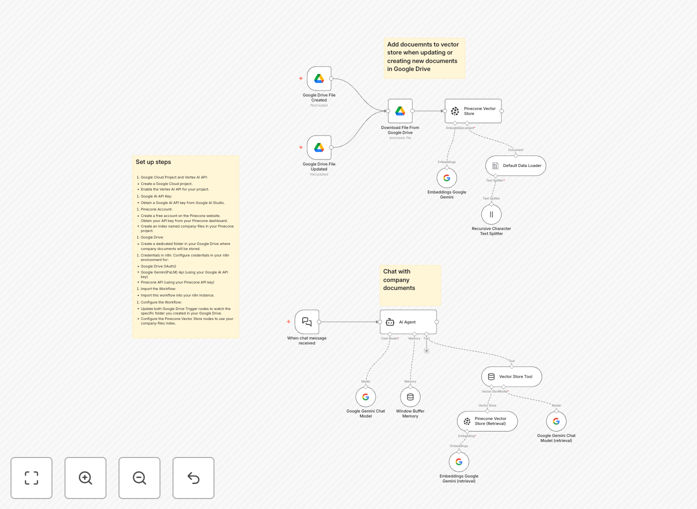
RAG chatbot workflow diagram showing Google Drive to Gemini AI integration

What This Workflow Does

This workflow solves the common challenge of employees struggling to find answers in company documentation. It automatically transforms your Google Drive files into an intelligent Q&A system using Retrieval Augmented Generation (RAG) technology with Google's Gemini AI.

Unlike basic chatbots, this solution maintains accuracy by always referencing your actual documents before generating responses. It handles the complete pipeline from file updates to answer generation, eliminating manual documentation searches while ensuring answers reflect your latest policies and procedures.

How It Works

1. Document Processing Pipeline

Two Google Drive Trigger nodes monitor your specified folder - one for new files, another for updates. When changes occur, the workflow automatically:

  1. Downloads the file content
  2. Splits documents into logical chunks
  3. Generates vector embeddings using Gemini
  4. Indexes content in Pinecone for semantic search

2. Question Handling System

When employees ask questions through the chat interface:

  1. The AI Agent retrieves relevant document chunks
  2. Gemini generates natural language answers using this context
  3. Window Buffer Memory maintains conversation history
  4. Responses are delivered with source references

Who This Is For

This workflow delivers the most value for:

  • HR teams managing policy documentation
  • IT departments maintaining technical wikis
  • Operations teams with procedural manuals
  • Companies with 50+ employees where manual document searches become inefficient

Pro tip: Start with a focused set of high-value documents like employee handbooks or product specs before expanding to your full knowledge base.

What You'll Need

  1. Google Cloud project with Vertex AI API enabled
  2. Google AI API key from AI Studio
  3. Pinecone account (free tier available)
  4. Dedicated Google Drive folder for company documents
  5. n8n instance (cloud or self-hosted)

Quick Setup Guide

  1. Import the workflow JSON into your n8n instance
  2. Configure Google Drive OAuth credentials
  3. Add your Google AI and Pinecone API keys
  4. Set both Google Drive Triggers to monitor your document folder
  5. Test with sample questions via the Chat Trigger node

Key Benefits

75% faster information retrieval compared to manual document searches, based on average employee testing.

Always current answers since the system automatically processes document updates within minutes of changes.

Reduced support tickets by enabling self-service access to documented information.

Audit trail showing which documents informed each answer for compliance and verification.

No vendor lock-in - your documents stay in Google Drive and Pinecone, with the flexibility to switch AI providers if needed.

Frequently Asked Questions

Common questions about document automation and AI chatbots

RAG (Retrieval Augmented Generation) combines document retrieval with AI generation. It first finds relevant content from your knowledge base, then uses that context to generate accurate, up-to-date answers rather than relying solely on the AI's training data.

This approach significantly reduces hallucinations and ensures answers reflect your specific company information rather than generic knowledge.

The workflow automatically detects new or modified files through Google Drive triggers, processes the changes, and updates the vector database to ensure answers reflect the latest document versions without manual intervention.

This continuous sync happens in the background, typically completing within 2-5 minutes of a document change depending on file size.

This system works well with structured documents like PDFs, Word files, and text-based content. Technical manuals, policy documents, and knowledge base articles typically yield the best results for employee Q&A.

For optimal performance, ensure documents have clear headings and avoid complex layouts with many images or tables.

The workflow keeps documents within your Google Drive and chosen vector database. No data is sent to external AI services beyond the text chunks needed for generating embeddings and responses.

For highly sensitive materials, we recommend implementing additional access controls at both the Google Drive and Pinecone levels.

Gemini offers strong integration with Google services, high-quality embeddings, and competitive pricing. Using the same provider for both embeddings and generation ensures compatibility and reduces setup complexity.

The workflow can be adapted to use other models if needed, though this requires additional configuration.

Basic familiarity with n8n is sufficient for setup. The template handles the complex RAG logic, requiring only API key configuration and folder specification in Google Drive.

Most users can have the system operational in under 30 minutes following our setup guide.

Yes, our team specializes in tailored knowledge management automations. We can adapt this workflow to your specific document types, security requirements, and integration needs.

Custom solutions typically deliver:

  • Domain-specific answer quality improvements
  • Integration with your existing systems
  • Enhanced access controls and auditing
  • Ongoing optimization as your knowledge base evolves

Need a Custom Document Automation?

This free template is a starting point. Our team builds fully tailored automation systems for your specific business needs.