What This Workflow Does
Traditional document processing for AI often fails because it treats text as isolated chunks, losing crucial context that gives words their meaning. This intelligent automation solves that problem by implementing context-aware chunking—a technique that preserves document structure and meaning throughout the AI pipeline.
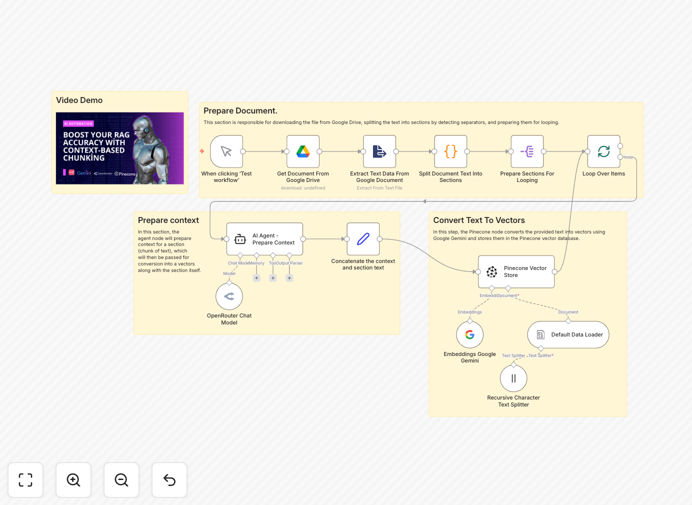
The workflow extracts documents from Google Drive, intelligently segments them while maintaining contextual relationships, enriches each segment with AI-generated metadata, creates semantic embeddings using Google Gemini, and stores everything in Pinecone for lightning-fast retrieval. The result is a knowledge base that actually understands your documents' structure and meaning, leading to dramatically better AI responses.
Whether you're building a customer support chatbot, internal knowledge management system, or research assistant, this template provides the foundation for AI that truly comprehends your content rather than just searching keywords.
How It Works
1. Document Retrieval & Extraction
The workflow begins by connecting to your Google Drive and retrieving target documents. It supports various formats (PDFs, Docs, Sheets) and extracts clean text while preserving document structure markers that indicate sections, headings, and logical breaks.
2. Intelligent Context-Aware Chunking
Instead of blindly splitting text at arbitrary character counts, this step analyzes document structure to create meaningful segments. It identifies natural boundaries like section headers, topic changes, and paragraph transitions, ensuring each chunk represents a coherent unit of information.
3. AI-Powered Context Enrichment
Each chunk is processed through OpenRouter (using GPT-4 or similar models) to generate contextual metadata. The AI analyzes what information came before and after each segment, creating summaries and relationships that preserve the document's narrative flow.
4. Embedding Generation & Vector Storage
The enriched chunks pass through Google Gemini's text-embedding model, transforming them into high-dimensional vectors that capture semantic meaning. These vectors, along with their metadata and original content, are indexed in Pinecone for efficient similarity search.
5. Automated Pipeline Management
The entire process runs automatically on schedule or trigger, handling error recovery, logging, and monitoring. You can process thousands of documents without manual intervention while maintaining data quality and consistency.
Who This Is For
This template is ideal for businesses and developers building AI applications that require deep understanding of document content. Perfect for:
- Customer Support Teams creating chatbots that accurately answer questions from knowledge bases
- Research Organizations needing to search across technical papers and reports
- Legal & Compliance Departments analyzing contracts and regulatory documents
- Content Creators & Marketers building intelligent content recommendation systems
- Software Developers implementing RAG systems for their applications
- Educational Institutions creating AI tutors from course materials
What You'll Need
- n8n Instance (cloud or self-hosted) with access to the required nodes
- Google Drive API Credentials with appropriate document access permissions
- OpenRouter API Key or access to another LLM provider (OpenAI, Anthropic, etc.)
- Google Gemini API Key for generating text embeddings
- Pinecone Account with an index configured for your document dimensions
- Source Documents in Google Drive with some structure (headings, sections, etc.)
Quick Setup Guide
- Download & Import the template JSON file into your n8n instance
- Configure Credentials for Google Drive, OpenRouter, Gemini, and Pinecone in n8n
- Set Source Folder in the Google Drive node to point to your documents
- Adjust Chunking Logic in the Code node if your documents have unique structure markers
- Test with Sample Documents to verify chunking quality and embedding generation
- Deploy & Schedule the workflow to run automatically as new documents arrive
- Monitor & Optimize using n8n's execution history and adjust prompts as needed
Pro tip: Start with a small set of representative documents to fine-tune your chunking parameters before processing your entire knowledge base. Document structure varies widely, and optimal chunk sizes differ by content type.
Key Benefits
70-90% Improvement in Retrieval Accuracy: Context-aware chunks dramatically outperform fixed-size splitting, ensuring your AI retrieves relevant, complete information rather than fragmented pieces.
80% Reduction in Manual Document Processing: Automate what would take hours of human effort to categorize, summarize, and prepare documents for AI consumption.
Scalable to Thousands of Documents: Process entire knowledge bases consistently without degradation in quality or requiring additional human oversight.
Future-Proof AI Foundation: Build once, update easily. As your documents evolve, the automated pipeline keeps your AI's knowledge current without rebuilding from scratch.
Flexible Integration Options: Easily adapt to different document sources, AI models, and vector databases while maintaining the core intelligent processing pipeline.