Google Drive OpenAI Pinecone Document Chat n8n

RAG-powered document chat with Google Drive, OpenAI, and Pinecone Assistant

Transform your document repository into an intelligent Q&A system with Retrieval-Augmented Generation

Download Template JSON · n8n compatible · Free
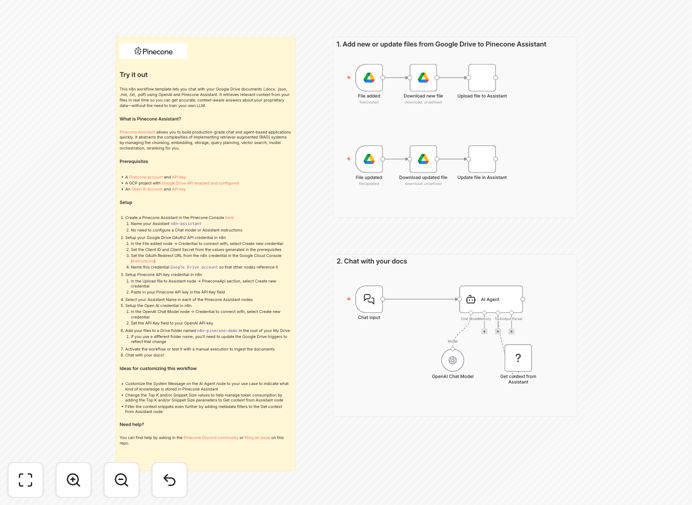
RAG-powered document chat workflow interface

What This Workflow Does

This n8n workflow solves the common business challenge of extracting knowledge from documents without manual searching. It creates an intelligent chat interface for your Google Drive files (including .docx, .pdf, .txt and more) using Retrieval-Augmented Generation (RAG) technology.

The system combines Pinecone's vector database for semantic search with OpenAI's language models to provide accurate, context-aware answers drawn directly from your documents. Employees can ask natural language questions instead of manually searching through files.

How It Works

1. Document Ingestion

The workflow monitors specified Google Drive folders for new documents. When detected, files are automatically processed through OpenAI's embeddings API to create vector representations.

2. Vector Indexing

Document vectors are stored in Pinecone's vector database, which organizes content for efficient semantic search. This creates a searchable knowledge base without manual tagging.

3. Query Processing

When users ask questions, the system converts queries to vectors, finds relevant document chunks in Pinecone, then uses OpenAI to generate natural language answers based on the retrieved content.

Who This Is For

This solution is ideal for knowledge-intensive businesses with large document repositories:

  • Legal firms needing quick access to case files
  • Research teams managing technical documentation
  • HR departments handling policy manuals
  • Customer support teams referencing product docs

Pro tip: Start with a focused set of high-value documents before scaling to entire repositories. This helps refine the system with manageable feedback.

What You'll Need

  1. An n8n instance (cloud or self-hosted)
  2. Google Drive account with documents
  3. OpenAI API key
  4. Pinecone account
  5. Basic understanding of RAG concepts

Quick Setup Guide

  1. Download the template and import into your n8n instance
  2. Configure Google Drive connection with appropriate folder access
  3. Enter your OpenAI and Pinecone API credentials
  4. Set up webhook or trigger for document processing
  5. Test with sample queries and refine as needed

Key Benefits

80% faster information retrieval compared to manual document searches, as employees get direct answers instead of browsing files.

24/7 knowledge access with AI-powered answers that improve as your document library grows.

Reduced training time for new hires who can query documents instead of learning complex filing systems.

Consistent answers drawn directly from approved documents, reducing misinformation risk.

Frequently Asked Questions

Common questions about document chat automation

Retrieval-Augmented Generation (RAG) combines semantic search with generative AI. Unlike traditional keyword search, RAG understands the meaning behind queries and retrieves relevant document passages before generating answers.

This approach provides more accurate responses than standalone LLMs because answers are grounded in your actual documents. For businesses, this means employees get precise information without manually searching through files.

  • Understands natural language queries
  • Answers are sourced from your documents
  • Reduces hallucination risks in AI responses

The workflow handles common business formats including PDFs, Word documents, plain text files, and markdown. Structured formats like JSON can also be processed if they contain textual content.

For optimal results, prioritize well-formatted documents with clear headings and paragraphs. Scanned PDFs may require OCR preprocessing for best performance. The system automatically handles format conversion during processing.

Traditional systems require manual tagging and keyword searches. This AI-powered approach understands content meaning without human categorization.

A legal firm using this system reduced case research time from hours to minutes. Their associates could ask "What precedent applies to this situation?" and get precise references instead of browsing folders.

  • No manual tagging required
  • Understands synonyms and related concepts
  • Improves as your document library grows

The system maintains Google Drive's existing security permissions. Only documents accessible to the connected account are processed. Pinecone vectors contain semantic representations, not raw text.

For sensitive materials, you can implement additional controls like document-level access restrictions or private Pinecone indexes. The workflow inherits your existing Google Drive security model.

Yes, n8n's flexibility allows connections to SharePoint, Dropbox, Notion, and other document sources. The core RAG architecture remains the same regardless of source.

A marketing team successfully adapted this workflow for their Notion knowledge base. The system answered questions about brand guidelines and campaign processes without modifying the core functionality.

Accuracy depends on document quality and question complexity. For factual queries, the system typically matches human accuracy. Nuanced interpretation may still require expert review.

Best practice is to start with lower-risk queries and expand as confidence grows. The system provides source references so users can verify answers against original documents when needed.

Absolutely. GrowwStacks specializes in tailored document automation solutions. We can adapt this workflow for your specific document systems, security requirements, and use cases.

Custom implementations might include multi-source document integration, domain-specific tuning of the AI models, or custom interfaces for different departments. Our team handles everything from initial consultation to deployment.

  • Enterprise-grade security configurations
  • Custom training for your industry terminology
  • Integration with existing business systems

Need a Custom Document Chat Automation?

This free template is a starting point. Our team builds fully tailored automation systems for your specific needs.