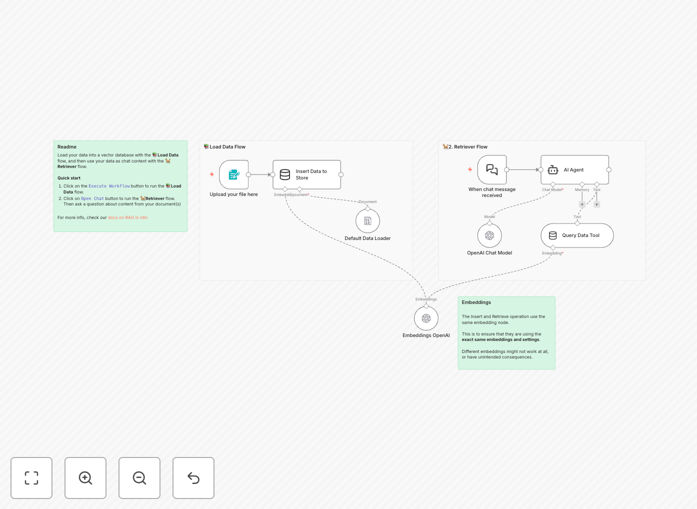
What This Workflow Does
This template solves a critical problem in AI implementation: how to give your AI agents specific, up-to-date knowledge from your own documents. Without RAG (Retrieval-Augmented Generation), AI models can only answer based on their general training data, which may be outdated, incomplete, or irrelevant to your specific business context.
The workflow creates a complete RAG pipeline that lets you upload PDFs or other documents, convert them into searchable vector embeddings, store them in a vector database, and then query this knowledge base through an AI agent. When someone asks a question, the system retrieves the most relevant document chunks and uses them to generate accurate, context-specific answers.
This transforms generic AI into a specialized assistant that knows your products, processes, policies, or research—dramatically improving response accuracy and usefulness for customer support, internal knowledge management, research assistance, and training.
How It Works
1. Document Upload & Processing
The workflow starts with a form trigger where users upload their knowledge documents (PDFs, text files, etc.). The system automatically processes these documents, splitting them into manageable chunks that can be effectively searched and retrieved.
2. Vector Embedding Generation
Each text chunk is converted into a numerical vector (embedding) using OpenAI's embedding models. These vectors capture the semantic meaning of the text, allowing the system to find conceptually similar content even when exact keywords don't match.
3. Vector Store Population
The embeddings are stored in a simple vector store along with their original text content. This creates a searchable knowledge base where documents can be retrieved based on semantic similarity rather than just keyword matching.
4. Query Processing & Retrieval
When a user asks a question, the system converts the query into an embedding and searches the vector store for the most semantically similar document chunks. The top matches are retrieved as context for the AI.
5. Context-Aware Response Generation
The retrieved document chunks are fed to an AI agent (using OpenAI's chat models) along with the original question. The agent generates a response that's grounded in the specific knowledge from your documents, ensuring accuracy and relevance.
Who This Is For
This template is ideal for businesses and teams that need to provide accurate, document-based information through AI interfaces. Customer support teams can create AI assistants that reference product manuals and FAQs. Research departments can build systems that summarize technical papers. HR teams can implement onboarding bots that explain company policies. Legal and compliance teams can develop assistants that reference regulations and internal guidelines.
It's particularly valuable for organizations with extensive documentation that changes frequently, where keeping human teams updated is challenging, or where 24/7 access to accurate information is critical. The template serves as a starting point that can be customized for virtually any domain-specific knowledge application.
What You'll Need
- n8n instance (cloud or self-hosted) with access to the workflow editor
- OpenAI API key for embedding generation and chat completion
- Knowledge documents in PDF, text, or other supported formats
- Basic understanding of how to import and activate workflows in n8n
- Optional: Custom instructions for your AI agent to tailor its behavior to your specific use case
Quick Setup Guide
Follow these steps to get your RAG system running quickly:
- Download the template JSON file using the button above
- Import it into your n8n instance via the workflow import function
- Configure your OpenAI credentials in the relevant nodes
- Test the workflow by uploading a sample PDF document
- Ask questions through the form interface to verify retrieval works correctly
- Customize the AI agent prompts to match your specific use case and tone
- Deploy the workflow and share the form URL with your team or users
Pro tip: Start with a small, well-structured document (like a product FAQ or process guide) for testing. This helps you verify the system works correctly before scaling to larger document collections. Pay attention to how the document is chunked—sometimes adjusting chunk size or overlap can significantly improve retrieval quality.
Key Benefits
Eliminates AI hallucinations by grounding responses in your actual documents. Instead of making up plausible-sounding answers, the system retrieves and references specific information from your knowledge base, dramatically increasing accuracy and trustworthiness.
Scales expert knowledge access across your organization 24/7. A single implementation can provide instant access to specialized knowledge that would otherwise require contacting specific team members or searching through disorganized document repositories.
Reduces training and support costs by creating self-service knowledge access. New employees can get immediate answers to common questions, customers can find product information without waiting for support, and teams can access procedures without interrupting colleagues.
Improves document utilization by making static content interactive and searchable. Documents that were previously filed away and forgotten become active resources that drive decision-making and problem-solving throughout your organization.
Future-proofs your AI strategy with a scalable architecture. As your document collection grows or changes, the system easily adapts—simply upload new versions or additional documents to keep the knowledge base current without rebuilding from scratch.