What This Workflow Does
This automation solves the common challenge of manually transferring time tracking data between project management and CRM systems. Agencies and professional service teams often waste hours each week copying time entries from ClickUp to HubSpot for client billing and project reporting.
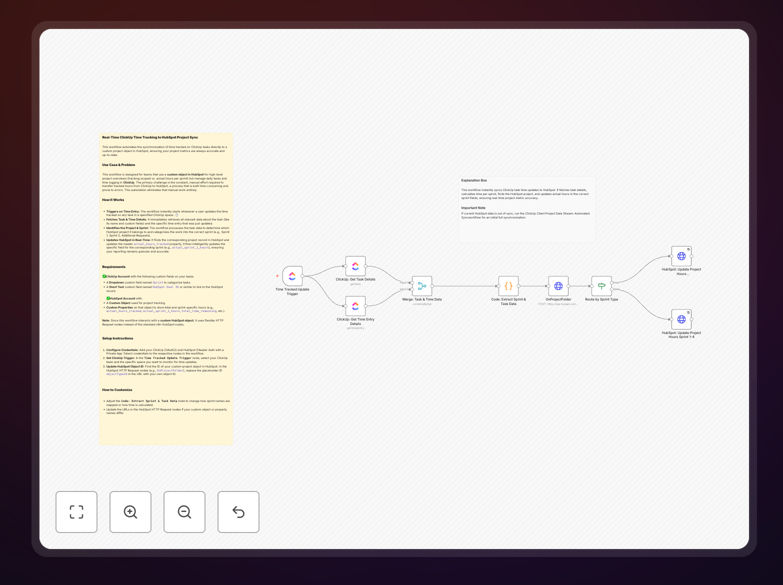
The workflow automatically syncs time logged on ClickUp tasks to corresponding HubSpot projects in real-time. It maintains accurate records by updating HubSpot whenever time entries are added or modified in ClickUp, eliminating duplicate work and ensuring billing accuracy.
How It Works
1. Monitoring ClickUp for new time entries
The workflow continuously checks ClickUp's API for new time tracking entries. It can be configured to watch specific task lists, projects, or team members based on your needs.
2. Matching tasks to HubSpot projects
Using custom field mappings or naming conventions, the system identifies which HubSpot project each ClickUp task belongs to. This maintains the connection between operational work and client records.
3. Syncing data to HubSpot
Time entries are pushed to HubSpot's custom objects or time tracking fields. The workflow preserves all relevant details including duration, description, billable status, and team member information.
4. Handling updates and corrections
If a time entry is later modified in ClickUp, the workflow detects the change and updates HubSpot accordingly. This ensures billing records always reflect the most accurate time data.
Pro tip: Configure the workflow to include task tags or custom fields in the sync. This adds valuable context to time entries in HubSpot for better reporting.
Who This Is For
This workflow is ideal for professional services teams, agencies, and consultants who use ClickUp for task management and HubSpot for client relationship management. It's particularly valuable for:
- Marketing agencies tracking campaign work
- Development teams working on client projects
- Consultants who bill by the hour
- Businesses needing accurate project costing
What You'll Need
- Active ClickUp account with time tracking enabled
- HubSpot account with custom objects or time tracking fields configured
- n8n instance (cloud or self-hosted)
- API access for both platforms
- Clear mapping between ClickUp tasks and HubSpot projects
Quick Setup Guide
- Download the template file
- Import into your n8n instance
- Connect your ClickUp and HubSpot accounts
- Configure field mappings between systems
- Set up filters for which tasks to sync
- Test with sample time entries
- Activate the workflow
Key Benefits
Eliminate manual data entry: Save 2-5 hours per week previously spent copying time entries between systems.
Improve billing accuracy: Reduce errors by automatically syncing time data without human intervention.
Enhance client transparency: Provide clients with detailed, audit-ready time reports directly from HubSpot.
Better project insights: Analyze actual vs. estimated time across all projects in one system.
Real-time updates: Keep HubSpot records current without waiting for manual updates.