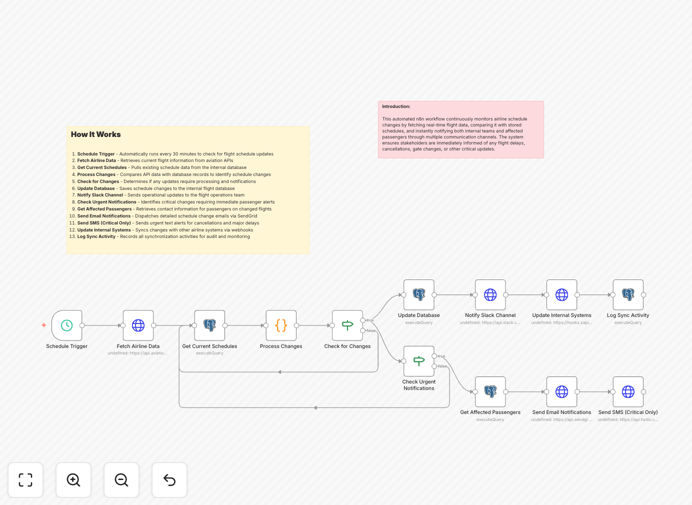
What This Workflow Does
Flight delays, cancellations, and gate changes create operational chaos for airlines and frustration for passengers. Manual monitoring of schedule updates is time-consuming, error-prone, and often results in delayed notifications. This automation solves that by continuously checking aviation APIs for real-time flight data, comparing it against stored schedules, and instantly alerting both internal teams and affected passengers through their preferred channels.
The system runs every 30 minutes (configurable), detects any schedule deviations, updates your internal database, sends Slack alerts to operations teams, and dispatches personalized notifications to passengers via email (SendGrid) and urgent SMS (Twilio). It maintains a complete audit trail of all changes for compliance and analysis, turning flight disruptions from customer service nightmares into managed operational events.
How It Works
1. Schedule Trigger & Data Fetching
The workflow automatically activates on a schedule (default: every 30 minutes) to check for updates. It connects to aviation APIs like AviationStack or FlightAware to retrieve current flight status, departure/arrival times, gate assignments, and aircraft information.
2. Database Comparison & Change Detection
Retrieved API data is compared against your PostgreSQL database containing scheduled flight information. The system identifies discrepancies in times, gates, status (delayed/cancelled), or aircraft changes, filtering out minor variations that don't require notification.
3. Internal Team Notification
All detected changes trigger immediate Slack notifications to your operations team channel. Messages include flight numbers, change details, affected passenger counts, and suggested actions, enabling quick response planning.
4. Passenger Communication
For changes requiring passenger notification, the system queries your database for affected travelers' contact information and preferences. It sends detailed email notifications via SendGrid with rebooking options and, for critical changes like cancellations, urgent SMS alerts via Twilio.
5. System Synchronization & Logging
The workflow updates your internal flight database with confirmed changes, syncs with other airline systems via webhooks, and logs all activities in an audit table for compliance tracking and operational analysis.
Who This Is For
This automation is ideal for airlines, travel agencies, corporate travel departments, airport operations teams, and ground handling companies. It's particularly valuable for businesses managing multiple daily flights, those with premium customer service standards, or operations experiencing frequent weather-related disruptions. If you're manually checking flight status websites or sending batch email updates, this workflow will save hours daily while improving customer satisfaction.
What You'll Need
- Aviation API access – Subscription to AviationStack, FlightAware, or similar real-time flight data service with API credentials.
- PostgreSQL database – With flight schedules, passenger, ticket, and audit tables (schema provided in workflow).
- Slack workspace – With bot token for posting to operations channels.
- SendGrid account – For sending passenger email notifications with customizable templates.
- Twilio account (optional) – For urgent SMS alerts on critical changes like cancellations.
- n8n instance – Self-hosted or cloud version with HTTP Request, PostgreSQL, Slack, SendGrid, and Twilio nodes installed.
Quick Setup Guide
- Import the template – Download the JSON file and import into your n8n instance.
- Configure API credentials – Add your aviation API keys, database connection details, Slack bot token, and SendGrid API key in the credential manager.
- Set up database tables – Create the required flight_schedules, passengers, tickets, and sync_logs tables using the SQL schema included in workflow comments.
- Customize notifications – Modify Slack message formats, email templates, and SMS content to match your brand voice and operational procedures.
- Test with sample data – Run the workflow with test flight data to verify all connections and notification channels work correctly.
- Adjust monitoring frequency – Change the schedule trigger interval based on your operational needs and API rate limits.
- Go live – Activate the workflow and monitor sync logs for the first few days to ensure reliable operation.
Key Benefits
Reduce manual monitoring by 80-90% – Operations teams no longer need to constantly check flight status websites or airline portals, freeing them for higher-value tasks like disruption management and customer service.
Instant passenger notifications – Travelers receive updates about delays, gate changes, or cancellations within minutes rather than hours, dramatically improving customer experience and reducing call center volume during disruptions.
Complete audit trail – Every schedule change, notification sent, and system update is logged with timestamps and details, providing compliance documentation and data for operational analysis.
Multi-channel communication – Reach passengers through their preferred method (email for details, SMS for urgency) while keeping internal teams informed via Slack for coordinated response.
Scalable operations – The system handles increasing flight volumes without additional staff, making it cost-effective as your airline or travel business grows.
Pro tip: Start by monitoring only your most critical routes or peak travel periods. Once the system proves reliable, expand to all flights. Consider adding weather API integration to predict potential disruptions before they appear in flight status data.