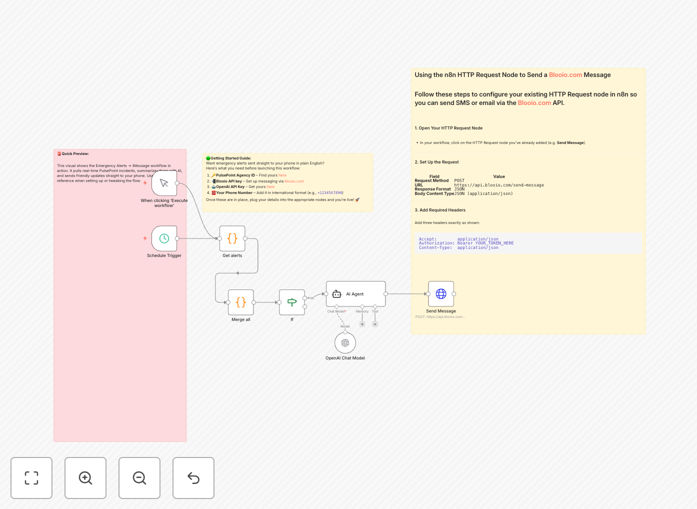
What This Workflow Does
This automation solves a critical information gap: emergency services dispatch data is publicly available via PulsePoint, but it's raw, technical, and buried in an app. For community safety groups, families with vulnerable members, or local businesses, manually checking for incidents is inefficient and easy to miss.
The workflow fetches real-time incident alerts (fires, medical emergencies, traffic accidents) from PulsePoint for a specified agency. It then uses an AI agent to transform the cryptic dispatch codes and locations into a clear, concise, human-readable summary. Finally, it delivers this summarized alert directly to any phone number via iMessage using the Blooio API, ensuring immediate, actionable awareness.
You move from being reactive to proactively informed. Instead of wondering about sirens or checking an app, a formatted message arrives on your phone: "🚨 Fire Response - 123 Main St. Engine 7, Medic 2 responding. 2-block radius advised." This level of automated, intelligent notification was previously only available to professional dispatchers.
How It Works
The automation is built on a reliable, scheduled pipeline that ensures no alert is missed and no duplicate messages are sent.
Step 1: Scheduled Trigger & Data Fetch
A Schedule Trigger initiates the workflow at regular intervals (configurable from every minute to hourly). It activates a Code node which makes an HTTP request to the PulsePoint API, decrypting the live incident data for your chosen agency ID.
Step 2: Deduplication & Filtering
The workflow checks each new incident against a stored list of previously seen IDs using n8n's static memory. This prevents you from being notified about the same incident multiple times, a common frustration with raw alert feeds.
Step 3: AI-Powered Summarization
If new incidents are found, their details (type, priority, location, units dispatched) are bundled and sent to an OpenAI agent (using a model like o4-mini). The AI is prompted to output a brief, plain-English summary, add relevant emojis for quick scanning, and highlight the urgency and location.
Step 4: Secure Message Delivery
The finalized, AI-crafted message is passed to an HTTP Request node configured with your Blooio API credentials. Blooio sends the message via iMessage (falling back to RCS/SMS if needed) directly to the pre-configured phone number, ensuring delivery through Apple's native messaging system.
Who This Is For
This template delivers value to anyone who needs immediate, clarified awareness of local emergency activity.
Community Safety Volunteers & Neighborhood Watch Groups: Get instant alerts about incidents in your patrol area to coordinate response or increase vigilance.
Families with Elderly or Vulnerable Relatives: Receive notifications if emergency services are dispatched near a loved one's home, allowing for quick check-ins.
Small Business Owners in High-Risk Areas: Know immediately if a fire or major incident is affecting your street, enabling proactive measures to protect property or inform staff.
Local Journalists & News Aggregators: Automate the first alert on breaking incidents, getting a summarized report faster than manual monitoring.
Property Managers & Security Firms: Integrate public safety data into your monitoring dashboard, creating a more complete picture of activity around managed properties.
What You'll Need
- A PulsePoint Agency ID: Found by inspecting network calls on the PulsePoint web app for your local agency.
- An OpenAI API Key: Required for the AI summarization step. Sign up at platform.openai.com.
- A Blooio Account & Bearer Token: This service handles the iMessage delivery. Create an account at blooio.com to get your API key.
- A Target Phone Number: The recipient's number in international format (e.g., +1234567890).
- An n8n Instance: Either n8n.cloud (hosted) or a self-hosted n8n setup to run the workflow.
Pro tip: Use the OpenAI o4-mini model for this task. It's fast, cost-effective, and produces perfectly readable summaries for alert text, balancing speed with quality.
Quick Setup Guide
Import this template and have it running in under 10 minutes.
- Download & Import: Click the "Download Template" button above. In your n8n instance, go to Workflows > Import from File and select the downloaded JSON.
- Configure PulsePoint: Open the first Code node. Replace the placeholder
agencyidvalue with your local agency's ID (found on PulsePoint.org). - Set Up OpenAI: In the OpenAI Chat Model node, add your OpenAI API key. Ensure the model is set to
o4-miniand review the system prompt for summarization style. - Configure Blooio: In the HTTP Request node named "Send iMessage via Blooio," add your Blooio Bearer Token in the Authentication tab. Update the "to" phone number in the node's parameters.
- Set the Schedule: Adjust the Schedule Trigger node to your desired frequency (e.g., every 5, 10, or 30 minutes).
- Activate & Test: Toggle the workflow to "Active." Manually trigger it once to test the full flow and confirm you receive a test alert on your phone.
Key Benefits
⏱️ Instant Situational Awareness: Reduces the time between an incident dispatch and your awareness from minutes (or hours) to seconds. You know about emergencies as they happen, not when you remember to check an app.
🧠 AI-Clarified Information: Turns technical codes ("MVA PI" at "GRID 7B") into clear, actionable English ("Multi-Vehicle Accident with Injuries at 5th & Maple"). Eliminates confusion and speeds up understanding.
📱 Direct, Reliable Delivery: Leverages iMessage, a channel people check constantly, ensuring high visibility. Blooio's fallback to SMS guarantees delivery even if iMessage is unavailable.
🔒 No Duplicate Alerts: Built-in deduplication logic means you're notified once per incident. This prevents alert fatigue and keeps your phone from buzzing repeatedly for the same event.
⚙️ Fully Customizable & Scalable: The workflow is a foundation. Easily add filters for specific incident types, send to group chats, log incidents to a database, or trigger additional actions like Slack notifications or automated phone calls.