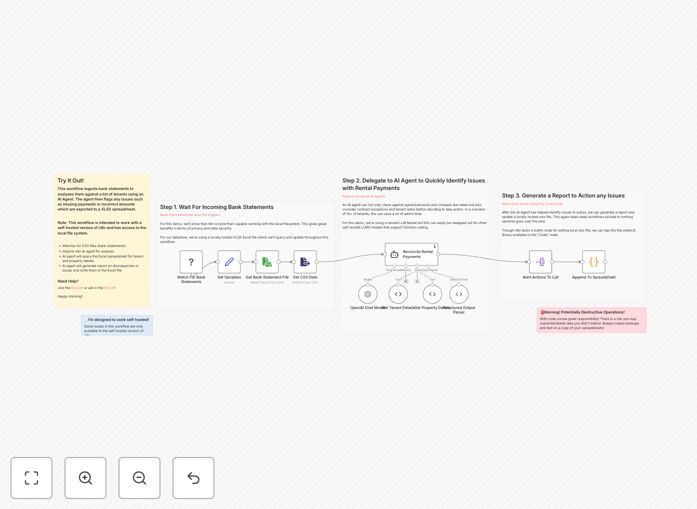
What This Workflow Does
For property managers and landlords, monthly rent reconciliation is a tedious, error-prone task that consumes valuable time. This automation solves that by creating a seamless connection between your bank statements and tenant records.
The workflow monitors your local network for new bank statement files, extracts payment information using AI, compares it against your Excel-based tenant database, and automatically flags discrepancies like late payments, incorrect amounts, or missing deposits. Instead of spending hours cross-referencing spreadsheets, you receive a clear report showing exactly which tenants are current, which need follow-up, and any potential accounting issues.
Beyond simple matching, the AI component understands payment patterns—recognizing partial payments, bank fees, and transfers that might confuse manual review. This transforms a monthly administrative burden into a fully automated process that improves accuracy while freeing up 5-10 hours of your time each month.
How It Works
1. Bank Statement Monitoring & Import
The workflow watches a designated folder on your local network where you save downloaded bank statements. When a new statement file appears (PDF, CSV, or Excel), it automatically imports the data and extracts all transaction details including dates, amounts, and descriptions.
2. AI-Powered Payment Analysis
Using OpenAI's language models, the system intelligently analyzes transaction descriptions to identify rent payments—even when descriptions vary between tenants. It distinguishes rent from other deposits, handles partial payments, and extracts tenant identifiers from payment notes.
3. Tenant Record Matching
The workflow accesses your local Excel spreadsheet containing tenant information: names, properties, monthly amounts, due dates, and lease terms. It matches bank transactions to specific tenants based on amount, date ranges, and payment patterns.
4. Discrepancy Detection & Reporting
For each tenant, the system compares expected payment (from Excel) with actual payment (from bank). It flags late payments, missing payments, incorrect amounts, and partial payments. The final report is generated in your Excel file with clear status indicators and actionable insights.
Who This Is For
This automation is ideal for property managers handling 5+ rental units, real estate investors with multiple properties, small to medium rental businesses, and accounting professionals serving landlords. If you currently spend more than 2 hours monthly manually matching bank deposits to tenant records, this workflow will save you significant time and reduce errors.
It's particularly valuable for those using Excel or Google Sheets for tenant tracking but lacking integration with their banking. The solution bridges that gap without requiring expensive property management software subscriptions.
Pro tip: Schedule this workflow to run automatically on the 3rd of each month (allowing for payment processing delays). This gives you early visibility into payment issues before they become serious cash flow problems.
What You'll Need
- Self-hosted n8n instance running on your local network (required for accessing local files)
- OpenAI API key for the AI analysis component (GPT-3.5 or higher)
- Excel spreadsheet with tenant records including: Tenant Name, Property Address, Monthly Rent, Due Date, Lease Start/End
- Consistent bank statement format (ideally CSV exports from your banking portal)
- Designated network folder where you'll save monthly bank statements
Quick Setup Guide
Follow these steps to implement this automation in under 30 minutes:
- Download and import the JSON template into your n8n instance.
- Configure the Local File Trigger node to monitor your bank statement folder.
- Connect your OpenAI credentials in the AI Agent node settings.
- Update the Excel file path in the workflow to point to your tenant spreadsheet.
- Test with a sample bank statement to verify matching accuracy.
- Schedule the workflow to run automatically each month after statements are available.
The workflow includes detailed configuration comments at each node. For most users, only the file paths and API credentials need updating.
Pro tip: Start with 2-3 months of historical bank statements to test the matching accuracy before going live. This helps the AI learn your tenants' payment patterns and description variations.
Key Benefits
Save 5-10 hours monthly on manual reconciliation work. What used to take an entire morning now happens automatically while you focus on higher-value property management tasks.
Reduce payment errors by 90%+ compared to manual matching. The AI system catches discrepancies humans miss, ensuring accurate late fee application and tenant accounting.
Improve cash flow visibility with immediate reporting. Know exactly which payments are missing by the 3rd of each month rather than discovering issues weeks later.
Enhance tenant relationships through accurate accounting and timely payment confirmation. Automated receipts and clear communication build professional trust.
Scalable foundation that grows with your portfolio. The same workflow handles 10 units or 100 with minimal additional configuration.