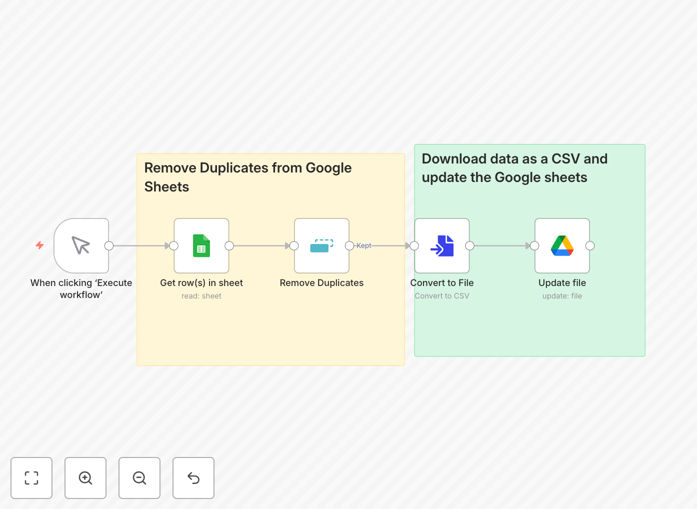
What This Workflow Does
Duplicate data in Google Sheets wastes time, causes communication errors, and leads to poor business decisions. This automation solves that problem by automatically identifying and removing duplicate entries based on profile URLs or other identifiers, then updating your sheet with clean, deduplicated data.
Whether you're managing lead lists from web forms, contact databases from multiple sources, or CRM data that needs regular cleaning, this workflow eliminates the manual spreadsheet work that consumes hours each week. It ensures your marketing campaigns reach unique contacts, your sales team pursues distinct leads, and your reports reflect accurate numbers.
The automation runs on demand or on a schedule, pulling data from your specified Google Sheet, applying deduplication logic, and writing back the cleaned dataset. It's particularly valuable for businesses that aggregate data from multiple channels and need to maintain a single source of truth.
How It Works
The workflow follows a logical sequence to ensure thorough cleaning while maintaining data integrity.
1. Trigger & Data Retrieval
The workflow begins with a manual trigger or scheduled execution. It connects to your Google Sheets account using secure credentials and retrieves all rows from your specified spreadsheet and worksheet. This establishes the dataset that needs cleaning.
2. Duplicate Identification
Using the "Remove Duplicates" node, the workflow scans retrieved data for duplicate entries based on your chosen field—typically profile URLs, email addresses, or custom identifiers. The node compares values and flags duplicates using configurable matching logic.
3. Data Processing & Cleaning
Identified duplicates are processed according to your rules. You can choose to keep the first occurrence, last occurrence, or apply custom logic. The workflow preserves all unique entries while eliminating redundant data points that clutter your database.
4. File Conversion & Update
The cleaned dataset is converted into a file format compatible with Google Sheets update operations. The workflow then connects to Google Drive (if needed) and writes the updated, deduplicated data back to your original sheet, replacing old content with clean information.
Who This Is For
This automation template serves businesses and professionals who rely on Google Sheets for data management but struggle with duplicate entries. Marketing teams managing lead lists from webinars, forms, and campaigns will prevent sending duplicate communications. Sales teams tracking prospects can avoid pursuing the same lead multiple times.
Small business owners who aggregate customer data from various sources can maintain clean contact databases. Recruiters managing candidate pipelines can ensure they don't contact the same person through different channels. Researchers collecting data from multiple studies can maintain clean datasets for analysis.
Any organization using Google Sheets as a lightweight CRM, project management tool, or data repository will benefit from automated deduplication. It's especially valuable when multiple team members contribute to the same sheet or when importing data from external sources.
What You'll Need
- n8n instance (cloud or self-hosted) with workflow execution capabilities
- Google Sheets account with the spreadsheet containing data to clean
- Google Drive access for file operations (if updating via file upload)
- Google Cloud credentials with Sheets and Drive API permissions enabled
- Clear deduplication criteria (which field to use for duplicate detection)
- Backup of original data (recommended before first run)
Pro tip: Before running automation on production data, test with a copy of your sheet. Create a test spreadsheet with sample duplicate entries to verify the workflow identifies and removes them correctly according to your business rules.
Quick Setup Guide
Follow these steps to implement this deduplication automation in your n8n environment.
- Download and import the template JSON file into your n8n instance using the workflow import function.
- Configure Google Sheets credentials in n8n's credentials management, ensuring proper API access to Sheets and Drive.
- Update spreadsheet IDs in the Google Sheets nodes with your actual spreadsheet and worksheet identifiers.
- Set deduplication field in the Remove Duplicates node to match your data structure (profileUrl, email, etc.).
- Test with sample data by executing the workflow once and verifying results match expectations.
- Schedule execution (optional) using n8n's schedule trigger for regular automated cleaning.
- Monitor and adjust based on initial results, refining matching logic if needed for your specific data.
Key Benefits
Save 5-10 hours monthly on manual data cleaning. What typically requires tedious spreadsheet sorting and filtering now happens automatically, freeing your team for strategic work rather than administrative tasks.
Improve marketing campaign effectiveness by 15-25%. Clean contact lists mean no duplicate sends, better engagement rates, and more accurate conversion tracking from your campaigns.
Enhance data accuracy for business decisions. Leadership makes decisions based on reliable numbers when duplicate entries aren't inflating counts or distorting trends in your reports.
Reduce customer frustration from duplicate communications. Prospects and customers receive appropriate contact frequency instead of multiple identical messages that damage brand perception.
Maintain compliance with data management standards. Regular deduplication supports GDPR and other privacy regulations by ensuring accurate records and appropriate communication frequency.