n8n Slack Error Monitoring Automation

๐Ÿšจ Report n8n workflow errors to Slack

Get instant notifications in Slack when your n8n workflows fail. Monitor automation health in real-time and reduce downtime with automated error alerts.

Download Template JSON ยท n8n compatible ยท Free
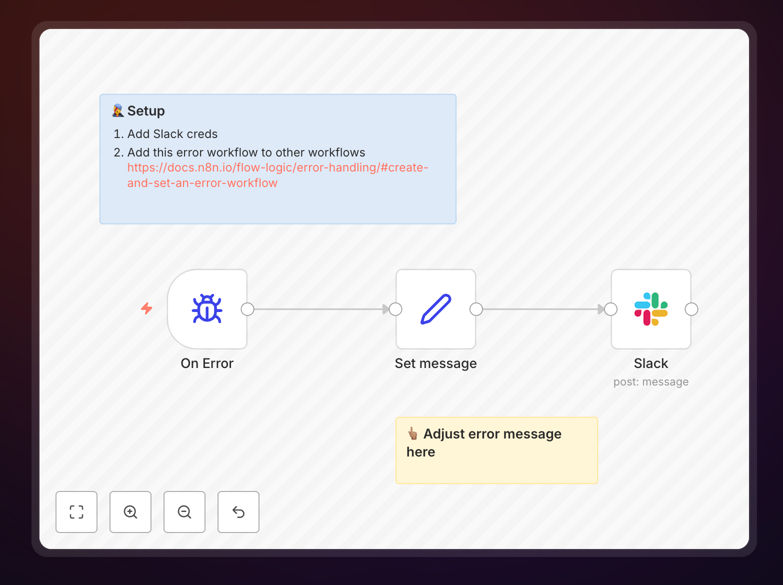
n8n error reporting workflow sending notifications to Slack

What This Workflow Does

This automation solves the critical problem of unnoticed workflow failures in n8n. When business processes break, delays in detection can lead to lost revenue, data inconsistencies, and operational headaches. The template automatically detects when an n8n workflow fails and sends detailed error notifications to your Slack channels.

Unlike manual monitoring which requires constant dashboard checks, this solution provides real-time alerts the moment something goes wrong. It transforms error handling from a reactive process to a proactive system, ensuring your team can address issues before they impact customers or business operations.

Screenshot of n8n error workflow configuration
Configuration example for setting up error reporting from n8n to Slack

How It Works

1. Error detection in n8n

The workflow monitors your n8n executions and detects when a workflow run fails. It captures the error details including the specific node where the failure occurred, error messages, and timestamps.

2. Notification formatting

The template structures the error information into a clear, actionable Slack message format. This includes workflow name, error type, timestamp, and contextual details to help with troubleshooting.

3. Slack delivery

Using n8n's Slack integration, the formatted error notification is sent to your designated Slack channel. The message can include @mentions for specific team members and links back to the failed workflow for quick access.

Pro tip: Configure different Slack channels for different severity levels - critical errors to #alerts, minor issues to #automation-logs.

Who This Is For

This solution is essential for any team running production n8n workflows. It's particularly valuable for:

  • Operations teams managing critical business processes
  • Developers maintaining complex automation systems
  • IT teams responsible for system reliability
  • Business units dependent on automated data flows

What You'll Need

  1. An n8n instance with workflows you want to monitor
  2. Slack workspace with appropriate channel access
  3. Slack app credentials with permissions to post messages
  4. Basic understanding of n8n workflow configuration

Quick Setup Guide

  1. Download the template JSON file
  2. Import into your n8n instance
  3. Configure your Slack credentials in the Slack node
  4. Set your desired notification channel and format
  5. Connect the error workflow to your production workflows
  6. Test by forcing a controlled workflow failure

Key Benefits

Reduce downtime by catching errors immediately - Get alerts within seconds of failure instead of discovering issues hours later during manual checks.

Standardize error reporting across all workflows - Consistent notification format makes troubleshooting faster and easier for your team.

Enable collaborative problem solving - Multiple team members see issues in Slack and can contribute to resolution.

Create an audit trail of incidents - Slack becomes a searchable history of workflow problems and resolutions.

Scale your automation monitoring - The system works equally well for 5 workflows or 500, with no additional monitoring overhead.

Frequently Asked Questions

Common questions about n8n error monitoring and Slack integration

Error monitoring is critical because n8n workflows often handle business-critical processes. Without alerts, failures can go unnoticed for hours, causing data loss or service disruptions. This automation provides immediate visibility into workflow failures through Slack notifications, allowing teams to respond quickly.

For example, an e-commerce order processing workflow failure could mean lost sales if not caught immediately. Monitoring ensures you maintain service level agreements and customer trust by addressing issues promptly.

  • Reduces mean time to resolution (MTTR)
  • Prevents cascading failures in dependent systems
  • Provides data for improving workflow reliability

The notifications typically include the workflow name, error message, timestamp, and relevant context about where the failure occurred. This helps teams quickly diagnose issues without logging into n8n.

Some implementations also include the failed payload data or a direct link to the workflow for quick access. The template can be customized to include additional troubleshooting details your team needs, such as environment variables or recent execution history.

  • Configurable detail level based on security needs
  • Can include screenshots of error context
  • Option to attach relevant log excerpts

While n8n has basic error workflows, this solution provides real-time team notifications through Slack rather than just logging errors internally. It creates a collaborative troubleshooting environment where multiple team members can see and respond to issues.

The template also standardizes error reporting format across all workflows, making incidents easier to track and analyze over time. Unlike built-in options, you can customize notifications with your company's branding and include links to runbooks or documentation.

  • Team-wide visibility vs individual monitoring
  • Standardized format across all workflows
  • Integration with existing communication tools

Yes, the template can be configured to send alerts to specific channels based on workflow type or severity. For example, critical financial workflows might notify an ops-team channel while marketing automation errors go to a growth-team channel.

You can also set up @mentions for specific team members when certain error conditions occur. The routing logic can be as simple or sophisticated as your operations require, including conditional branching based on error type or business impact.

  • Route by department, severity, or workflow type
  • Escalate critical errors to management channels
  • Integrate with on-call rotation systems

Automated error reporting reduces mean time to detection (MTTD) from hours to minutes, minimizing business impact of failures. It eliminates manual monitoring of workflow dashboards and creates an audit trail of incidents in Slack.

Teams report resolving issues 3-5x faster with automated alerts versus checking logs periodically. The system also provides valuable data for identifying recurring problems and improving overall workflow reliability through pattern analysis.

  • 24/7 monitoring without human oversight
  • Historical data for reliability improvements
  • Reduces alert fatigue through smart routing

The system is designed with redundancy - if Slack is unavailable, it can fall back to email or other notification channels. The template includes error handling for the error reporting itself, ensuring you don't miss alerts due to secondary failures.

For mission-critical workflows, you can implement multiple notification methods simultaneously. The architecture follows reliability best practices with retry logic and failsafes to maintain alert delivery even during partial system outages.

  • Built-in retry mechanisms for failed notifications
  • Optional secondary alert channels
  • Heartbeat monitoring for the monitoring system itself

Yes, GrowwStacks specializes in building tailored workflow monitoring solutions. We can create custom alerting systems with escalation paths, integrate with your existing incident management tools, and build dashboards to track workflow health metrics.

Our team will design a solution that fits your specific operational needs and team structure. We implement enterprise-grade monitoring with features like SLA tracking, automated remediation steps, and integration with your ticketing systems.

  • Custom severity classification rules
  • Integration with existing monitoring tools
  • Compliance-ready audit trails

Need a Custom Workflow Monitoring Solution?

This free template is a starting point. Our team builds fully tailored automation monitoring systems for your specific needs.