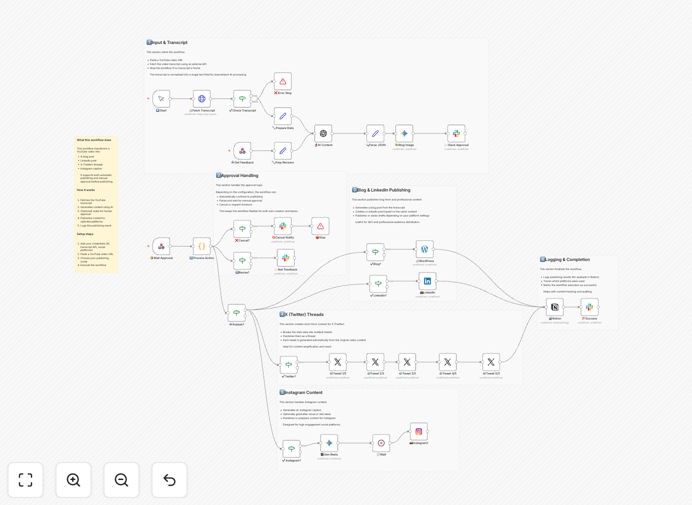
What This Workflow Does
Content creators, marketers, and businesses face a common challenge: you invest hours creating valuable video content for YouTube, but then struggle to extract maximum value from that investment. Manually repurposing videos into blog posts, social media updates, and other formats is time-consuming and often gets deprioritized.
This automation solves that problem by turning a single YouTube video into multiple content formats automatically. It extracts the video transcript, uses AI to generate optimized content for different platforms, and can publish directly to your WordPress site, LinkedIn, X (Twitter), and Instagram—with optional human approval steps to maintain quality control.
The workflow essentially creates a content multiplication effect. What used to take 4-8 hours of manual work now happens automatically in minutes, allowing you to maintain consistent content output across all your channels without additional creative burden.
How It Works
1. Video Processing & Transcription
The workflow starts by fetching the YouTube video URL you provide. It extracts the video transcript automatically using transcription services. This text becomes the raw material for all subsequent content creation.
2. AI Content Generation
Using GPT-4o or similar AI models, the system analyzes the transcript and generates multiple content variations: a comprehensive blog post with proper structure and SEO optimization, LinkedIn professional updates, X (Twitter) threads, and Instagram captions with relevant hashtags.
3. Optional Human Approval
Before publishing, the workflow can pause and send the generated content for your review. You can approve, edit, or reject any piece—giving you complete quality control while still saving the bulk of the creation time.
4. Multi-Platform Publishing
Once approved, the content publishes automatically to your configured platforms. The blog post goes to WordPress with proper categories and tags, social updates post to their respective networks at optimal times, and everything is logged for tracking.
5. Results Logging & Tracking
All actions are recorded with timestamps, publication links, and status updates. This creates an audit trail and helps you measure the effectiveness of your repurposing strategy over time.
Who This Is For
This automation is ideal for YouTube creators who want to extend their reach beyond the platform, marketing agencies managing multiple client content calendars, business owners using video for thought leadership, and content teams looking to maximize their production efficiency.
If you produce regular video content—whether tutorials, product demos, interviews, or educational content—and struggle to maintain consistent posting across your blog and social channels, this workflow will transform your content operations. It's particularly valuable for solopreneurs and small teams where time is the most limited resource.
What You'll Need
- n8n instance (cloud or self-hosted)
- YouTube video URLs you want to repurpose
- AI API access (OpenAI GPT-4o, Google Gemini, or similar)
- WordPress credentials with API access enabled
- Social media API keys for LinkedIn, X, and Instagram
- Optional: Transcription service API if not using built-in YouTube captions
Pro tip: Start with just one or two platforms initially. Get the workflow running smoothly with WordPress and LinkedIn first, then add X and Instagram once you're comfortable with the process.
Quick Setup Guide
- Import the template into your n8n instance using the downloaded JSON file
- Configure credentials for all connected services in n8n's credentials management
- Test with one video using manual trigger mode to verify everything works
- Adjust AI prompts to match your brand voice and content style preferences
- Set up scheduling to automatically process new YouTube videos on your channel
- Enable approval workflow if you want human review before publishing
- Monitor initial runs and fine-tune based on the generated content quality
Key Benefits
Save 15-30 hours monthly on manual content repurposing work. What used to be a multi-hour process for each video now happens automatically while you focus on higher-value activities.
Maintain consistent cross-platform presence without additional creative effort. Your YouTube content automatically becomes blog posts that drive SEO traffic and social updates that engage your audience.
Scale your content output without scaling your team. One video producer can effectively feed multiple content channels, maximizing your content investment and reach.
Improve content quality through AI-assisted optimization. The system can ensure proper SEO structure for blogs, optimal character counts for social platforms, and consistent messaging across all outputs.
Gain valuable analytics on what content performs best where. By tracking engagement across all platforms from the same source material, you can refine your video content strategy based on what resonates most.