AI Automation Social Media Content Creation Perplexity AI Facebook

Research-to-Social Post Generator with Perplexity AI & Facebook

Turn a simple chat prompt into a researched, ready-to-post social update—optionally published directly to your Facebook Page.

Download Template JSON · n8n compatible · Free
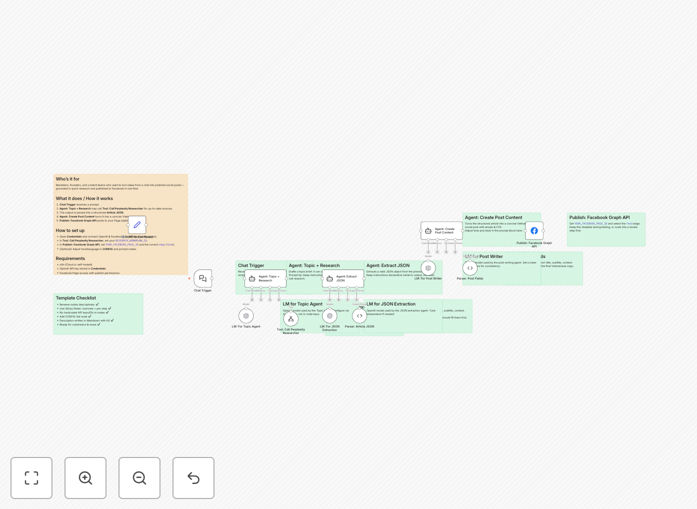
Visual diagram showing a chat prompt flowing through AI research to a published Facebook post

What This Workflow Does

Creating engaging, researched social media content is time-consuming. Between ideation, fact-checking, writing, and scheduling, a single post can eat up an hour of your team's day. This automation solves that by turning a simple chat message into a fully-formed, publication-ready social update in minutes.

The workflow accepts a topic prompt (like "latest trends in sustainable packaging"), uses Perplexity AI to research current information with sources, structures the findings, generates a concise and engaging post in your brand voice, and can optionally publish it directly to your Facebook Page. It's like having a dedicated content researcher and copywriter available 24/7.

How It Works

The automation follows a logical pipeline that transforms a raw idea into polished content.

Step 1: Chat Trigger Receives Prompt

You or your team member sends a topic idea through a chat interface (like Slack, Telegram, or directly in n8n). This could be as simple as "Write about remote work productivity tips for Q2."

Step 2: Topic Agent Calls Research Sub-Workflow

The system optionally triggers a dedicated research workflow using Perplexity AI. This searches the web for current information, statistics, and credible sources related to your prompt, ensuring your content is timely and factual.

Step 3: Output Validation & Structuring

The raw research data is validated and formatted into a clean JSON structure. This step ensures consistency and prepares the information for the content generation phase.

Step 4: Post Writing Agent Crafts Content

An AI writing agent (using OpenAI or similar) takes the structured research and generates a concise, engaging social media post. You can configure the tone, language (default is Vietnamese in the template), length, and call-to-action.

Step 5: Optional Facebook Publishing

If enabled, the finalized post is automatically published to your specified Facebook Page via the Facebook Graph API. You can also route it to a review queue or save it to a content calendar instead.

Who This Is For

This template is ideal for marketing teams, content creators, small business owners, and agencies who need to maintain an active social media presence with limited resources. It's particularly valuable for:

  • Social Media Managers: Who need to produce daily content across multiple topics.
  • Startups & Small Businesses: With no dedicated content team but who understand the importance of social engagement.
  • Digital Agencies: Managing social accounts for clients in niche industries requiring researched content.
  • Experts & Consultants: Who want to share timely insights on industry developments without spending hours writing.
  • Teams with Global Audiences: Needing content in different languages or tailored to regional trends.

What You'll Need

  1. An active n8n instance (cloud or self-hosted).
  2. An OpenAI API key (stored securely in n8n Credentials) for the writing agent.
  3. Facebook Page publishing permissions and access tokens if using the auto-publish feature.
  4. (Optional) A configured Perplexity AI research sub-workflow for the topic research step.
  5. Basic familiarity with n8n to configure node credentials and adjust prompts.

Quick Setup Guide

Get this workflow running in your n8n environment in under 15 minutes.

  1. Import the Template: Download the JSON file above and import it into your n8n instance via the "Import from File" option.
  2. Configure Credentials: Set up your OpenAI API key and Facebook Graph API credentials in n8n's Credentials section. Do not hardcode keys in nodes.
  3. Set Research Workflow ID: In the "Tool: Call Perplexity Researcher" node, enter the workflow ID of your research sub-workflow (if using).
  4. Configure Facebook Publishing: In the "Publish: Facebook Graph API" node, enter your Facebook Page ID and select the appropriate edge for posting.
  5. Adjust Prompts & Language: Review and modify the AI agent prompts in the "CONFIG" section to match your brand voice. Change the LANGUAGE parameter if needed.
  6. Test the Flow: Activate the workflow and send a test prompt through the chat trigger. Monitor the execution to ensure each step completes successfully.

Pro tip: Before enabling auto-publishing, run the workflow with the Facebook step disabled and review the generated posts in a spreadsheet or document for a week. This helps you fine-tune the AI's tone and ensure quality before going fully automatic.

Key Benefits

Cut content creation time from hours to minutes. What used to require opening multiple browser tabs for research, drafting, and editing now happens in a single automated sequence. This can save 5-10 hours per week for active social accounts.

Ensure your content is current and credible. By leveraging Perplexity AI's real-time web search with citations, your posts reference the latest information, not just generic AI knowledge. This builds authority and trust with your audience.

Maintain consistent posting even during busy periods. Social media algorithms reward consistency. This automation ensures you never have a content gap because the team was focused on other projects or out of office.

Scale content production without scaling headcount. A single marketing manager can effectively produce the volume of content that might otherwise require a junior writer or researcher, optimizing your team's capacity.

Create a reusable content pipeline. Once configured, this workflow becomes a template for any topic. You can duplicate it for different content formats (LinkedIn articles, Twitter threads) or client accounts, creating a scalable system.

Frequently Asked Questions

Common questions about AI social media automation and integration

AI can significantly speed up social media content creation by generating post ideas, drafting captions, conducting quick research on trending topics, and ensuring the tone matches your brand. It helps overcome writer's block and allows small teams to maintain a consistent posting schedule without dedicating hours to manual research and writing.

For example, instead of spending 30 minutes researching quarterly marketing statistics, AI can pull the latest data and draft three different post angles in under two minutes. The human's role shifts from creator to curator—reviewing, personalizing, and adding strategic context.

Automating social media posts saves 5-10 hours per week, ensures consistent engagement even when you're busy, allows for strategic scheduling during peak audience hours, and reduces the mental load of daily content creation. It also lets you batch-create content, maintaining quality while freeing up time for strategy and community interaction.

The biggest benefit isn't just time saved—it's consistency. Algorithms favor accounts that post regularly. Automation ensures you never miss a day because of meetings, travel, or creative fatigue, which directly impacts your reach and growth over time.

Yes, when used strategically. AI-generated content should be reviewed for brand voice alignment and factual accuracy before posting. The best approach is to use AI for ideation, research, and first drafts, then add human touchpoints like personal anecdotes, specific calls-to-action, and emotional nuance that AI might miss.

Think of AI as a collaborative assistant, not a replacement. The workflow in this template includes validation steps and optional human review gates. This hybrid approach maintains authenticity while leveraging AI's efficiency for the heavy lifting of research and initial drafting.

Perplexity AI excels at real-time web research with source citations, making it ideal for creating timely, fact-based social content. Unlike ChatGPT which relies on its training data (with a knowledge cutoff), Perplexity can pull current information, statistics, and recent developments—perfect for newsjacking or industry updates.

For social media, this means your posts can reference yesterday's earnings report, this week's product launch, or today's trending hashtag with verified information. This immediacy makes your content more relevant and shareable compared to generic AI-generated posts.

Ensure you have proper Facebook Page publishing permissions, establish a content review process (even if automated), maintain a mix of post types (not just AI-generated), schedule posts for optimal engagement times, and monitor comments regularly. Also, keep some posts spontaneous to maintain authenticity alongside your automated content.

Start with a pilot phase: automate 50-70% of your content while leaving room for real-time reactions and community engagement. Use Facebook Insights to track whether automated posts perform as well as manual ones, and adjust your AI prompts or posting schedule accordingly.

Absolutely. The core workflow—chat trigger → AI research → content generation—can be adapted for LinkedIn, Twitter/X, Instagram, or even email newsletters. You would simply replace or add the publishing step with integrations for those platforms. Many businesses use one research process to fuel content across multiple channels.

For instance, the same research on "Q2 cybersecurity trends" could become a short Twitter thread, a detailed LinkedIn article, and an Instagram carousel—all generated from a single prompt. This multi-platform repurposing maximizes the ROI of your research and writing efforts.

The biggest mistake is full 'set-and-forget' automation without human oversight. This leads to generic content, missed engagement opportunities, and potential brand misalignment. Successful automation balances efficiency with regular human review, community interaction, and strategic adjustments based on performance analytics.

Automation should handle the predictable, repetitive tasks—like drafting posts based on trending topics—while humans focus on strategy, community building, and creative direction. Schedule weekly reviews of your automated content's performance to refine prompts and ensure alignment with business goals.

Yes, GrowwStacks specializes in building custom social media automation systems tailored to your specific brand voice, content calendar, and multi-platform strategy. We can integrate your preferred AI models, add content approval workflows, connect to your analytics tools, and create custom publishing schedules that match your audience's behavior.

Our team works with you to understand your content pillars, audience segments, and performance goals, then builds an automation system that feels authentic to your brand while saving your team significant time. We handle the technical integration so you can focus on strategy and engagement.

  • Multi-platform publishing (Facebook, LinkedIn, Twitter, Instagram)
  • Custom content approval workflows with Slack/Teams notifications
  • Integration with your existing content calendar (Notion, Google Sheets)
  • Performance tracking and automated reporting

Need a Custom Social Media Automation?

This free template is a starting point. Our team builds fully tailored automation systems for your specific business needs.