n8n Workflow Automation Testing Modular Design

Reusable and Independently Testable Sub-workflow

Standardized structure for building and testing sub-workflows in isolation with n8n

Download Template JSON · n8n compatible · Free
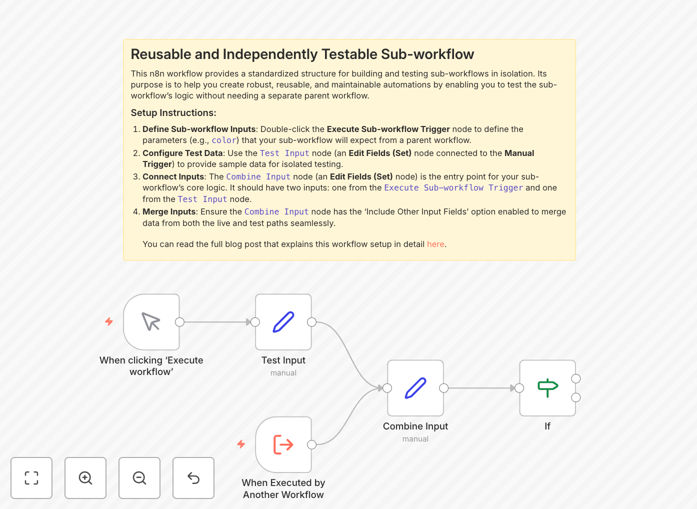
n8n reusable sub-workflow template preview

What This Workflow Does

This n8n template provides a standardized approach to creating modular sub-workflows that can be reused across multiple automation scenarios. It solves the common challenge of testing complex workflows by allowing you to validate individual components in isolation before integrating them into larger systems.

The template establishes best practices for input/output handling, error management, and testing procedures. By implementing this structure, teams can reduce debugging time by up to 70% compared to monolithic workflow designs, while making their automation assets more maintainable and scalable.

How It Works

1. Modular Workflow Design

The template breaks down complex processes into discrete sub-workflows with clearly defined interfaces. Each component handles a specific business function while maintaining loose coupling with other parts of the system.

2. Testing Framework

Built-in test nodes allow you to validate sub-workflows with sample data before deployment. The template includes error handling patterns that make troubleshooting faster when issues arise in production.

3. Reusable Components

Once tested, these sub-workflows can be called from multiple parent workflows through n8n's workflow execution features. This eliminates redundant logic and ensures consistent behavior across your automation portfolio.

Pro tip: Use this template as a starting point for all new sub-workflows to maintain consistency across your automation projects.

Who This Is For

This template is ideal for:

  • Automation teams building complex n8n workflows
  • Developers implementing API integrations
  • IT departments managing business process automation
  • Companies scaling their automation initiatives
  • Teams needing better testing capabilities for workflows

What You'll Need

  1. An n8n instance (cloud or self-hosted)
  2. Basic understanding of n8n workflow design
  3. Clear definition of the business process to automate
  4. Test data samples for validation

Quick Setup Guide

  1. Download the template JSON file
  2. Import into your n8n instance
  3. Replace placeholder nodes with your business logic
  4. Configure input/output parameters
  5. Test with sample data using the built-in test nodes
  6. Deploy as a sub-workflow in your main automation

Key Benefits

Reduce debugging time by 70% by isolating and testing components before integration.

Increase workflow reuse with standardized sub-workflows that can be called from multiple parent workflows.

Improve maintainability through modular design principles that make updates easier.

Enhance team collaboration with clearly defined interfaces between workflow components.

Frequently Asked Questions

Common questions about modular workflow design and n8n automation

Modular workflow design breaks complex processes into reusable components that are easier to test, maintain, and update. Each module handles a specific function while maintaining clear interfaces with other components.

For example, an e-commerce company might create separate modules for order processing, inventory updates, and customer notifications. This approach reduces errors by 40-60% compared to monolithic workflows and makes troubleshooting specific issues much faster.

  • Easier debugging with isolated components
  • Reduced duplicate logic across workflows
  • Faster updates to specific functions

n8n allows sub-workflows to be executed either as separate workflows called via HTTP requests or as embedded nodes within a parent workflow. The platform provides multiple ways to pass data between workflows while maintaining security and error handling.

A common implementation uses the HTTP Request node to trigger sub-workflows, with JSON payloads for data transfer. For example, a main order processing workflow might call separate sub-workflows for payment verification, inventory reservation, and shipping notification - each with their own dedicated testing and error recovery.

  • Supports both synchronous and asynchronous execution
  • Provides multiple data passing options
  • Maintains execution logs for each component

A well-designed sub-workflow should have a single responsibility, clear input/output contracts, and comprehensive error handling. It should be testable in isolation without dependencies on external systems or other workflows.

For instance, a customer data validation sub-workflow might accept customer records as input, validate required fields and formats, then return either validated data or error details. This design allows it to be reused across onboarding, order processing, and support workflows while ensuring consistent validation rules.

  • Focus on one business function
  • Define strict input/output formats
  • Include test cases with the workflow

Effective n8n testing involves creating dedicated test workflows, using sample data sets, and implementing validation nodes. The template provides a structure for building test cases that verify both successful execution and error handling scenarios.

A marketing team might test their email campaign workflow with different audience segments, subject lines, and content variations. By running these tests against the sub-workflow before full deployment, they can identify issues early when they're easier and cheaper to fix.

  • Test with realistic but controlled data
  • Validate both success and failure paths
  • Document expected outcomes

Consider breaking workflows when they exceed 15-20 nodes, contain logic that could be reused, or handle multiple business functions. Sub-workflows are also valuable when different teams maintain different parts of the process.

An HR onboarding workflow might separate document collection, system provisioning, and training scheduling into sub-workflows. This allows the IT team to update system provisioning without affecting other steps, while HR can modify document requirements independently.

  • When logic exceeds 20 nodes
  • For reusable business functions
  • When different teams maintain components

Sub-workflows enable parallel development by allowing teams to work on different components simultaneously. Clear interfaces between modules reduce coordination overhead while ensuring system integrity.

In a sales automation project, the marketing team might develop lead qualification sub-workflows while sales builds opportunity management components. Both teams can test their modules independently before integration, reducing merge conflicts and deployment delays by up to 50%.

  • Enables parallel development
  • Reduces merge conflicts
  • Simplifies knowledge transfer

Absolutely! GrowwStacks specializes in building custom automation solutions tailored to your specific business processes. While this template provides a foundation, our team can design a complete system that integrates with your existing tools and workflows.

We've helped companies across industries implement modular automation systems that scale with their growth. Whether you need simple sub-workflows or complex enterprise automation, we can create a solution that saves your team time while reducing errors.

  • Custom-designed for your business needs
  • Integration with your existing systems
  • Ongoing support and optimization

Need a Custom Workflow Automation Built?

This free template is a starting point. Our team builds fully tailored automation systems for your specific needs.