What This Workflow Does
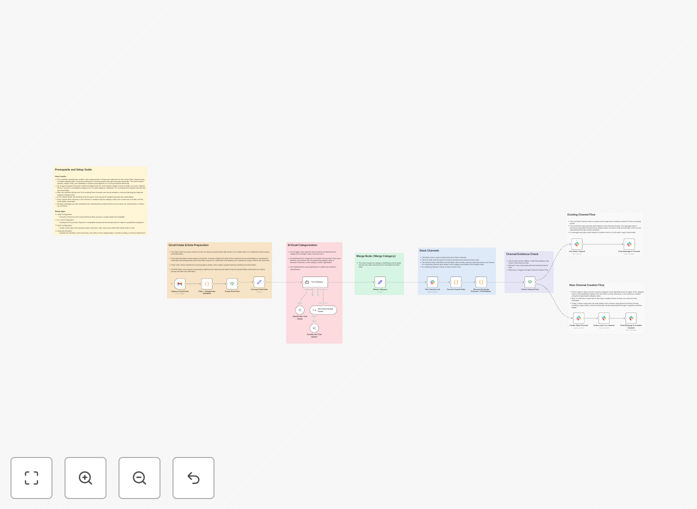
This intelligent automation transforms how teams handle incoming emails by eliminating manual triage. Instead of team members constantly checking a shared inbox, the system automatically reads new Gmail messages, understands their content using AI, and routes them to the appropriate Slack channels.
The workflow acts as a 24/7 email assistant that categorizes messages as sales inquiries, support tickets, internal communications, or other custom categories. It then ensures the right people see the right messages at the right time by posting formatted summaries directly into team collaboration spaces.
Beyond simple forwarding, this solution can even create new Slack channels on-the-fly when new topics emerge, ensuring your team's communication structure evolves automatically with your business needs.
How It Works
1. Email Capture & Filtering
The workflow continuously monitors a specified Gmail account for new, unread emails. It automatically filters out spam, drafts, and duplicates, ensuring only relevant messages proceed to categorization.
2. AI-Powered Categorization
Each email's subject and body are sent to an AI model (like Llama 3 via OpenRouter). The AI analyzes the content and assigns a category based on predefined business rules—such as "sales," "support," "billing," or "internal."
3. Slack Channel Matching
The system checks your Slack workspace to see if a channel corresponding to the AI's category already exists. For example, if an email is categorized as "sales," it looks for #sales or similar channels.
4. Intelligent Routing & Notification
If the channel exists, the workflow posts a formatted summary with key details, a link to the original email, and actionable buttons. If the channel doesn't exist, it can automatically create a new public channel, invite relevant team members, and then post the notification.
Who This Is For
This automation delivers the most value for teams drowning in shared inboxes or struggling with email response times. Customer support teams can ensure tickets never get missed in crowded inboxes. Sales departments can instantly route leads to the right representatives. Operations groups can automatically surface important communications without manual forwarding.
Businesses with distributed teams benefit particularly well, as it brings email visibility into central collaboration spaces. Companies receiving high volumes of customer inquiries see immediate improvements in response times and customer satisfaction. Even small teams can benefit by reducing the cognitive load of constant inbox monitoring.
What You'll Need
- Active n8n Instance: Either n8n Cloud or a self-hosted installation with the LangChain integration package installed.
- Gmail Account with API Access: A Gmail account where you have permission to enable API access for automation.
- Slack Workspace & App: A Slack workspace where you can install apps, plus a Slack App with bot tokens for channels:read, channels:manage, chat:write, groups:write, and users:read permissions.
- OpenRouter Account: An account with OpenRouter to access AI models like Llama 3, along with an API key for authentication.
- Basic Configuration Time: Approximately 15-20 minutes to connect accounts and customize categories for your business.
Quick Setup Guide
Follow these steps to implement this email routing system in your business:
- Import the Template: Download the JSON file above and import it into your n8n instance using the "Import from File" option.
- Connect Gmail: In the "Capture Gmail Event" trigger node, authenticate with your Gmail account using OAuth2 credentials.
- Configure AI: Add your OpenRouter API key to the "OpenRouter Chat Model" node and adjust the categorization prompt if needed.
- Set Up Slack: Create a Slack App with the required permissions, get your bot token, and add it to all Slack nodes in the workflow.
- Customize & Activate: Adjust category names, channel naming conventions, and team member IDs, then toggle the workflow to "Active."
Pro tip: Start with a small subset of emails (like those from a specific sender domain) to test categorization accuracy before rolling out to all incoming messages. This lets you refine the AI prompts without affecting critical communications.
Key Benefits
Eliminate Email Triage Time: Teams save 5-10 hours per week previously spent manually sorting and forwarding emails. This time can be redirected to higher-value work like customer engagement or problem-solving.
Improve Response Times: By routing emails directly to the right team channels, response times can improve by 60-80%. Customers get faster answers, leading to higher satisfaction and retention rates.
Never Miss Important Messages: Automated categorization ensures critical emails don't get buried in crowded inboxes. Sales leads are captured instantly, support tickets are routed immediately, and internal communications reach the right people.
Scale Team Collaboration: As your team grows, this system automatically creates organized communication channels for new topics. The structure evolves with your business without manual administrative overhead.
Create Searchable Records: All routed emails become searchable within Slack alongside related discussions. This creates a comprehensive record of customer interactions that's easily accessible to the entire team.