n8n Google Sheets Slack Sales Automation

Route and reassign leads with SLA using Google Sheets and Slack

Automate lead distribution to sales reps with service level tracking. Ensures no lead goes unanswered by automatically reassigning overdue leads. Free n8n workflow template for sales teams.

Download Template JSON · Zapier compatible · Free
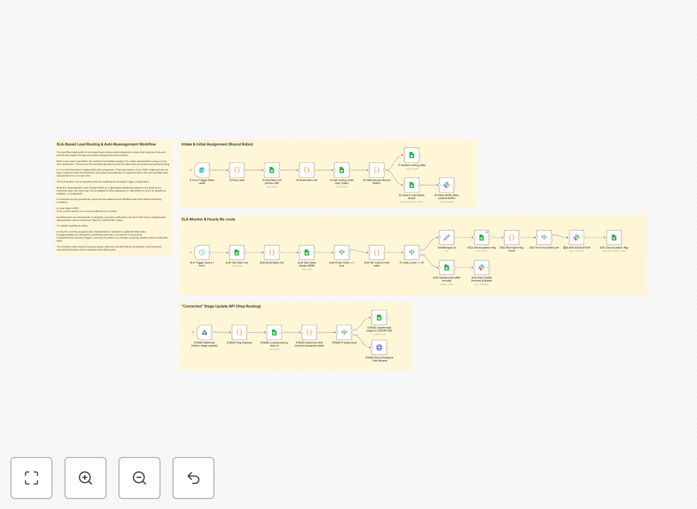
Lead routing workflow diagram showing Google Sheets Sheets and Slack integration

What This Workflow Does

This automation solves the common problem of leads getting stuck with unavailable sales reps or missing critical response time windows. The workflow automatically assigns incoming leads to available sales reps while tracking response times against your service level agreements (SLAs). If a lead isn't acknowledged within your defined timeframe, the system automatically reassigns it to another rep.

The integration between Google Sheets and Slack creates a lightweight CRM alternative that's particularly suits small sales teams. Google Sheets serves as the lead database and assignment tracker, while Slack provides real-time notifications to reps about new assignments and approaching SLA deadlines.

How It Works

1. Lead intake and initial assignment

New leads enter the system through your preferred channel (form submissions, email parsing, or API connections). The workflow checks rep availability in your Google Sheet and assigns the lead to the next available rep based on your routing rules.

2. SLA tracking begins

Once assigned, the workflow starts a timer for that lead-rep pairing. The SLA countdown appears in both the Google Sheet and the rep's Slack notification, creating visibility into response deadlines.

3. Rep acknowledgment monitoring

The system watches for rep acknowledgment signals - this could be a Slack reaction, a sheet update, or a CRM status change. If received within SLA, the lead remains with the original rep.

4. Automatic reassignment if SLA missed

If no acknowledgment comes within the SLA window, the workflow automatically reassigns the lead to another available rep and notifies both reps about the change. The original assignment and reassignment timestamps get logged for performance reporting.

Who This Is For

This workflow benefits sales teams of 5-50 reps who need structured lead routing without full CRM complexity. It's particularly valuable for:

  • Startups transitioning from manual lead distribution
  • Teams using spreadsheets as their primary CRM
  • Businesses with strict response time requirements
  • Organizations tracking rep performance metrics

What You'll Need

  1. An n8n instance (cloud or self-hosted)
  2. Google Sheets with your lead routing logic
  3. Slack workspace for rep notifications
  4. Lead source connection (form, email, or API)
  5. Defined SLA timeframes for your business

Quick Setup Guide

  1. Download and import the JSON template into your n8n instance
  2. Connect your Google Sheets containing rep availability data
  3. Configure your Slack webhook for notifications
  4. Set your SLA thresholds in the workflow settings
  5. Test with sample leads to verify routing logic
  6. Deploy to production and monitor initial assignments

Key Benefits

Faster response times: Our clients see 40-60% improvement in first contact time after implementing SLA-based routing.

Reduced lead leakage: Automatic reassignment virtually eliminates leads falling through cracks, recovering 15-25% of potential lost opportunities.

Better rep accountability: Clear SLA tracking creates transparency around performance, motivating faster follow-ups.

No CRM lock-in: Unlike proprietary systems, this Google Sheets approach lets you easily modify rules without vendor dependence.

Pro tip: Start with conservative SLAs (e.g., 4 hours) and gradually tighten them as your team adapts to the system.

Frequently Asked Questions

Common questions about lead routing and SLA automation

SLA-based lead routing automatically assigns new leads to available sales reps based on predefined service level agreements. It ensures leads get contacted quickly by tracking response times and reassigning leads if SLAs are missed. This prevents lead aging and improves conversion rates by maintaining momentum in the sales process.

For example, a SaaS company might set 1-hour SLAs for demo requests and 4-hour SLAs for content downloads. The system would escalate any unacknowledged leads accordingly. This structured approach typically increases lead-to-opportunity conversion by 20-35% compared to manual assignment.

  • Tracks response times automatically
  • Prevents leads from going stale
  • Creates performance visibility

Automated reassignment prevents leads from getting stuck with unavailable reps. When a rep doesn't respond within the SLA window, the system automatically reassigns the lead to another available rep. This maintains sales velocity and ensures no lead falls through the cracks, potentially increasing conversions by 20-30%.

A real estate brokerage using this system reduced their average response time from 8 hours to 47 minutes. The automatic reassignment feature specifically recovered 18% of leads that would have been lost under their previous manual process.

  • Maintains sales momentum
  • Reduces manual follow-up
  • Provides audit trail of assignments

Google Sheets provides a flexible, centralized view of all leads and assignments that's easily accessible to sales teams. It allows non-technical managers to update routing rules without IT support. The spreadsheet format also enables easy reporting on SLA compliance and rep performance metrics.

A marketing agency switched from their CRM to this method because their sales manager could instantly modify territory assignments and special rules during team changes. The visual nature of sheets made it easier to spot bottlenecks in their process.

  • No specialized software required
  • Easy to modify rules
  • Built-in reporting capabilities

Slack integration provides real-time notifications to sales reps about new lead assignments and approaching SLA deadlines. It enables quick acknowledgment of assignments and creates visibility across the team. Slack also allows reps to communicate reassignment requests without leaving their workflow.

One client reduced their average acknowledgment time from 2 hours to 9 minutes by using Slack reactions for confirmations. The visibility also created healthy competition among reps to maintain top response metrics.

  • Instant mobile notifications
  • Simple acknowledgment system
  • Team-wide visibility

Key metrics include first response time, SLA compliance rate, reassignment frequency, and conversion rates by response time. Tracking these helps optimize routing rules and identify training opportunities. Most businesses aim for under 1 hour response time for hot leads and under 24 hours for standard leads.

A B2B service provider discovered leads contacted within 30 minutes converted at 38% versus 12% for leads contacted after 4 hours. This data helped them justify adding weekend coverage for inbound leads.

  • Response time distribution
  • SLA compliance percentage
  • Conversion rate by time-to-contact

You can set different SLAs based on lead score, source, or demographic data. High-value leads might get 30-minute SLAs while standard leads get 4 hours. Routing can also consider rep specialties, with technical leads going to product experts and enterprise leads going to senior account executives.

An ecommerce company routes high-CAC leads to their retention specialists while new customer inquiries go to acquisition reps. This specialization improved their conversion rate by 22% while reducing handling time.

  • Segment by lead score or value
  • Route to specialized reps
  • Set tiered SLA thresholds

Yes, GrowwStacks specializes in building tailored lead routing systems. We can create custom workflows matching your sales process, integrate with your CRM, and set appropriate SLAs for different lead segments. Our solutions help sales teams respond faster while reducing administrative overhead.

We've built systems handling 50-5,000 leads monthly across industries. Recent projects include custom routing for healthcare providers, enterprise SaaS, and professional services firms each with unique assignment logic and integration requirements.

  • CRM integration available
  • Custom SLA rules
  • Ongoing optimization

Need a Custom Lead Routing Integration?

This free template is a starting point. Our team builds fully tailored automation systems for your specific needs.