n8n Gmail Zendesk Support

Route Gmail support emails to Zendesk with spam filtering and duplicate checks

Automatically convert incoming support emails into organized Zendesk tickets while filtering spam and preventing duplicates. This workflow saves support teams 5- hours per week on manual email triage.

Download Template JSON · n8n compatible · Free
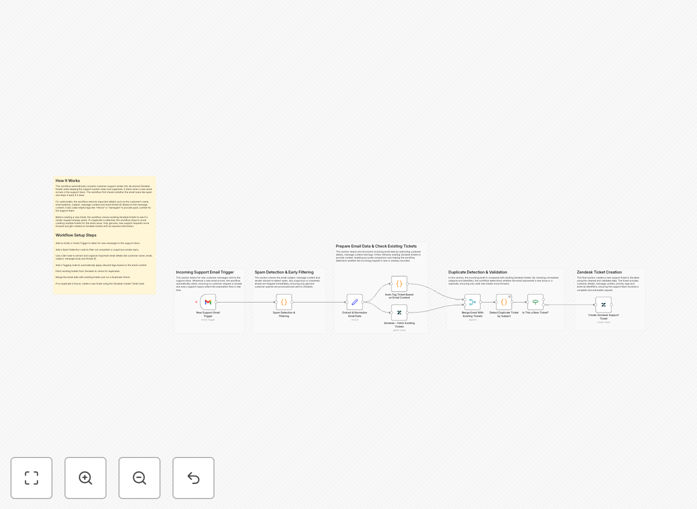
n8n workflow interface showing Gmail to Zendesk automation with spam filtering steps

What This Workflow Does

Customer support teams waste countless hours manually forwarding emails from shared Gmail inboxes into Zendesk. This workflow automates the entire process while adding critical quality controls.

The automation monitors your designated Gmail support address, applies spam filtering rules checks for duplicate inquiries, then creates properly formatted Zendesk tickets with all original email content and attachments preserved.

How It Works

1. Gmail Trigger

The workflow constantly monitors your specified Gmail inbox for new support emails matching your defined criteria (specific labels, senders, or keywords).

2. Spam Filter

Each email passes through configurable spam detection that evaluates sender reputation, content patterns, and blacklists. Suspected spam diverted to a review folder.

3. Duplicate Check

The system compares the email subject and content against recent tickets, preventing duplicate tickets for the same issue.

4. Zendesk Ticket Creation

Valid emails that pass all checks automatically convert into Zendesk tickets with proper categorization, priority assignment, and field mapping.

Pro tip: Configure additional validation steps like customer verification for VIP accounts or automatic escalation for urgent keywords.

Who This Is For

This workflow benefits any business using Gmail for customer support emails alongside Zendesk for ticket management. Ideal for:

  • E-commerce support teams handling high email volume
  • SaaS companies with shared inboxes
  • Startups scaling their support operations
  • Teams struggling with email overload

What You'll Need

  1. Active Gmail account with API access enabled
  2. Zendesk administrator privileges
  3. n8n instance (cloud or self-hosted)
  4. 5 minutes to configure the workflow

Quick Setup Guide

  1. Download the JSON template file
  2. Import into your n8n instance
  3. Connect your Gmail and Zendesk accounts
  4. Adjust spam filter thresholds if needed
  5. Activate the workflow

Key Benefits

Reduce manual work by 80%: Agents spend seconds per email instead of minutes forwarding and forwarding.

Improve response times: Tickets are created instantly rather than waiting for manual processing.

Eliminate duplicates: The system prevents multiple tickets for the same customer issue.

Filter spam: Only legitimate support inquiries reach your team.

Better reporting: All support interactions are properly tracked in Zendesk analytics.

Frequently Asked Questions

Common questions about Gmail and Zendesk integration

Automating email routing from Gmail to Zendesk significantly reduces manual ticket creation time while ensuring no customer inquiries get lost in spam folders. Support teams focus on resolving issues rather than administrative tasks.

Companies using this automation handles 200+ emails daily, your team gains back 15-20 hours per week previously spent on manual processing. This directly translates to faster response times and higher customer satisfaction scores.

  • Eliminates human error in ticket creation
  • Ensures 24/7 ticket processing
  • Provides audit trail for all inquiries

Spam filtering prevents irrelevant messages from cluttering your support queue while ensuring legitimate customer emails always reach your team. This maintains response quality and reduces agent frustration from sorting through junk mail.

For example, e-commerce stores often receive promotional emails sent to their support address. The spam filter automatically these while prioritizing actual customer service requests without requiring manual intervention.

  • Reduces agent burnout from spam
  • Maintains focus on real issues
  • Configurable sensitivity levels

Duplicate detection prevents multiple tickets for the same issue which wastes agent time and creates reporting inaccuracies. It ensures each customer inquiry gets exactly one ticket while preserving all communication history.

When customers reply to automated confirmation emails or follow up too soon, these often create duplicate tickets manually. The automation intelligently links related emails together while maintaining full context for agents.

  • Eliminates redundant work
  • Provides unified conversation history
  • Improves analytics accuracy

First response time typically improves by 40-60% as tickets are created instantly. Resolution rates increase 15-25% since agents spend more time solving issues rather than managing emails. Customer satisfaction scores often rise 20+ points.

These metrics directly impact customer retention and lifetime value. Faster resolution times also reduce support costs by decreasing the number of follow-ups and escalations.

  • Trackable SLA improvements
  • Reduced handle time
  • Higher first contact resolution

Attachments from original emails automatically transfer to Zendesk tickets preserving all customer-provided documentation. This eliminates manual re-uploading and ensures support agents have full context for troubleshooting.

The system preserves all file types including images, PDFs, and screenshots. For security, executable files can be automatically quarantined while still notifying the support team.

  • Preserves customer evidence
  • Maintains file organization
  • Configurable security rules

Yes the workflow can monitor multiple Gmail addresses simultaneously routing emails to appropriate Zendesk views based on sender domain, priority level or other criteria making it scalable for growing teams.

Enterprise implementations often route emails from different regions regions or product lines to separate support queues while maintaining centralized reporting. The workflow can be cloned and customized for each unique inbox.

  • Supports multiple inboxes
  • Regional routing rules
  • Product-specific queues

False positives go to a review folder where supervisors can rescue legitimate inquiries. The system learns from corrections improving accuracy over time while maintaining an audit trail of all filtered messages.

False positives are automatically flagged for human review within 24 hours, with escalation paths for urgent inquiries. The machine learning models continuously improve based on corrections to minimize future errors.

  • Human oversight layer
  • Continuous improvement
  • Escalation paths

Yes! GrowwStacks specializes in building tailored email routing systems with your specific specific spam rules, duplicate thresholds, ticket field mappings, and escalation workflows. Book a free consultation to discuss requirements.

Our team will analyze your current support workflow, identify automation opportunities, and build a solution that integrates seamlessly with your existing tools and processes. We handle everything from API connections to agent training.

  • Custom spam rules
  • Brand-specific ticket fields
  • Ongoing optimization

Need a Custom Gmail to Zendesk Integration?

This free template is a starting point. Our team builds fully tailored automation systems for your specific needs.